Installation and Operation Manual
1311 East Franklin Road, Suite 102
Meridian, Idaho 83642
Support: 1-888-254-1634
www.PreCiseMRM.com
a subsidiary of FORCE America
Copyright 2017
Sales: 1-888-449-0357
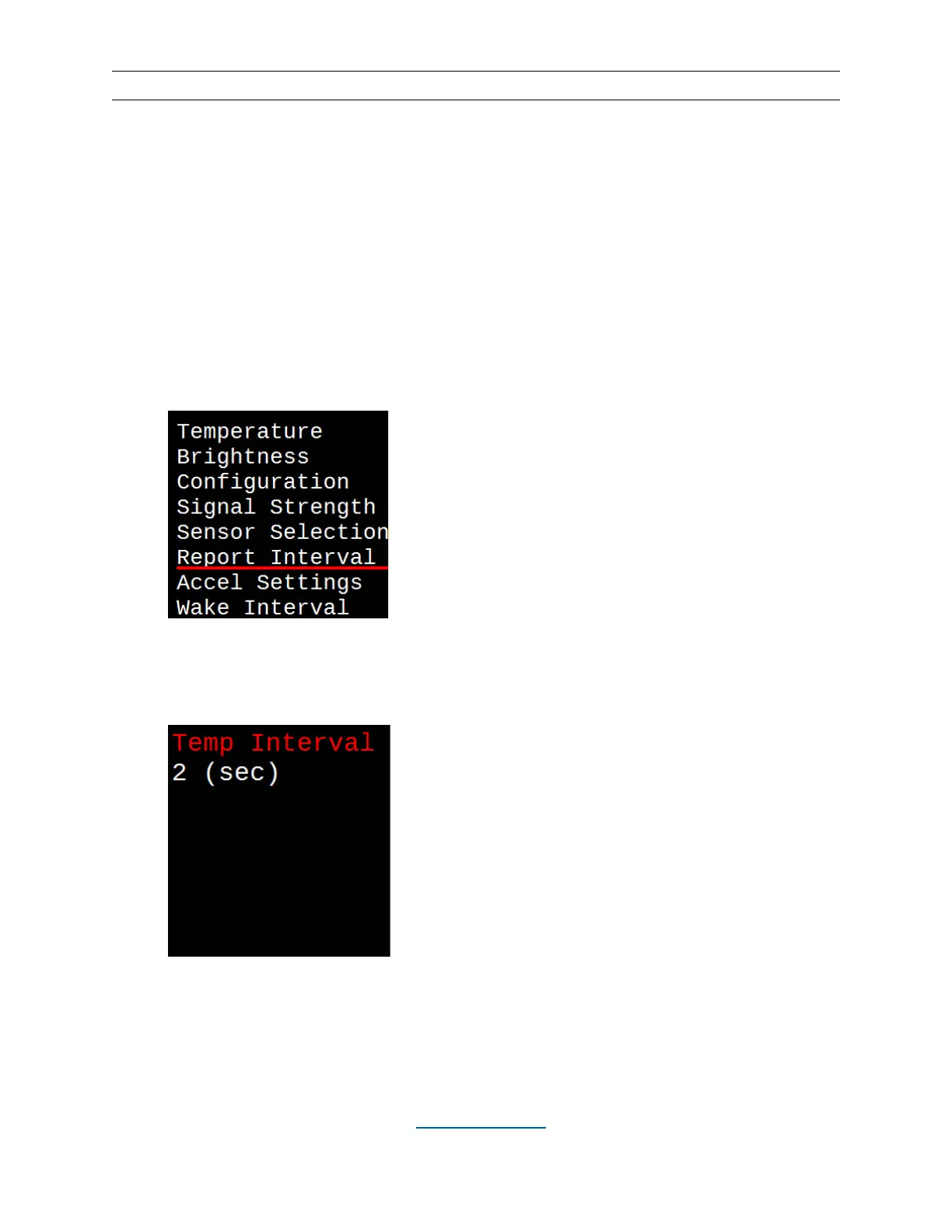
Report Interval
The time between temperature and humidity readings being sent from the wireless sensor
(WTS-01) to the WCM-02 display is controlled with this setting. The wired sensor (TS-01) will
report every second, regardless of this setting. Once the interval is selected, the setting is saved
until the next time it is changed. The default report interval is once every two seconds.
Increasing the time between reports will provide a longer battery life for the WTS-01 wireless
sensor.
• Hit the MENU button.
• Use the UP (▲) and DOWN (▼) buttons to underline “Report Interval”.
• Hit the SELECT button, then increment or decrement the interval with the UP (▲)
and DOWN (▼) buttons. Hit SELECT again. This will take you back to the main
display screen.


 To Next Page