Installation and Operation Manual
1311 East Franklin Road, Suite 102
Meridian, Idaho 83642
Support: 1-888-254-1634
www.PreCiseMRM.com
a subsidiary of FORCE America
Copyright 2017
Sales: 1-888-449-0357
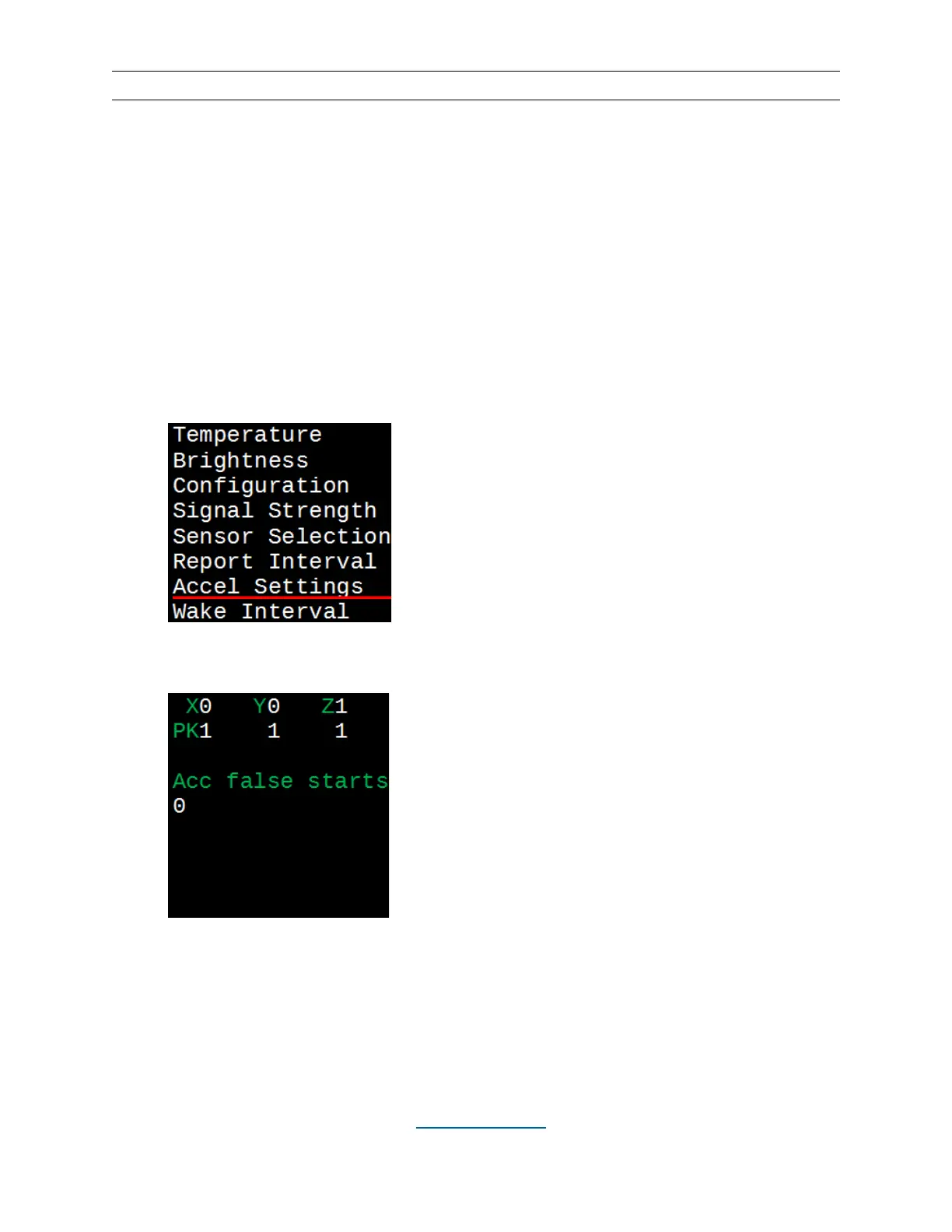
Accel Settings
The wireless sensor (WTS-01) will “wake up” and determine if its paired display is on,
based on sensing movement via the built-in accelerometer and periodically based on
the wake interval. The wired sensor (TS-01) does not have an accelerometer. This
screen will show the latest accelerometer readings in each axis, as well as the peak
readings. Additionally, it will show the number of times the sensor has been brought out
of sleep mode by the accelerometer without the display being on.
• Hit the MENU button.
• Use the UP (▲) and DOWN (▼) buttons to underline “Accel Settings”.
• Hit the SELECT button.
• To clear the peak and false start readings, hit the SELECT button, underline
“yes” and hit SELECT again. To return to the menu screen, hit the MENU button.


 To Next Page