Using the keyboard
10
English
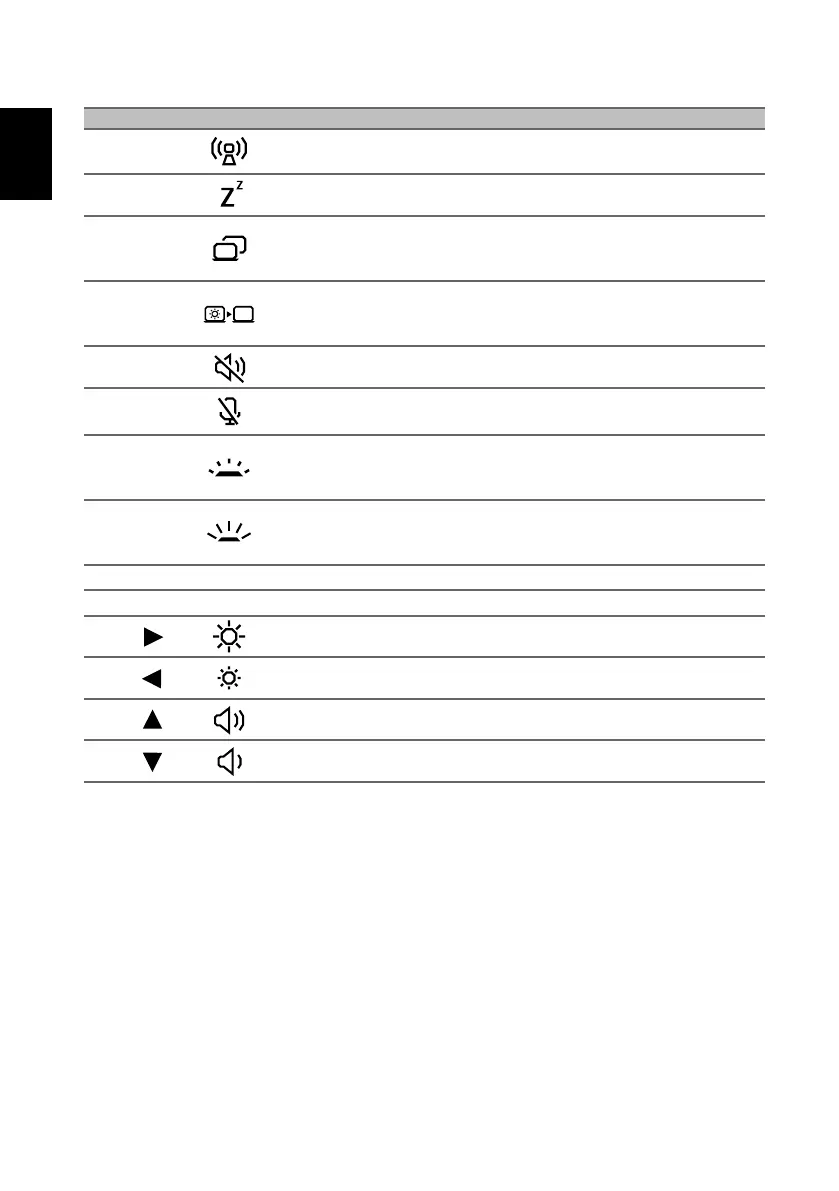
Fn + F3 Flight mode
Turns on / off the computer's network
devices.
Fn + F4 Sleep Puts the computer in Sleep mode.
Fn + F5 Display toggle
Switches display output between the
display screen, external monitor (if
connected) and both.
Fn + F6 Display off
Turns the display screen backlight off
to save power. Press any key to
return.
Fn + F7 Speaker toggle Turns the speakers on and off.
Fn + F8
Microphone
toggle
Turns the microphones on and off.
Fn + F9
Keyboard
backlight
decrease
Decreases the intensity of the
keyboard backlight.
Fn + F10
Keyboard
backlight
increase
Increases the intensity of the
keyboard backlight.
Fn + F11 Pause Pause Sends a Break Command.
Fn + F12 Scr Lk Scroll Lock Turns Scroll Lock on or off.
Fn +
Brightness up Increases the screen brightness.
Fn +
Brightness down Decreases the screen brightness.
Fn +
Volume up Increases the sound volume.
Fn +
Volume down Decreases the sound volume.
Hotkey Icon Function Description



 To Previous Page