Your Predator notebook tour
6
English
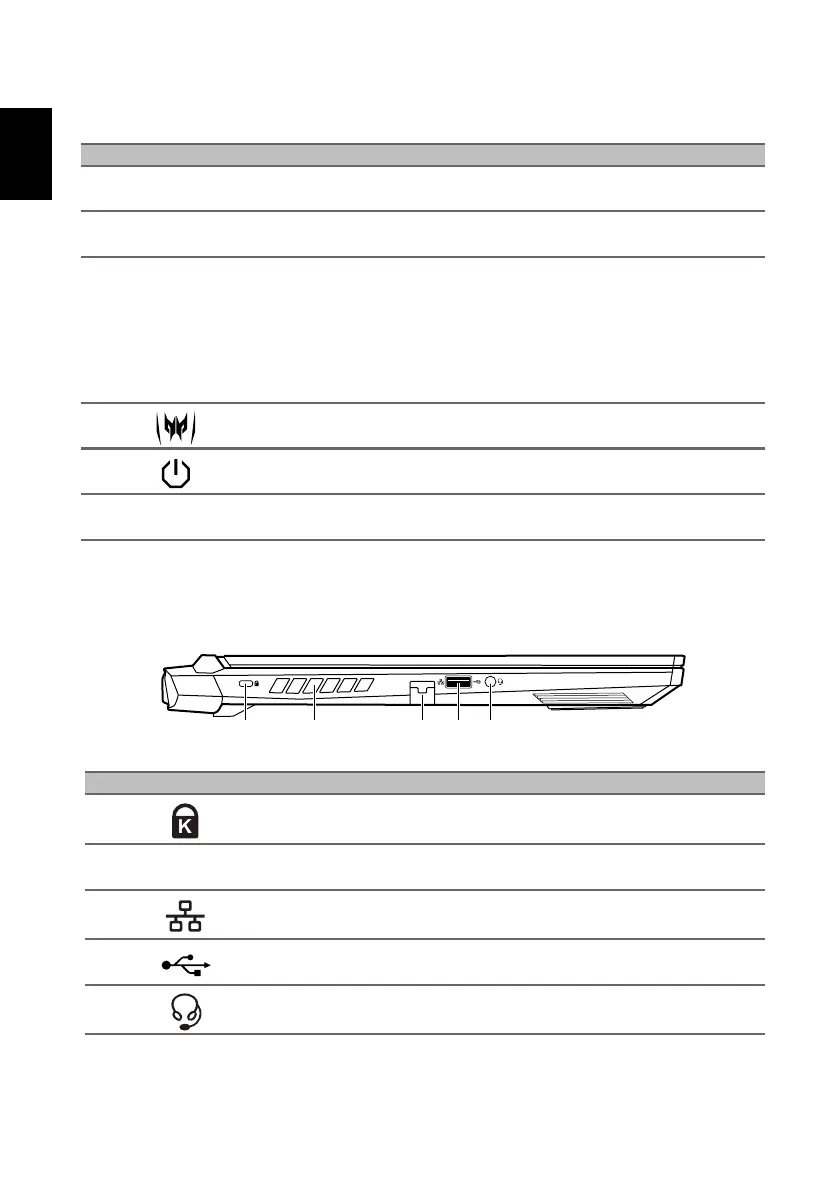
Left view
# Icon Item Description
1
TURBO
TURBO key Switches overclocking and fan speed level.
2 Keyboard
For entering data into your computer.
See "USB Type-C information" on page 9.
3 Touchpad
Touch-sensitive pointing device.
The touchpad and selection buttons form a
single surface.
Press down firmly on the touchpad surface
to perform a left click.
Press down firmly on the lower right corner
to perform a right click.
4 PredatorSense key Launches PredatorSense application.
5 Power button Turns the computer on and off.
6
Ventilation and
cooling fan
Allows the computer to stay cool.
Do not cover or obstruct the openings.
# Icon Item Description
1
Kensington lock
slot
Connects to a Kensington-compatible
security lock.
2
Ventilation and
cooling fan
Allows the computer to stay cool.
Do not cover or obstruct the openings.
3
Ethernet (RJ-45)
port
Connects to an Ethernet 10/100/
1000Mbps/2.5Gbps-based network.
4 USB port Connects to USB devices.
5
Headset/speaker
jack
Connects to audio devices (e.g., speakers,
headphones) or a headset with microphone.



 To Next Page