5
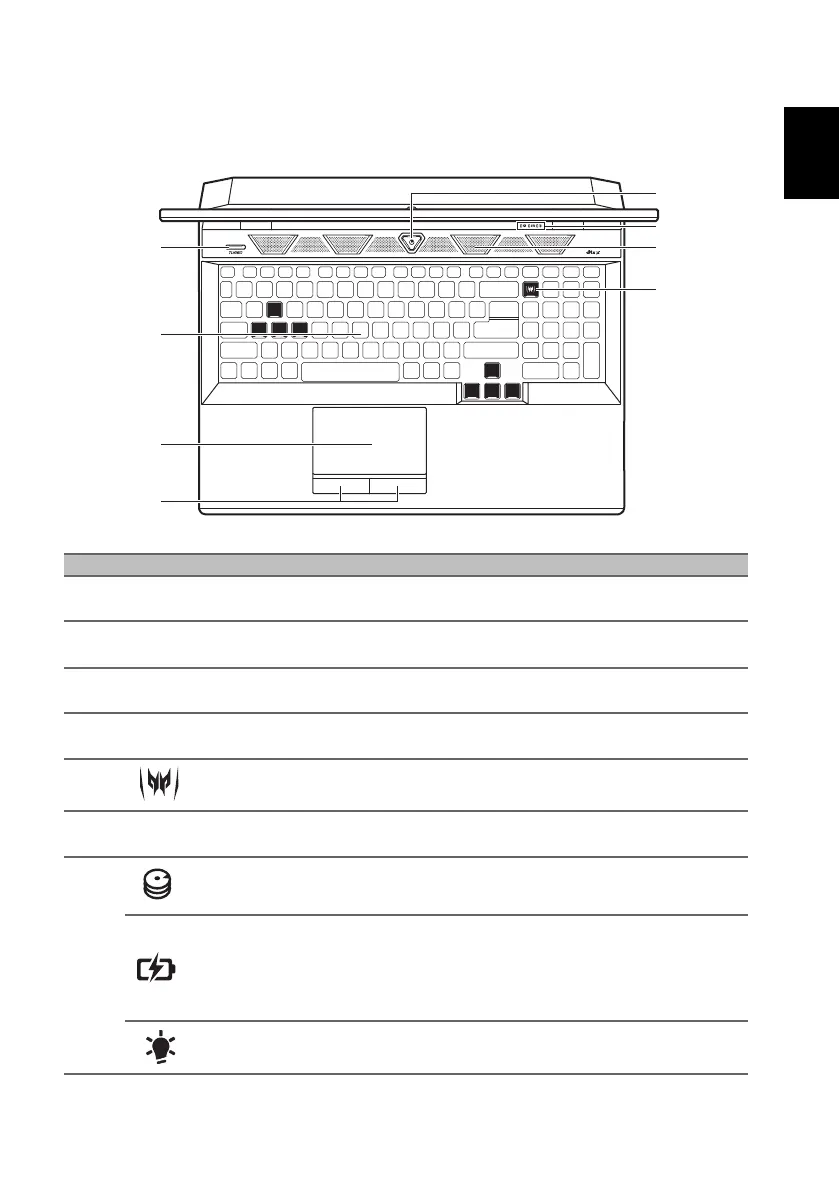
Keyboard view
# Icon Item Description
1
TURBO
TURBO key Switches overclocking and fan speed level.
2Keyboard
For entering data into your computer.
See "Using the keyboard" on page 9.
3 Touchpad Touch-sensitive pointing device.
4
Click buttons
(left and right)
The left and right buttons function like the
left and right mouse buttons.
5
PredatorSense key Launches PredatorSense application.
6
Ventilation and
cooling fan
Allows the computer to stay cool.
Do not cover or obstruct the openings.
7
Hard drive indicator
Indicates when the computer’s hard drive is
active.
Battery indicator
Indicates the computer’s battery status.
Charging: The light shows amber when the
battery is charging.
Fully charged: The light shows blue when in
AC mode.
Power indicator Indicates the computer’s power status.



 To Next Page