3. USE AND MANTENANCE
3.1 REMOTE CONTROL
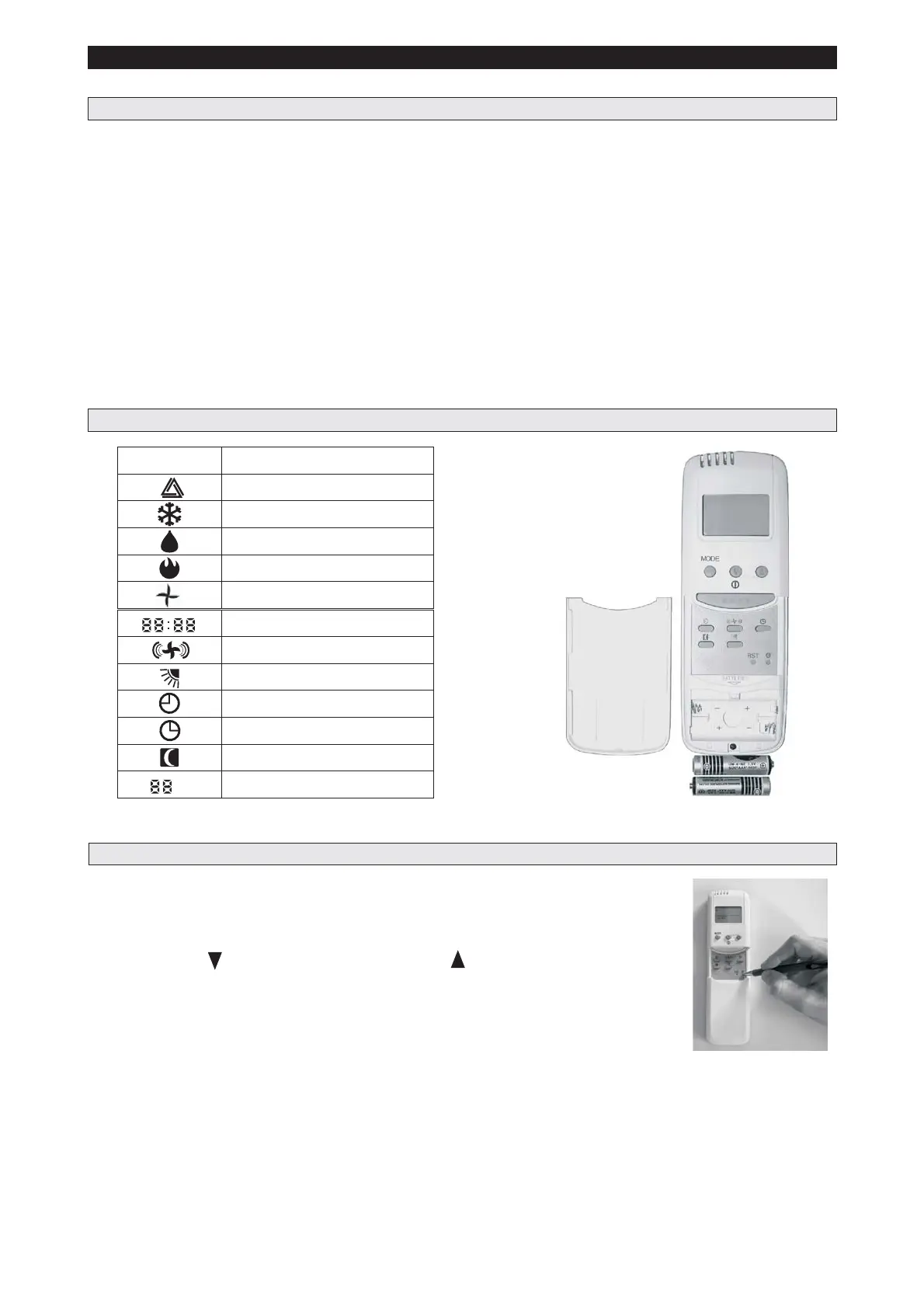
FITTING AND CHANGING THE BATTERIES
- Slide off the cover on the front of the remote to reveal the battery compartment.
- Insert the battery (2 x AAA).
- Refit the battery cover.
- Important: if pressing ON/OFF button no icons are displayed, please install the battery in the correct
position.
- The exhausted batteries must be disposed of responsibly.
Switch on the remote control using the pink button in the centre of the remote control.
Firstly set the time by gently depressing the timer set button in the bottom
right hand corner just above the battery compartment, then adjust
the time by using button to adjust the minutes and button to
adjust the hours.
Once this has been done, press the MODE button to select the required function:
- Cooling - Dehumidification - Fan only - Heating - Auto.
When the mode is selected, adjust the temperature setting to your comfort: these temperatures are
dependent on your individual requirement and can be adjusted while the unit is running.
In Auto mode the temperature settings are not adjustable ( see paragraph 3.9 )
Slide the front panel downwards to display further buttons.
Timer on - Timer off - Fan speedx3-Sleep - Louvers.
Please refer to thefollowing sections
All the air conditioners functions are controlled, set or adjusted through the infrared remote control.
You cannot fully operate the unit without the remote control, so please ensure you replace the remote after
use in the provided holder. If the remote control is misplaced, switch the unit off via the mains socket. To
switch the unit on, plug back into the power socket. The unit will thus start up in the last programmed setting.
For example if in heating and switched off via the mains socket and then reconnected, the unit would then
operate in heating mode. A new remote will need to be purchased from your supplier if misplaced.
3.2 REMOTE CONTROL FUNCTIONS
To operate the unit, direct the remote control at the unit.
3.3 INSTRUCTION FOR USE WITH REMOTE CONTROL
13
°C
ICON
Temperature
FUNCTION
Auto mode
Cooling mode
Dehumidifying mode
Timer off
Timer on
Fan speed
Heating mode
Air direction
Sleeping mode
Time
Fan mode



 To Next Page