5.3.1
CSR-1 Controls
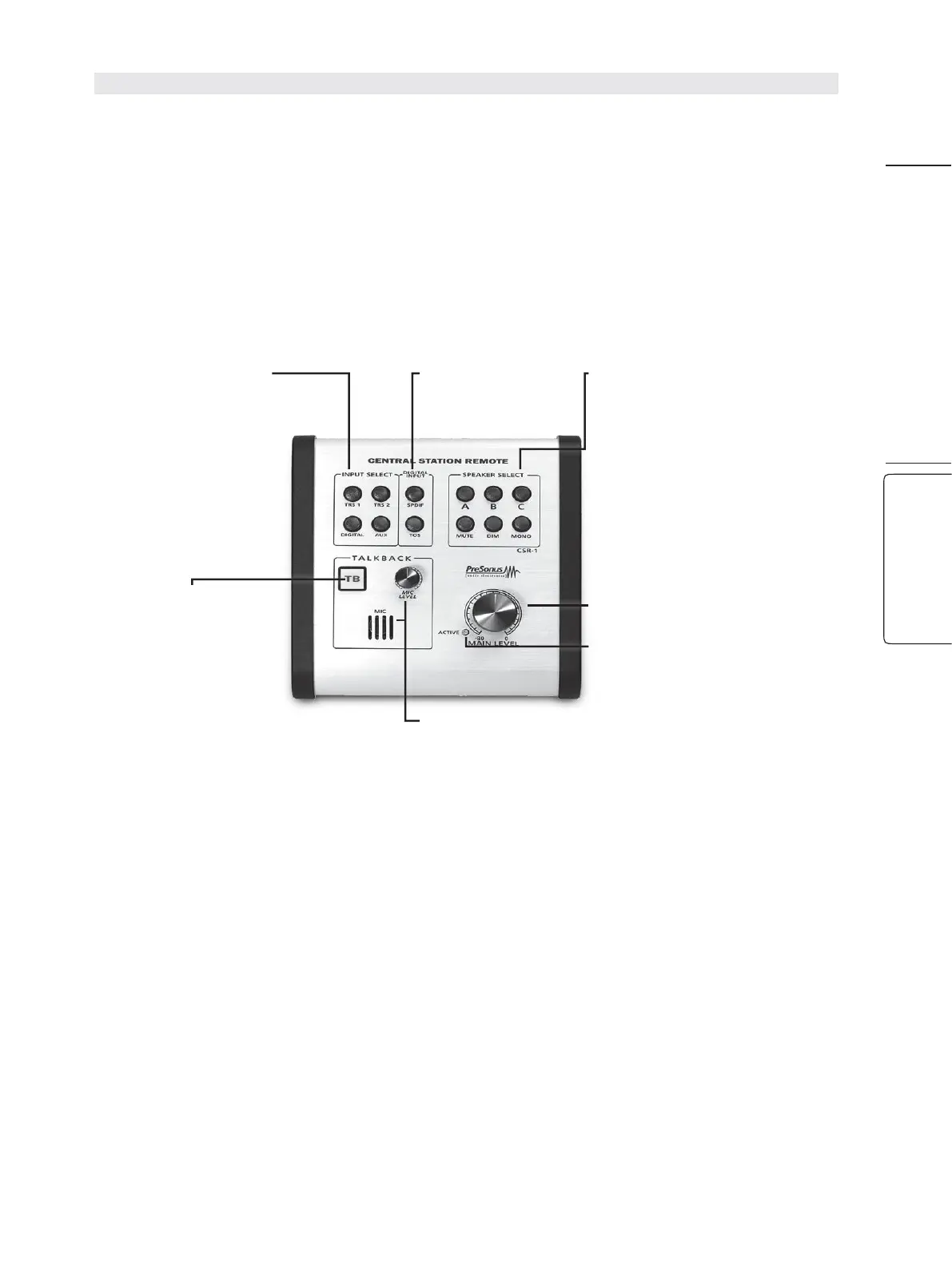
BelowisadiagramoftheCSR-1controls.Eachcontrolcorresponds
directly to the same control on the Central Stration. All CSR-1 functions
controltheircorrespondingCentralStationfunctions,exceptforthe
Talkback Mic level.The Central Station and CSR-1 retain independent
control over their respective onboard talkback microphones.
下面是CSR-1的控制示意图。每个控制都直接对应于中央控制台上的相同控制。
所有CSR-1的功能都控制其相应的Central Station 的功能,除了对讲机的电平。
Central Station 和 CSR-1保留独立的对其各自的板载对讲麦克风的控制。
Input Select Buttons
TRS1: Patches the analog
TRS1 input to the Mains.
TRS2: Patches the analog
TRS2 input to the Mains.
Digital: Patches the
current digital input
selection to the Mains.
Aux: Patches the analog
Aux input to the Mains.
Digital Input Select:
Selects the S/PDIF or
Toslink input as the digital
source for the Cue and
Main audio paths.
Passive Speaker
Controls
Speaker Select A,B,C:
Activates the stereo
speaker line outputs.
Mute: Mutes the Main
Audio Output.
Dim: Attenuates the Main
audio output by -16 dB.
Mono:
Sums the left and
right signals.
Main Level: Adjusts the
overall volume level of
the Main output.
Active Light: When
illuminated, this light
alerts you that your CSR-1
has Main Volume Control.
Talk Button:
Engages /
disengages the talkback
microphones on both the
CSR-1 and the Central
Station.
Because both micro-
phones remain active
when the CSR-1 is
connected, it is recom-
mended that you turn the
Talkback Mic level all the
way down on the main
unit when you are not
using it.
Talkback Mic and Level:
The TalkbackMicLevel adjusts the
gain for the built-in eletretcondenser microphone on theCSR-1
only.
Because theTalkbackMic intheCSR-1 remains active when an
external microphone is connected,we recom- mend you turn
theMic Level all the way down when using an external talkback
m
icrophoe.


 To Next Page