1.2 Connect Input Sources 连接输入源
1.1
Connect Power
Beforeconnectinga powersupplytotheCentralStation,ensure that the power
supply meetsthe input-voltagerequirementsof the regionor country where you
areusing it.PreSonusonlysupports thepowersupply that isshipped withyour
CentralStation.If it does not meet your requirements,or you wishto purchase
an additional power supply, please contact your local dealer or distributor. 在
将电源连接到CentralStation,之前,请确保该电源符合你使用的地区或国家
的输入电压要求。PreSonus 公司只支持与你的中心站一起运送的电源。如
果它不符合你的要求,或者你想购买一个额外的电源,请联系你当地的经销
商或分销商。
1.
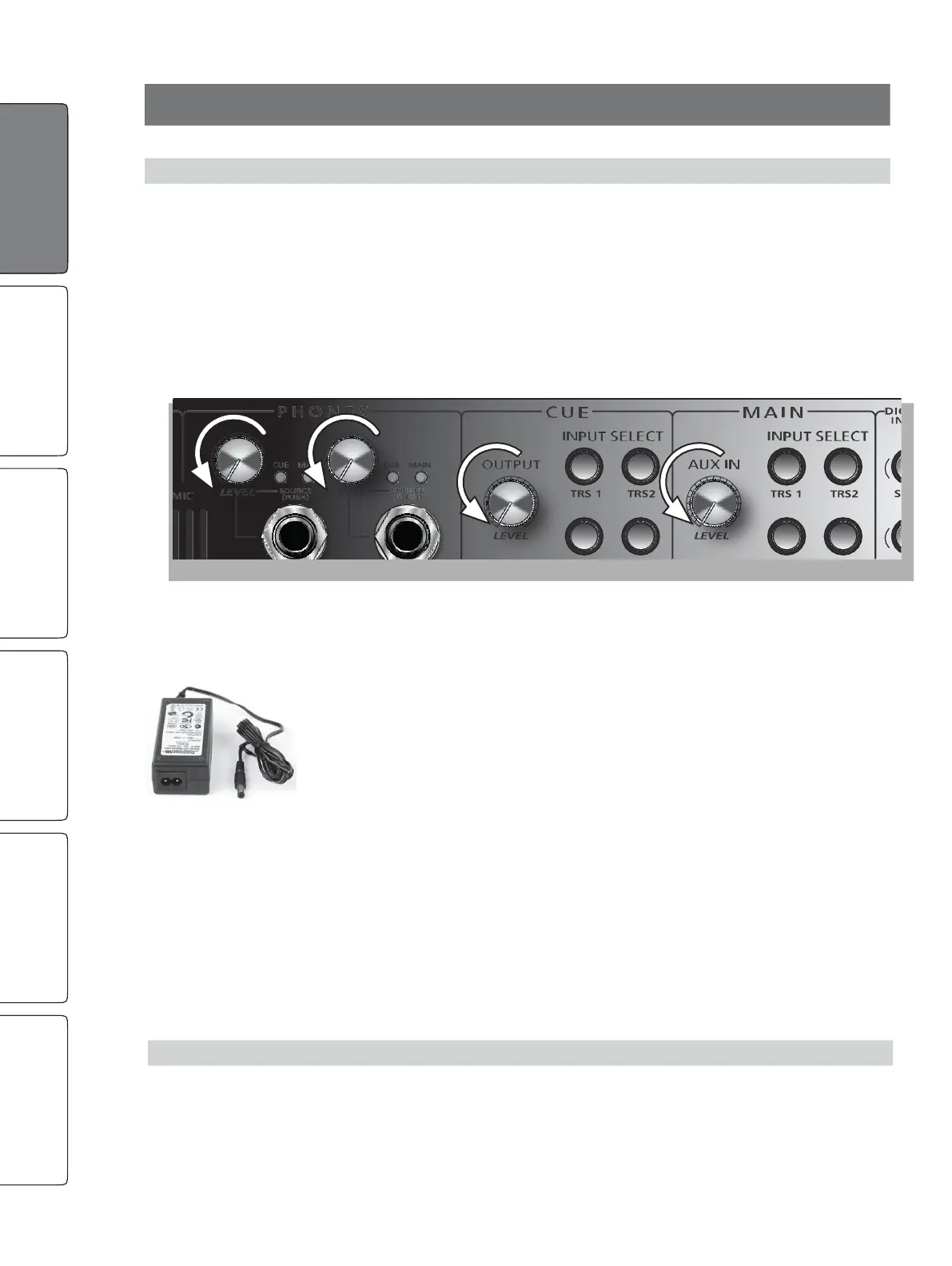
“Zero”the Main, Cue, Aux In, and Phones level knobs by turning
them fully counterclockwise. If you have speakers or other
gear connected to the Main L/R outputs, turn them all the way
down and make sure that the amplifier is powered off.
2.
Connect the included power supply to the Central Station’s power-input
connector and to the appropriate wall socket. Because of its passive circuitry,
it is designed to be left on forlong periods of time.Many manufacturers
make power-relaysystemsthat sendpowertoblocksofoutlets at different
times so that your gear is instantly turned on and off in the correct order
with the flip of a single switch. If you are uncomfortable leaving your
equipmentpoweredon allthe time,these productsareexcellentsolutions.
1.逆时针旋转主、提示、辅助输入和话筒的电平旋钮,使其归零。如果你
有扬声器或其他设备连接到主L/R输出,把它们全部调低,并确保功放的电
源关闭。
2.将附带的电源连接到中央台的电源输入接口和适当的墙上插座。由于它
的无源电路,它被设计成可以长时间开启。许多制造商生产的电源中继系
统可以在不同的时间将电源送到不同的插座区,这样你的设备只转动一个
开关,就可以按照正确的顺序立即打开和关闭。如果你不习惯让你的设备
一直处于通电状态,这些产品是很好的解决方案。
1.
“Zero”the Main, Cue, Aux In, and Phones level knobs
by turning them fully counterclockwise.
将 Main、Cue、辅助输入和耳机电平旋钮逆时针旋转
至 "零"。
G
G
e
e
t
t
t
t
i
i
n
n
g
g
S
S
t
t
a
a
r
r
t
t
e
e
d
d


 To Next Page