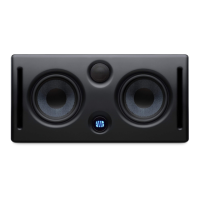
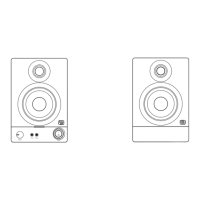
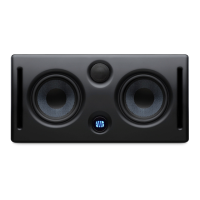
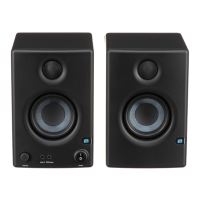
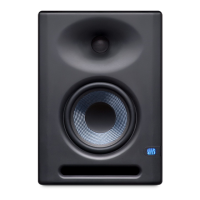
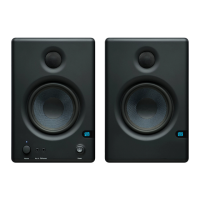
PreSonus Eris E5 & E8
By Paul White
It’s no secret that, as the process of
recording and mixing music has been
increasingly taken over by software,
audio hardware manufacturers are
looking more to the start and end
of the audio chain to provide them
with an income. at’s why there’s
so much choice these days when
it comes to mics, preamps, audio
interfaces and studio monitors.
Based in Baton Rouge, in the extreme
south of the US,
PreSonus are well
established in the
preamp and audio
interface market,
and in recent
years, they’ve
made their mark with their Studio-
Live digital mixing consoles. Now
they’ve added loudspeakers to their
portfolio, with the new Eris range
aiming for the aordable studio mon-
itor market. e Eris E5 is the smallest
of the new speakers, while if you need
something a little larger, there’s the
Eris E8. Both models are designed in
the US and assembled in China —a
common scenario these days.
Gimme Five!
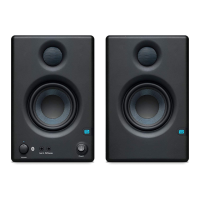
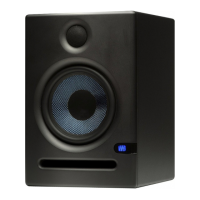
Taking the E5 rst, its outwardly
conventional two-way front-ported
box houses a 5.25-inch Kevlar-coned
woofer and a one-inch silk-dome
tweeter, protected behind its own
metal grille. Powered by a 45W and
35W Class-AB amplier for the lows
and highs, respectively, the speakers
cross over at 3 kHz. e specs give a
useable frequency response of 53Hz
to 22kHz, and a surprisingly loud
maximum SPL of 102dB at one metre.
Built from vinyl-nished MDF, the
internally braced cabinets measure
a compact 178 x 195 x 260 mm and
weigh a reassuring 4.63kg each. e
slot-shaped port is located on the
bae below the woofer while the
bae is curved and slightly sculpted
around the drivers to smooth out
any sharp angles that might other-
wise result in diraction. A discrete
Presonus logo illuminates when the
speakers are switched on.
Audio input is via a choice of bal-
anced XLR, balanced quarter-inch
TRS jack or unbalanced RCA phono
socket, and power is on the usual
IEC socket. A red slide switch selects
the appropriate mains voltage. Many
small monitors lose out on rear-pan-
el adjustment, but the Eris E5s are
particularly well appointed in that
department. In addition to the usual
gain control, there’s an acoustic space
switch that may be used to optimize
the bass response to compensate for
placement near to walls or corners.
is oers a choice of at, -2dB or
-4dB responses below 800 Hz. en
there’s a low cut-o switch with
settings for at, 80Hz and 100Hz,
the last two engaging a 12dB/octave
high-pass lter. Finally, both the mid-
range and high end are separately ad-
justable — a pair of centre-detented
rotary controls gives —6dB of adjust-
ment for each range. What you don’t
see is that the amplier pack also
includes ltering to reject RF inter-
ference and damaging subsonic lows.
Output current limiting, over-tem-
perature and transient protection are
also present.
Crazy Eights
With exactly
the same con-
nectivity op-
tions, frequency
response tailor-
ing and design
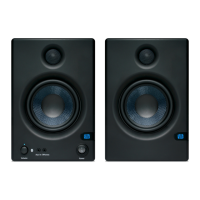
ethos, the E8 goes down to 35Hz
and has more power in the amplier
department, with 75W available to
the woofer and 65W to the tweeter,
adding another 3dB to the maximum
SPL of the E5. e crossover frequen-
cy is lower, at 2.2kHz, and the cabinet
work is larger and heavier to take
the eight-inch woofer and 1.25-inch
tweeter. Measuring 250 x 299 x 384
mm, these speakers are more than
twice the weight of the E5s at a hair
over 10kg each, but follow the same
style and general construction.
Switching on the E5 speakers
doesn’t result in any unwanted pops
or bangs as the circuitry is designed
to have a ‘soft start-up’. I made sure
all the controls were centred and set
the environment bass switch to at,
as the speakers weren’t particularly
close to either the side or rear walls.
In comparison with a couple of other
sets of monitors costing around
three times the price, the sound was
extremely revealing and not at all
what I’d expected from such small
and inexpensive speakers. Other
than the larger speakers having more
“I’ve heard speakers costing
twice as much that don’t deliver
nearly such ‘adult’ results.”
SOUND on SOUND
November 2013
The Eris
™
Monitor Phenomenon
We didn’t set out to create a stir.
We just wanted to make monitors
that would go with our aordable
USB and FireWire interfaces; moni-
tors that would be a comfortable fit
for our StudioLive AI digital mixers.
On the high end, we uncorked our
CoActual
™
Sceptre
™
s. And if you
have the money, you should drop
this brochure, forget about Eris, and
immediately buy a pair of Sceptres.
But what if you’re on a budget?
When we surveyed the competition,
we discovered that entry- level-
priced monitors were also inflexible
monitors. They have a “sound” —
usually designed to impress you in
the show room with a lot of bonk
and wheeze. But they lacked the
adjustments needed to tailor them
to your studio’s room acoustics.
Without these controls, you’re
going to be fooling yourself — and
creating mixes that don’t travel well.
So we created Eris. Powerful.
Musical. Accurate. And aordable.
Critics have given them a warm
welcome. Several competitors have
panicked and slashed the prices of
their small monitors. But at the end
of the day, it’s about which monitor
sounds best.
Don’t take our word for it. Read
on and see why top editors and
reviewers like Eris.
Beware of “monitors”
that have VOLUME
controls that only
change the output level
of the speaker. Eris’
INPUT GAIN control
lets you optimize the
level and signal-to-
noise ratio coming
into each Eris speaker,
much like you do when
you set gain levels on a
mixer channel.
What happens if you
add a subwoofer but
don’t have this control?
You hear lots of bass.
You style your mixes
accordingly. Then,
when the mix is played
on another system, it
lacks low-end punch.
The LOW CUTOFF
switch helps coordi-
nate the bass output
of your Eris monitor
system.
Depending on the size
of the subwoofer, you
can eliminate Eris
output below either 80
or 100 Hz, where the
subwoofer takes over.
Are you mixing in a “live” room
with a lot of reflective surfaces?
In a room with lots of acoustic
treatment? Is your mid- and
high-frequency hearing starting
to falter after playing in loud
bands for 20 years? MIDRANGE
and HIGH frequency controls
are designed to address these
situations. They balance your
monitors’ sound to your ears,
your room, and your musical
preferences.
Where you place your monitors
in your control room has a huge
eect on the amount of bass
you hear (and add or don’t
add to your tracks and mixes).
Room corners act as amplifying
“horns” that exaggerate bass.
If you don’t compensate for this
with the -4 dB ACOUSTIC SPACE
setting, you’ll hear a lot of bass
— but you’ll probably end up
with bass-shy mixes.
Monitors placed on each side of
a computer monitor, with a wall
behind them, also boost bass,
although to a lesser extent
(-2 dB setting).
Only if you’re lucky enough to
be able to place your monitors
toward the middle of a room will
you hear accurate bass without
having to compensate (0 dB
setting).
That is why Eris’ E8 and E5
Acoustic Space adjustment is
so important. It lets you control
bass output so that the monitor
is working with your studio
layout.


 To Next Page
 Loading...