Studio One ArtistQuick Start
Creating a New Song
Quantum-series
Owner’sManual
3.
Select Empty Song from the Templates list. At this point, you should give
your Song a name and select your preferred sample rate and bit depth for
recording and playback. You can also set the length of your Song and the
type of time format you would like the timeline to follow (notation bars,
seconds, samples, or frames). Click the OK button when you are finished.
从模板列表中选择空的歌曲。在这一点上,你应该给你的歌曲起个名
字,并选择你喜欢的采样率和比特深度来进行录音和播放。你还可以
设置歌曲的长度和你希望时间线遵循的时间格式类型(记号条、秒、
样本或帧)。完成后,点击 "OK" 按钮。
PowerUserTip:
Ifyouplan to importloopsintoyour Song, makesurethat theStretch
AudioFilestoSongTempooptionis selected.Thiswill automaticallyimportloopsatthe
correct BPM.
用户提示:如果你打算将循环播放导入你的歌曲,请确保选择
"
Stretch Audio
Files
"
选项。这将自动以正确的
BPM
导入循环。
6.3.1
Configuring Your I/O
配置你的输入
/
输出
1.
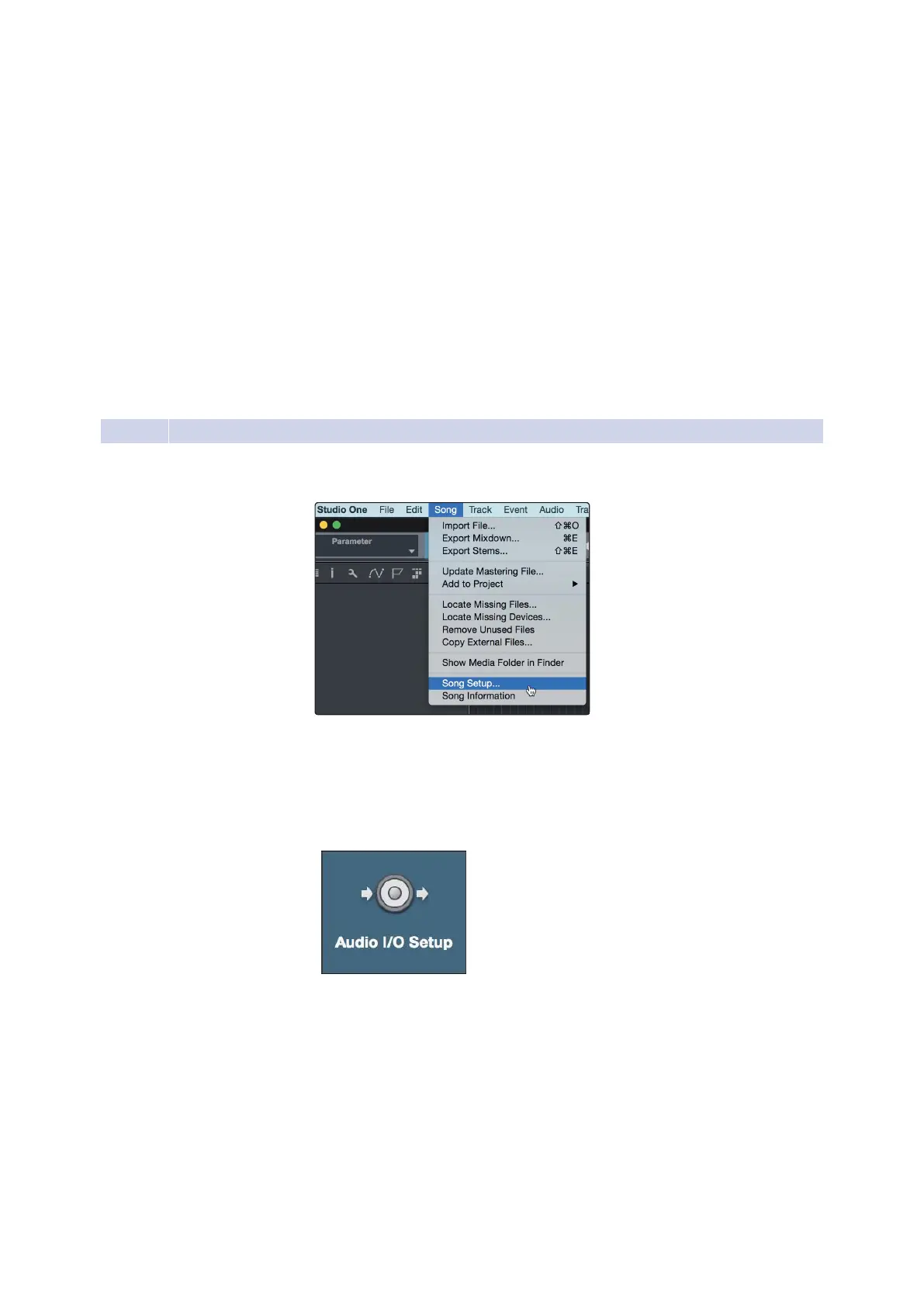
Click on Song
|
Song Setup to set your sample rate and
resolution and configure your audioI/O.
点击歌曲
|
歌曲设置,设置你的采样率和分辨率,
配置你的音频I/O。
2.
Click on the Audio I/O Setup tab.
点击音频
I/O
设置标签。
3.
From the Inputs tab, you can enable any or all of the inputs on your PreSonus
Quantum audio interface that you’d like to have available. We recommend
that you create a mono input for each of the inputs on your interface. If you
plan on recording in stereo, you should also create a few stereo inputs.
在Inputs选项卡上,你可以启用 PreSonus Quantum 音频接口上的任何
或所有你想要的输入。我们建议为你的音频接口上的每个输入创建一
个单声道输入。如果你打算用立体声录音,你也应该创建一些立体声
输入。




 To Next Page