EN – 8
Image
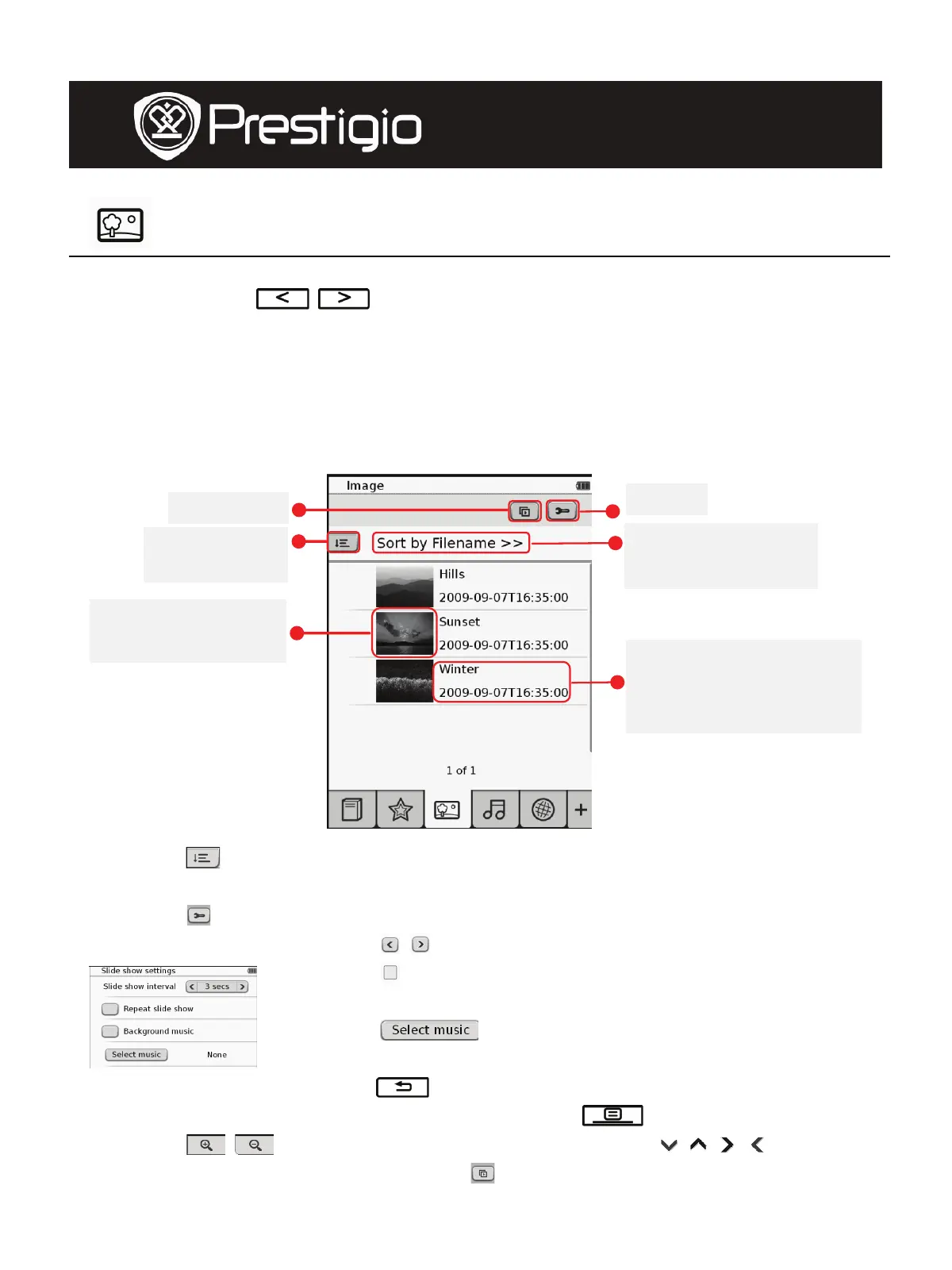
z Tap on the icon to enter Image mode. Image list will be displayed on
screen. Press
/ to turn pages if available.
NOTE:
Photos saved on micro SD card will be displayed on the list. The
device supports only the following picture formats .JPEG, .PNG,
and .BMP. All other file formats will not be displayed on purpose.
z Tap on
to select sorting method. The image list can be sorted by
Filename and Time.
z Tap on
to enter slide show settings detailed as follows.
z Tap on
/ to set up slide show interval time.
z Tap on
to enable slide show repetition and
background music.
z Tap on
to select an audio file as the
background music.
z Tap o n
to confirm the option and exit settings.
z During images playback in full screen, press to enter submenu.
Tap on
/ to zoom the image in/out. Tap on / / / to
move to the desired part. Tap on
to enter slide show.
Slide Show
Sorting
Method
Setting
Current sorting
method
Thumbnail of the
ima
e
File name; Last
modified/download
time
User Manual
Prestigio Libretto
PER5062B










 To Next Page