2. You can:
- Tap Artists/Albums/Playlists, you can browse songs sorted by artists, albums, or playlists.
- Tap Songs, browse all songs.
- Tap Now playing, check the song is playing now.
The Now playing selection is only available when your phone in landscape view.
Listen to music
1. On the home screen or list menu, tap .
2. Tap a song from the category.
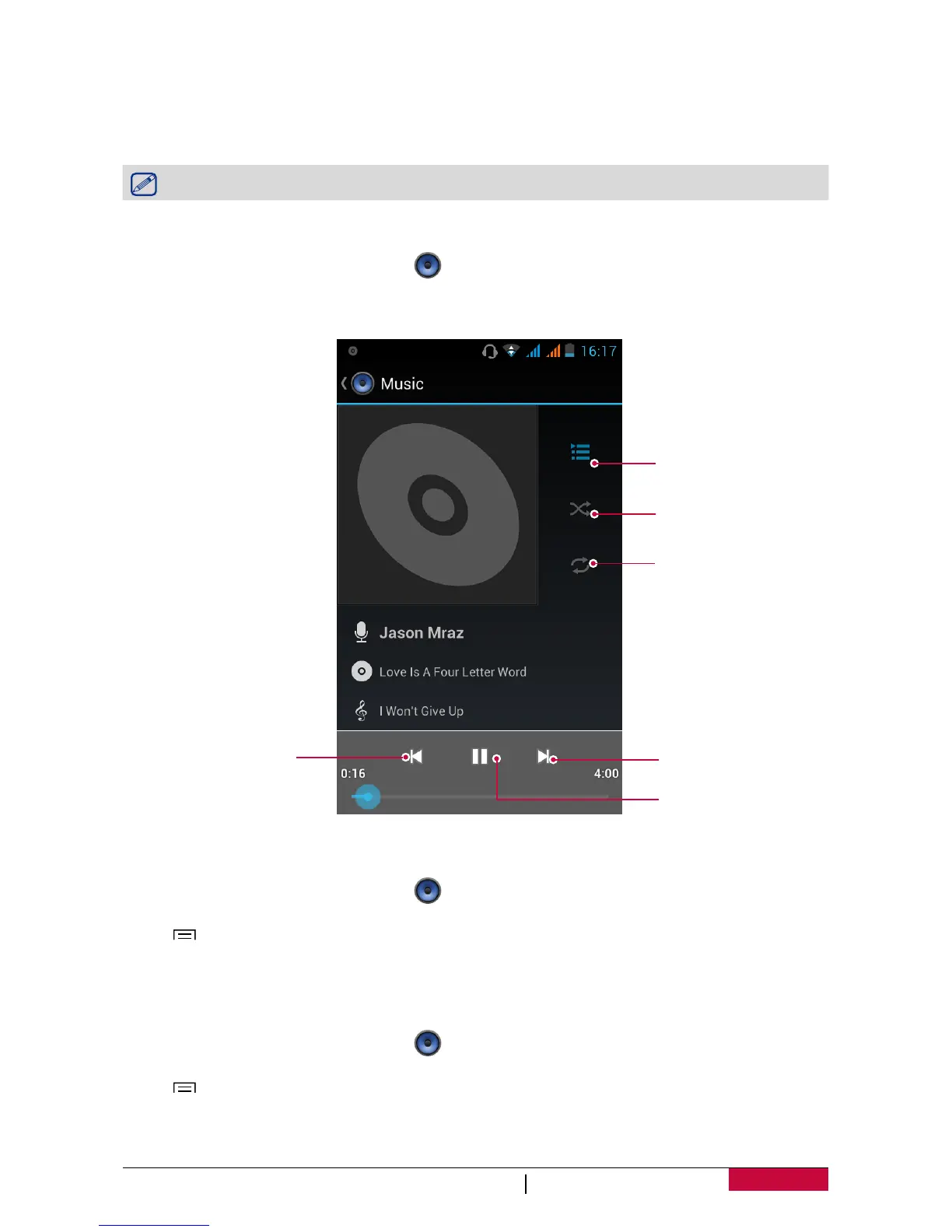
3. Use the following keys to control playback:
Back to current
playlist.
Turn on shuffle.
Select play mode: Repeat
one, Repeat all or Off.
Skip to the next song.
Tap and hold to move
fowards quickly.
Pause and resume
playback.
Skip to the previous song.
Tap and hold to move
backwards quickly.
Set a song as ringtone
1. On the home screen or list menu, tap .
2. Tap a song from the category.
3. Tap to select Use as ringtone.
Your playlist
Create a playlist
You can make your own playlist.
1. On the home screen or list menu, tap .
2. Tap a song from the category.
3. Tap to select Add to playlist.
4. On the pop up screen, tap New to create a new playlist.
5. Enter a title and tap Save.












 To Next Page