Mark the task as done or undone
- Select the task on the TODO category, tap to mark the task as done.
- Select the task on the DONE category, tap to mark the task as undone.
Delete a task
1. On the home screen or list menu, tap .
2. Tap the task your want to delete, and then tap .
FreeNote
Use this app to jot down ideas, questions, and everything else. Type in text, attach photos and
documents.
- On the home screen or list menu, tap . The first time you open the app, you can take a
quick tour.
Compose a note
1. On the home screen or list menu, tap .
2. Use the keyboard or handwrite to enter the text.
3. Use the painting brush to draw a picture.
4. Tap to exit and save the note.
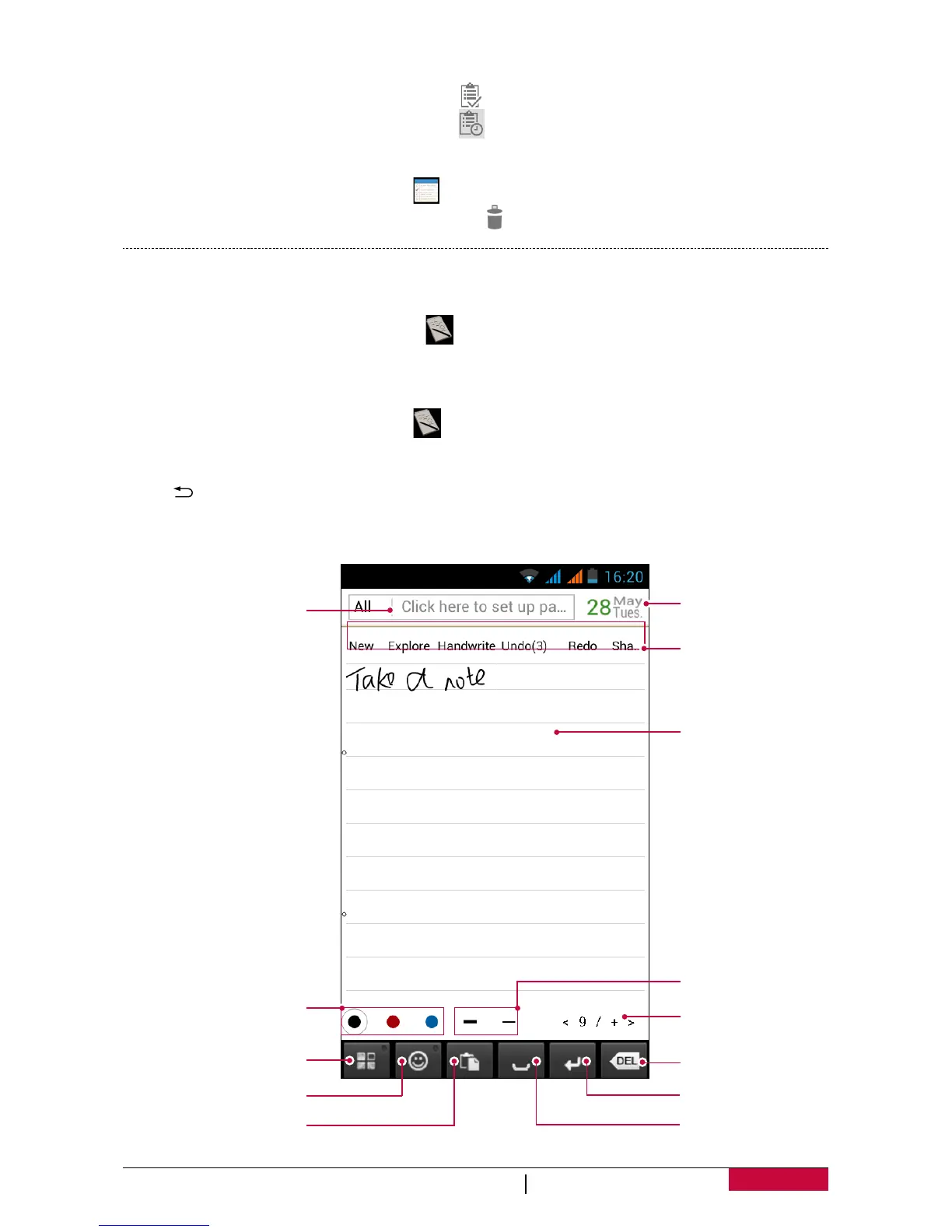
Use handwrite
- Tap the third selection in action tab (handwrite/paint/keyboard), choose handwrite.
Editing area
Action tab
Open calendar
Set the pattern
of the pencil
Page/Total pages
Delete
Enter
Space
Set the color
of the pencil
Set up page
Set magic button
Insert emotion picture
Paste












 To Next Page