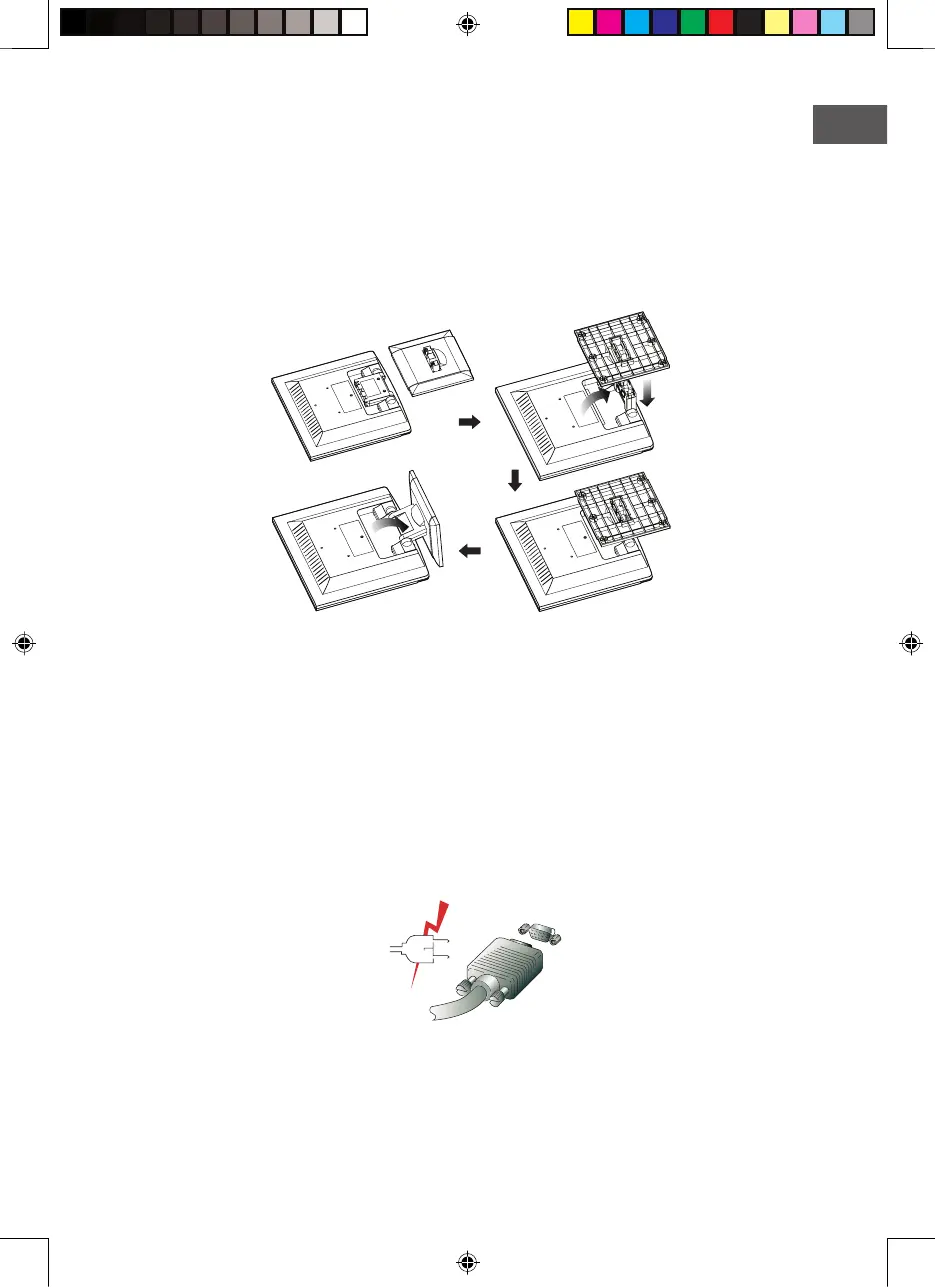
3-2. Instructions to Install the Stand
Install the stand according to the following instructions on a flat surface.
1. Place the main unit body with screen face down and flip open the folded Stand Post
at 90 degree angle.
2. Engage the Base to the Stand Post by pressing down gently in right position (If installed
correctly you will hear a click sound).
3. Pull the installed base open to bring the main body unit to stand.
3-3. Selecting a suitable location
• Place the monitor at least 30cm from other electrical or heat-emitting equipment and
allow at least 10cm on each side for ventilation.
• Place the monitor in a position where no light shines directly onto or is reflected on
the screen.
• To reduce eye strain, avoid installing the display unit against a bright background
such as a window.
• Position the monitor so that the top of the screen is no higher than eye level.
• Position the monitor directly in front of you at a comfortable reading distance (around
45 to 90cm).
Before you start cabling your monitor, check that the power is off on all units.
To avoid any possibility of electric shock, always connect your equipment to properly
earthed outlets.


 To Next Page