13
[Checking the Mode]
The selected mode can be checked by looking at the icon displayed at the top of the screen.
Make sure to select the correct mode for the measurement target.
Pitching mode Batting mode Multi mode
[Display Screen]
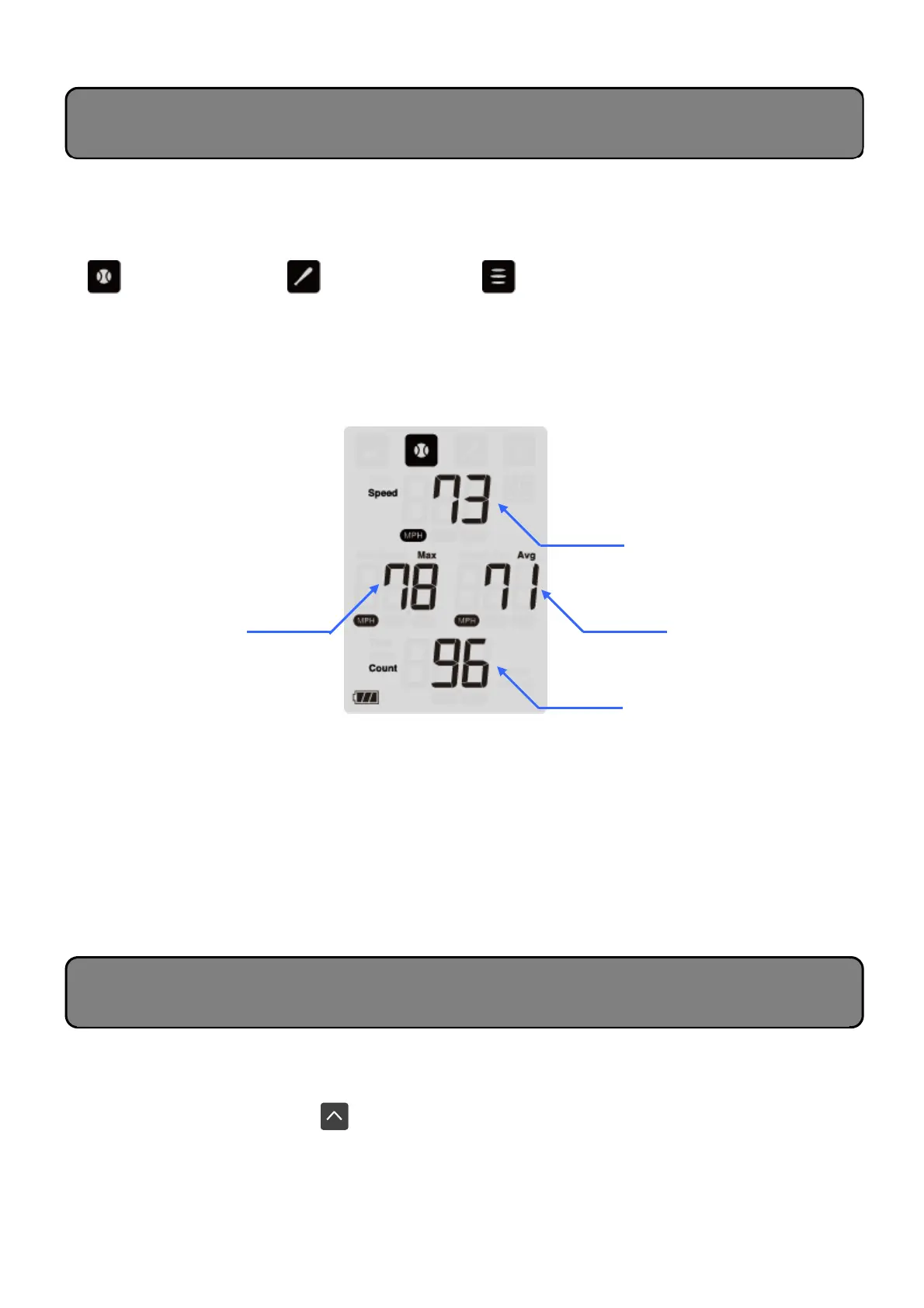
In addition to the measured speed, the maximum and average speeds saved to the history are
also displayed.
The total measurement count is also displayed.
[Regarding the Counter Function]
The Pitching, Batting, and Multi modes include a counter function displayed on the bottom of the
screen that tracks the measurement count. This function can be used to count the number of
practice swings and thrown balls.
* The counter can count up to 999. However, only up to 500 instances of measurement data
can be saved in the history (total for all modes).
* When the history is cleared, the count will also be cleared.
This device enables up to 500 instances of measurement data to be saved in the history (total for
all modes). Use the following procedure to display history data.
• Press the Up Scroll button .
⇒ The most previous measurement results will be displayed.
* You can continue to scroll by continuously pressing the Scroll buttons.
* When the total number of data reaches 500, the oldest data will be automatically overwritten.
Average speed
Measurement count
Description of Screen Displays
(Pitching/Batting/Multi Modes)
Checking History Data
Maximum speed


 To Next Page