16 www.pridemobility.com Quantum/Jazzy 1450 Series
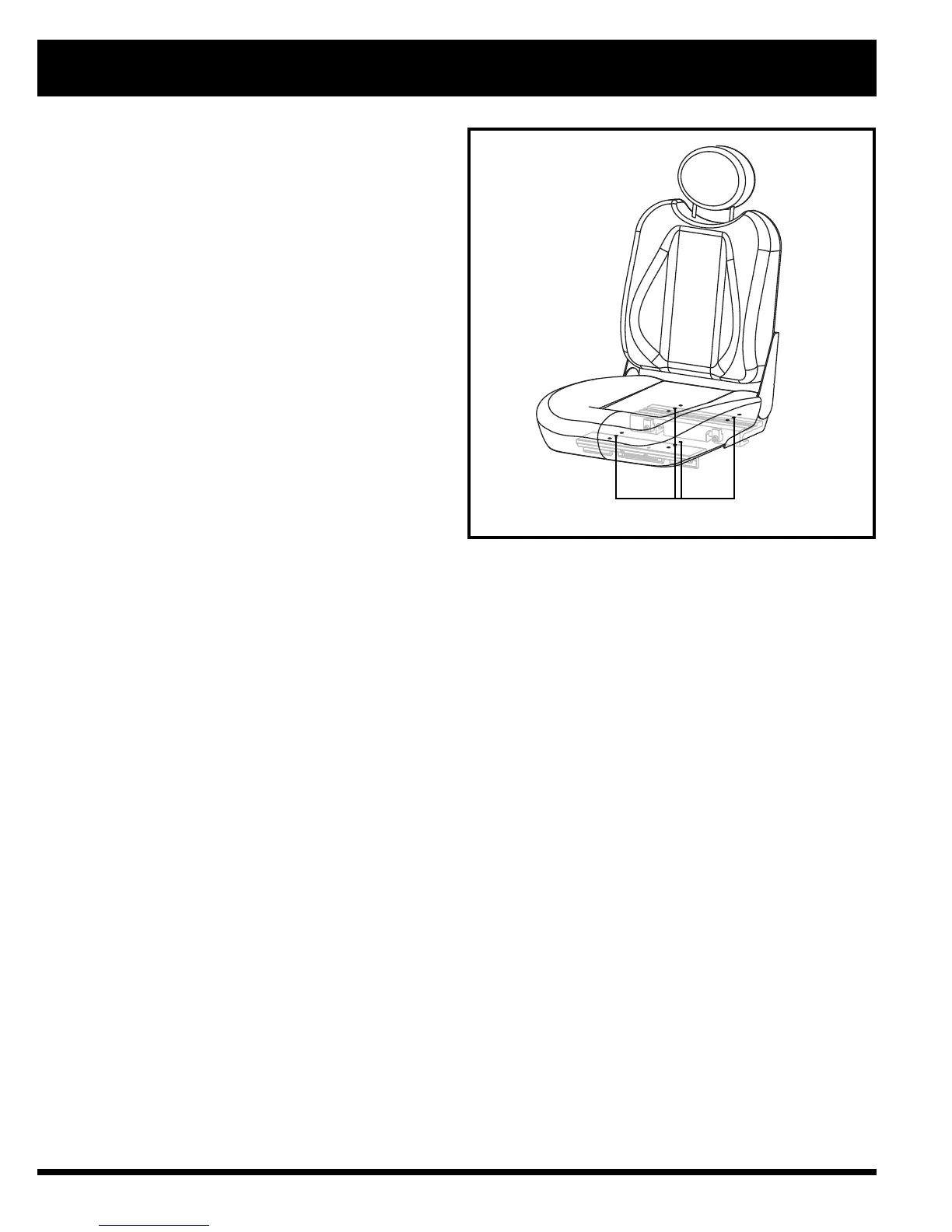
Figure 12. Seat Position Adjustment
V. COMFORT ADJUSTMENTS
SEAT MOUNTING HOLES
9. Reinstall the hardware.
10. Reinstall the seat.
11. Reconnect the controller to the power base.
Seat Position
You can move the seat forward or rearward by chang-
ing the extrusion mounting position.
To change the position:
1. Turn off the power to the controller.
2. Make sure the power chair is in drive mode.
3. Unplug the controller connector(s) from the power
base.
4. Remove the seat from the power base.
5. Remove both extrusions from the bottom of the seat.
6. Reposition the extrusions on a different set of
mounting holes. You must move both extrusions
the same number of holes either forward or back-
wards. See figure 12.
7. Fasten the extrusions back onto the bottom of the
seat.
8. Reinstall the seat.
9. Reconnect the controller to the power base.
Manual Recline Seatback Adjustment
If your power chair is equipped with a reclining seat,
you can adjust the seatback angle with the seatback
release lever. The lever is located on the right side of
the seat base.
To adjust the recline angle:
1. Pull up on the seatback release lever.
2. Lean forward or backwards to the desired position.
3. Release the lever.



 To Next Page