18 www.pridemobility.com Quantum/Jazzy 1450 Series
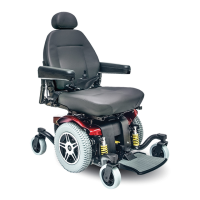
HARDWARE
FOOT PLATFORM
BRACKET
V. COMFORT ADJUSTMENTS
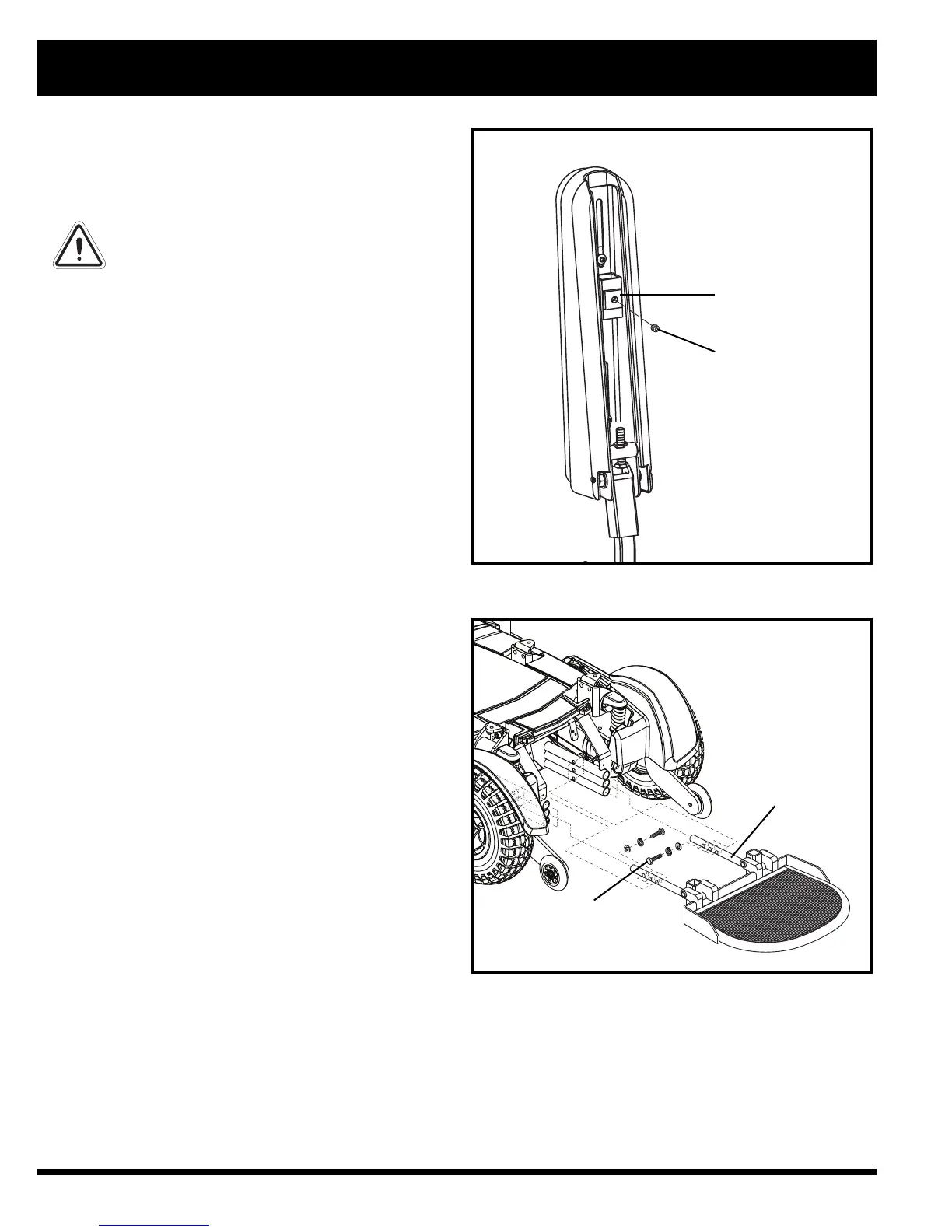
Figure 14. Underside of Armrest
Controller Position
You can move the controller in toward or out away
from the armrest, or change the position of the control-
ler for either left-hand or right-hand use.
WARNING! Do not place the controller
harness so that it can be pinched in the
seat frame or the power base frame.
To extend the controller:
1. Flip up the armrest so it is perpendicular to the floor.
2. Loosen the setscrew on the controller bracket. See
figure 14.
3. Slide the controller into or out of the armrest to the
desired position.
4. Tighten the setscrew to secure the controller.
To change the controller position:
1. Turn off the power to the controller.
2. Unplug the controller connector(s) from the power
base.
3. Remove any wire ties securing the controller har-
ness to the armrest.
4. Flip up the armrest so it is perpendicular to the floor.
5. Loosen the setscrew on the controller bracket.
6. Slide the controller out of the armrest.
7. Loosen the setscrew in the other armrest.
8. Place the controller in the other armrest.
9. Tighten the setscrews in both armrests.
10. Route the controller harness to the back of the
power base and plug in the controller.
11. Secure the controller harness to the armrest with
wire ties. See figure 10.
NOTE: If your power chair is equipped with a Syn-
ergy Seat or TRU-Balance Power Positioning Sys-
tem, refer to the information provided in supplemen-
tal manuals provided with your seating system.
Foot Platform Height Adjustment
The foot platform height is easily adjusted to several
different heights.
To raise or lower the foot platform:
1. Remove the hardware from the foot platform
bracket. See figure 15.
2. Raise or lower the foot platform to the desired
height.
3. Reinstall the hardware into the foot platform
bracket and tighten.
Foot Platform Depth Adjustment
You can adjust the depth of the foot platform.
Figure 15. Foot Platform Adjustment
CONTROLLER BRACKET
SETSCREW



 To Next Page