28 www.pridemobility.com Quantum/Jazzy 1450 Series
VII. CARE AND MAINTENANCE
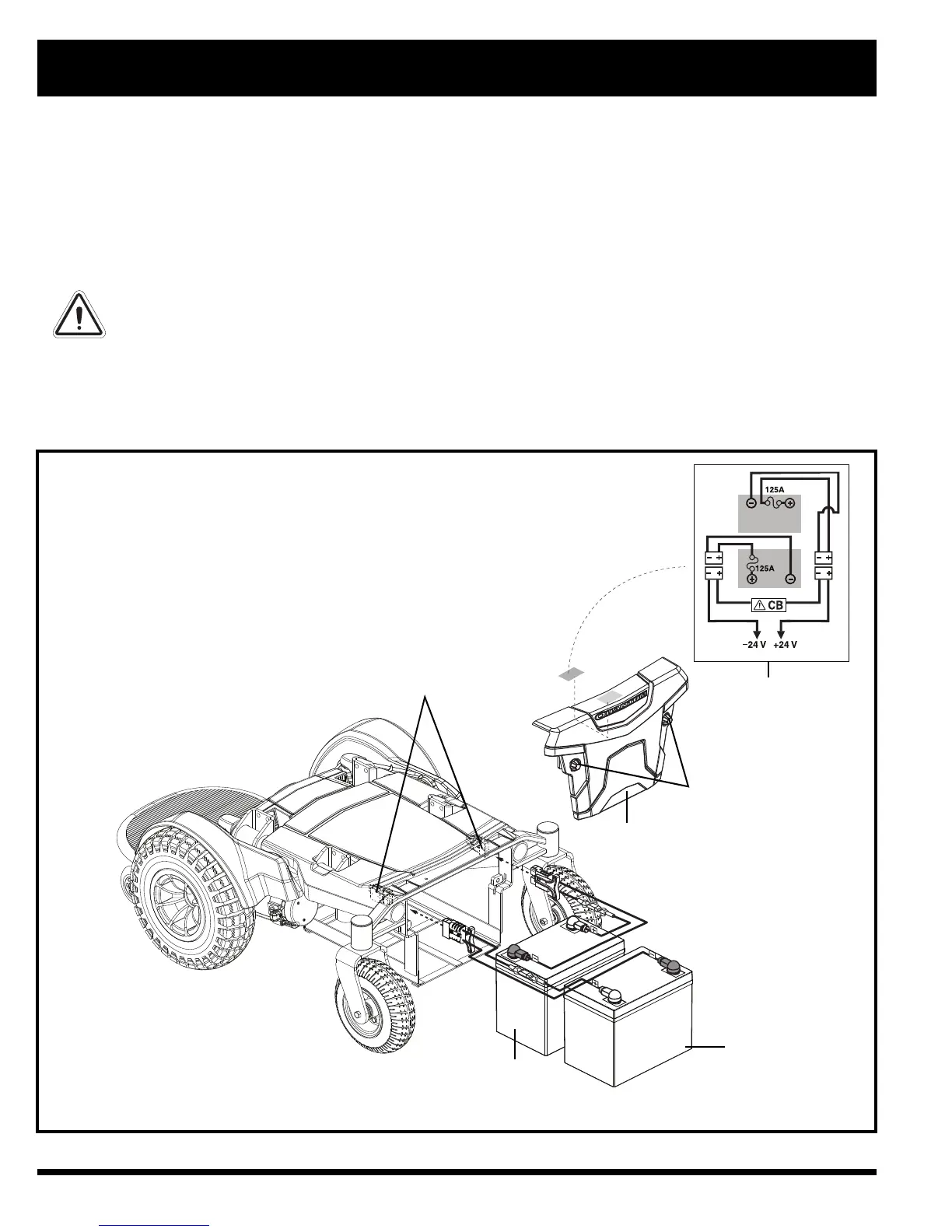
Figure 20. Battery Installation
BATTERY WIRING
DIAGRAM LABEL
QUICK RELEASE
BATTERY CONNECTORS
REAR BATTERY
FRONT BATTERY
REAR COVER
To replace the batteries:
1. Turn off the power to the controller.
2. Make sure that the power chair is in drive mode. See III. “Your Power Chair.”
3. Loosen the yellow thumbscrews (see figure 20) and remove the rear cover.
4. Disconnect the quick release battery connectors. See figure 3.
5. Remove the batteries.
6. Disconnect the battery harness from each battery.
7. Connect the battery harness to the new front battery according to the battery wiring diagram. See figure 20.
WARNING! Make sure you tighten the fasteners so that the connections are secure.
8. Connect the battery harness to the new rear battery according to the battery wiring diagram. See figure 20.
9. Install the new batteries and connect the quick release battery connectors.
10. Reinstall the rear cover.
11. Charge the batteries. See VI. “Batteries and Charging.”
BATTERY SET CONFIGURATION:
+ = POSITIVE (RED) TERMINAL POST
- = NEGATIVE (BLACK) TERMINAL POST
CONNECT RED WIRES TO RED POSITIVE (+) TERMINAL POSTS.
CONNECT BLACK WIRES TO BLACK NEGATIVE (-) TERMINAL POSTS.
YELLOW THUMBSCREWS




 To Next Page