18
www.pridemobility.com Ultimate-4 XL
IV. YOUR SCOOTER
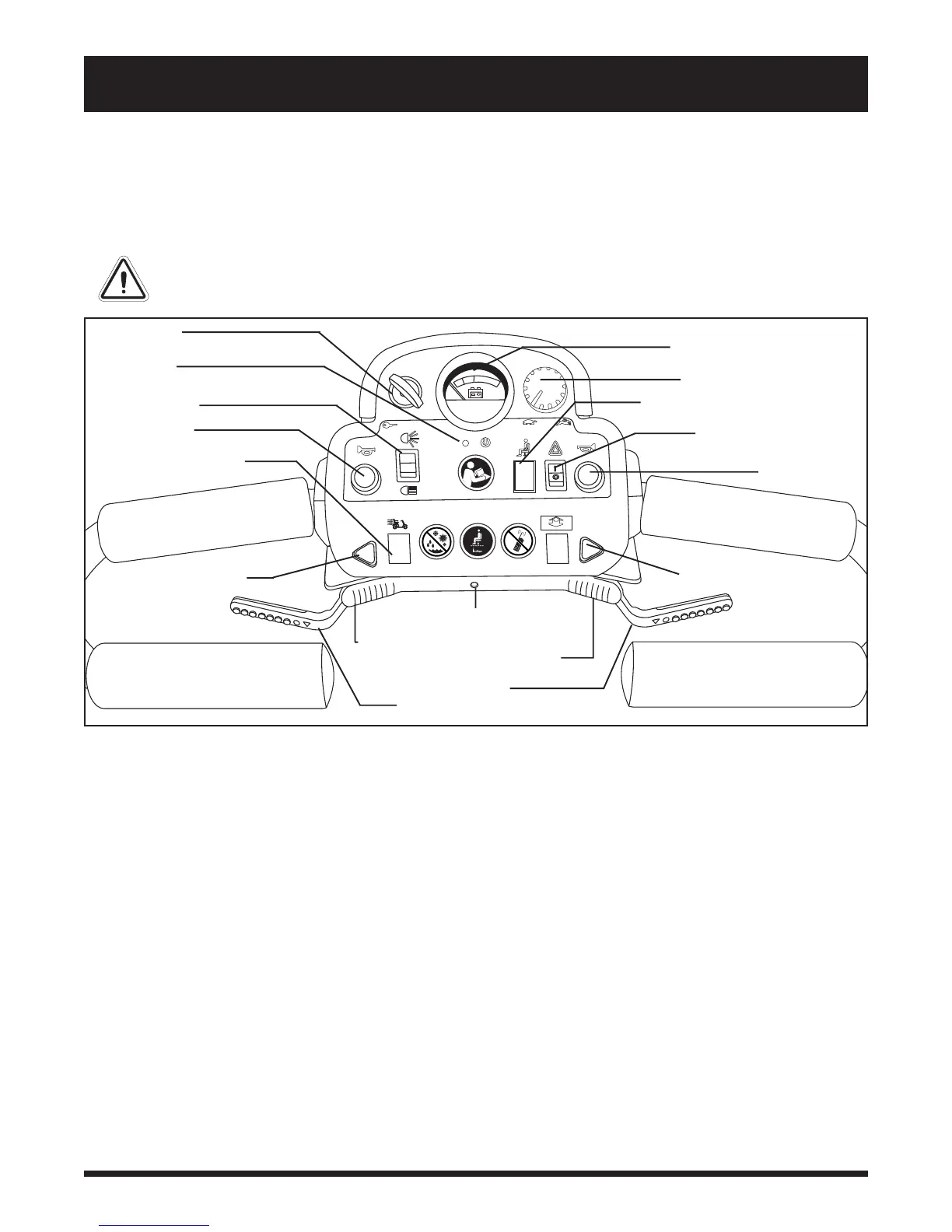
TILLER CONSOLE
The tiller console houses all of the controls needed to drive your scooter, including the speed adjustment dial, throttle
control lever, battery condition meter, lights switch, hazard lights switch, turn indicator buttons, status LED, and horn
buttons. See figure 5.
WARNING! Do not expose the tiller console to moisture. In the event that the tiller console
does become exposed to moisture, do not attempt to operate your scooter until the tiller
console has dried thoroughly.
Battery Condition Meter
When the key is fully inserted and turned clockwise to power up your scooter, this meter indicates the approximate
battery voltage strength. For further information on battery charging, see V. Batteries and Charging.
Turn Indicator Buttons
n Press the appropriate turn indicator button once to activate it.
n Your scooters turn indicators are timed to shut off automatically.
Hazard Lights Switch
This switch activates the 4-way flashers on your scooter.
n Toggle the switch forward to turn on the flashers.
n Toggle the switch rearward to turn off the flashers.
Horn Buttons
Your scooter must be turned on for the horn to be operational.
n These buttons activate a warning horn.
n Do not hesitate to use the warning horn when doing so may prevent accident or injury.
Figure 5. Tiller Console
400/181
HAZARD LIGHTS SWITCH
HORN BUTTON
KEY SWITCH
LIGHTS SWITCH
HORN BUTTON
SPEED ADJUSTMENT DIAL
THROTTLE CONTROL LEVER
LEFT TURN INDICATOR
BUTTON
RIGHT TURN INDICATOR
BUTTON
BATTERY CONDITION METER
POWER SEAT SWITCH (OPTIONAL)
STATUS LED
HI/LOW SPEED SWITCH
PUSH TO GO FORWARD
PUSH TO GO REARWARD
PULL TO GO FORWARD
PULL TO GO REARWARD



 To Next Page