NOTE: The scooter battery can be charged with
the battery box either installed on or removed
from the scooter.
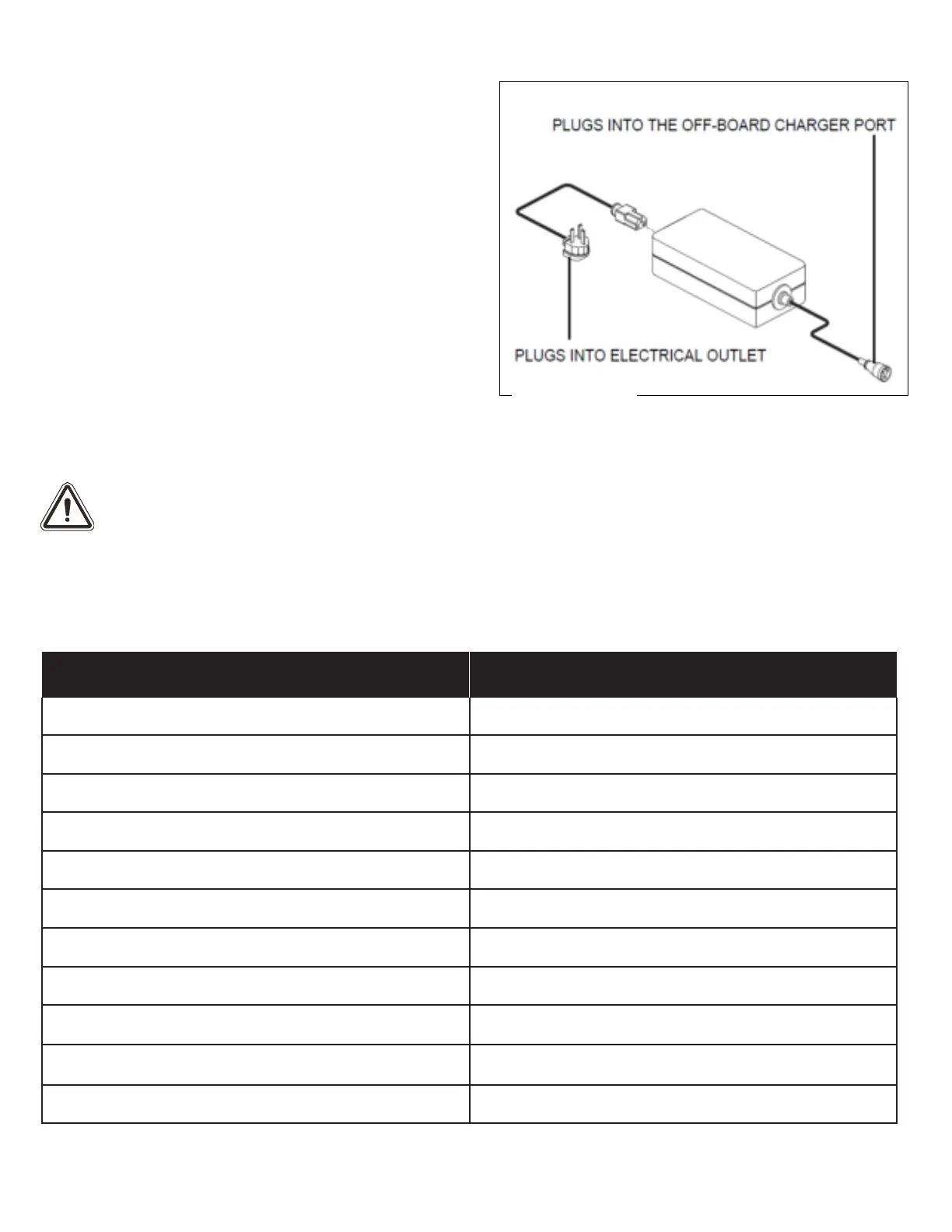
To charge the battery using the off-board charger:
1.
Position your scooter next to a standard
electrical outlet.
2.
Be certain the scooters power is turned off.
3.
Plug the off-board charger into the off-board
charger socket of the scooter’s battery pack. See
figure 12.
4.
Plug the off-board charger into the electrical
outlet.
5.
When the battery is fully charged, unplug the off-
board charger from the electrical outlet and then
from the scooter.
NOTE: The battery condition meter on your scooter displays an approximate reading of battery
strength. Refer to Table 1 for battery condition meter codes.
91-100% battery remaining
Table 1. Battery Condition Meter Codes (Please note that these values are estimated)
WARNING! The LED light colour on the charger indicates a different charger status. The LED is RED
when the charger is not or cannot connect to the scooter. The LED is ORANGE when the charger is
connected and charging the scooter. The LED will be GREEN when the scooter has finished charging.
Note: The LED should always be orange when the scooter is initially plugged in. If the LED immediately
goes to GREEN, it may mean that your batteries are too discharged to allow charging or there may be an
issue with your charger – In this case, please contact your Pride Service Provider for advice.
17


 To Next Page