US Jet 3 Ultra/RevC/Jun03 www.pridemobility.com 33
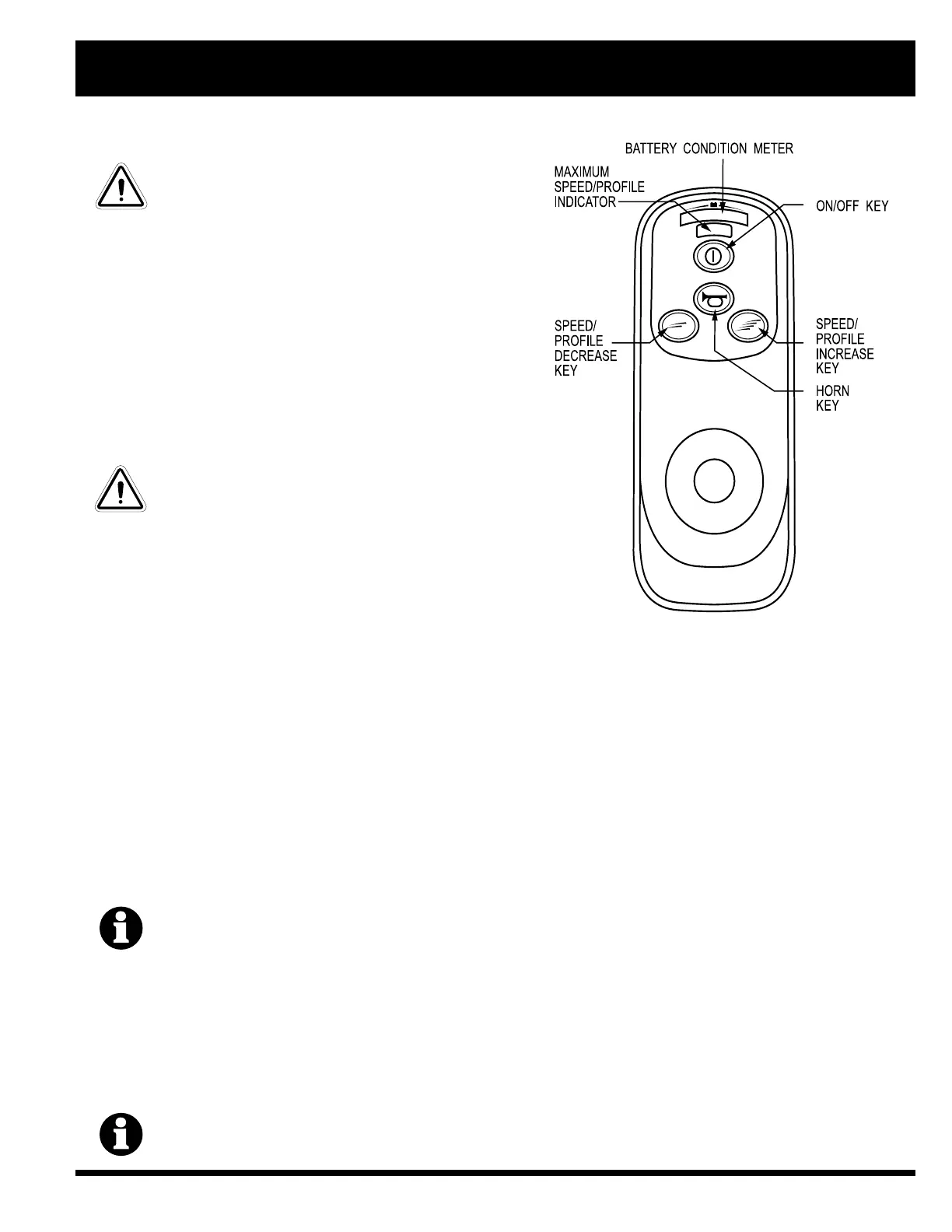
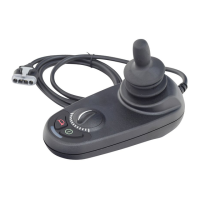
Figure 23. VSI Controller Keypad
VIII. OPERATION
WARNING! If your power chair begins to
move in an unexpected manner, immedi-
ately release the joystick. Unless the joy-
stick is damaged, this action should stop
your power chair.
Keypad
The keypad is located in front of the joystick. It contains
keys necessary to operate your power chair. See figure 23.
On/Off Key
The on/off key turns the VSI on and off.
WARNING! Unless faced with an emergency
situation, do not use the on/off key to stop
the chair. This will cause the power chair
to stop abruptly.
WARNING! Always turn the power off when
you are stationary to prevent unexpected
movement.
Battery Condition Meter
The battery condition meter is located in front of the joy-
stick. See figure 23. This is a 10-segment illuminated dis-
play that indicates that the VSI is powered on and also
gives the battery status, the VSI status, and the electrical system status.
n Red, yellow, and green lights lit: Batteries charged; VSI and electrical system OK.
n Red and yellow lights lit: Charge batteries if possible; VSI and electrical system OK.
n Red lights only lit or slow flash: Charge batteries as soon as possible; VSI and electrical system OK.
n Rapid flash of lights: Indicates a fault in the VSI or the electrical system. Refer to VSI Error Codes.
n Ripple up and down of lights: The joystick was not in the neutral position when the controller was powered on. If
you get ripple up and down of lights, turn off the controller, allow the joystick to return to the neutral position, then
turn on the controller.
NOTE: If you still get ripple up and down of lights, contact your authorized Pride Provider.
NOTE: When the batteries approach a discharged state, the first red light will begin to slowly
flash, reminding you the batteries need to be charged immediately!
Speed/Profile Keys
There are two keys that control either the speed or the profile. This depends on how your VSI was programmed. Press the
speed/profile increase key to increase the speed or change the profile. Press the speed/profile decrease key to decrease
the speed or change the profile. The speed/profile setting is displayed on the maximum speed/profile indicator. If your
power chair was programmed with a drive profile, contact your authorized Pride Provider for more information.
NOTE: We recommend that the first few times you operate your power chair, you set the speed to
the slowest setting until you become familiar with your new power chair.



 To Next Page