Primare AB • Renvägen 1 • SE - 35245 Växjö • Sweden • Tel +46 470 729215 • www.primare.net
PRIMARE
Technology By Image
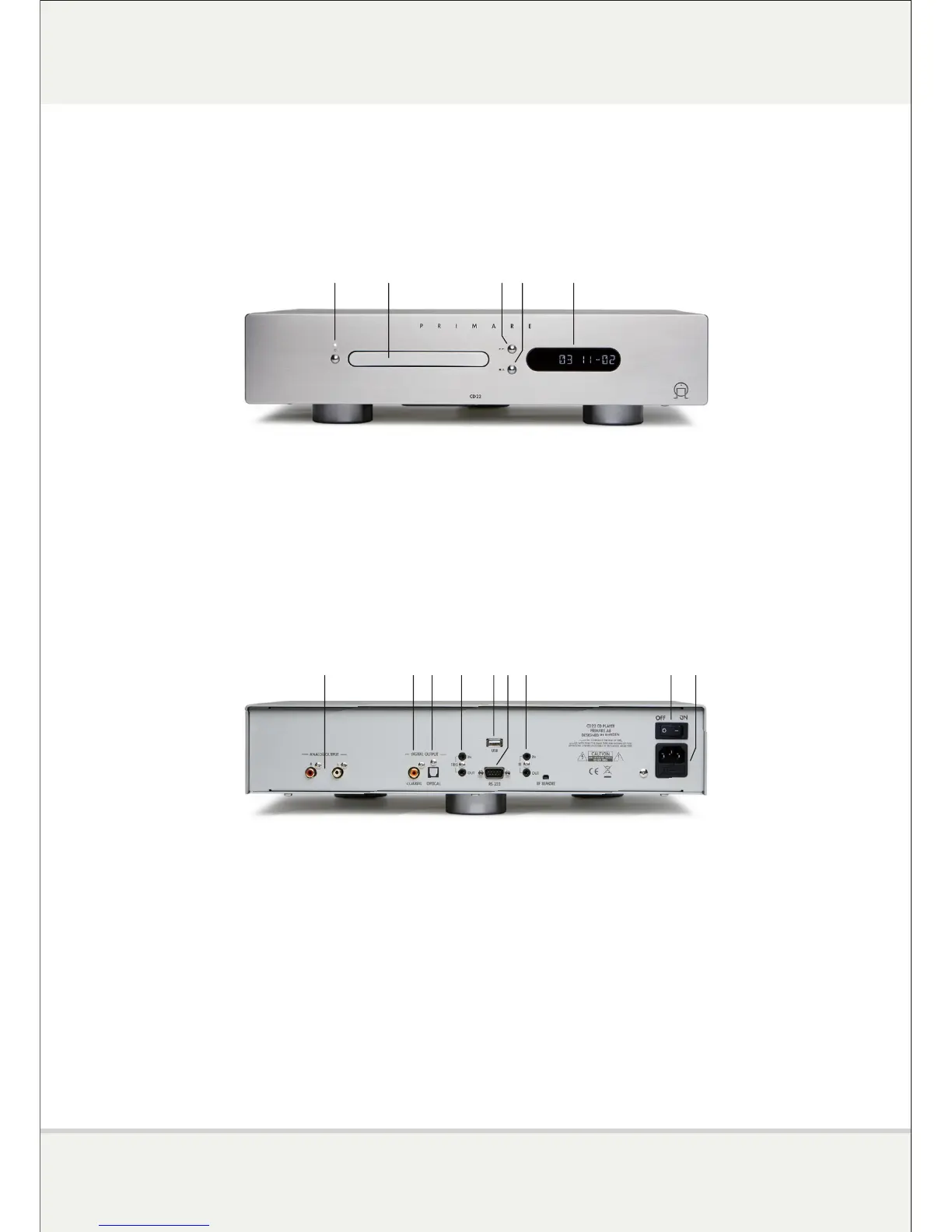
CD Front View
1 'Power / Standby' button.
2 Loading tray.
3 'Play / Skip' button. Pressing this starts playback if the CD is stopped. During playback,
pressing this proceeds to the next track and holding it returns to the previous track.
4 'Stop / Open' button. During playback, pressing this pauses the CD. Pressing it again stops
the playback. Holding it controls the opening/closing of the tray.
5 Multi-function display (track number, elapsed time, remaining time, etc.).
CD Rear View
1 Asymmetric Cinch analog outputs.
2 Cinch coaxial digital output.
3 TosLink optical digital output.
4 'Trigger' input and output: switch on and remote control.
5 USB A input : connection with a USB key or hard drive, for example.
6 RS-232 port (connection to a home automation system).
7 Wired remote control input and output (repetition of infrared remote control).
8 Main On / Off switch.
9 Power cord and fuse connection.
REVIEW: I22 INTEGRATED AMPLIFIER AND CD22 CD PLAYER
1 2 3 4 5
1 2 6 93 4 5 7 8



 To Next Page