EN
Página 33 de 43
This screen has at least one button and a maximum of six buttons (these buttons are always the
same size and are in the centre of the window). The number of available buttons depends on the
number of programmes stored in favourites. For example, if there are four programmes in
favourites, the layout is as shown in the diagram. If there are more than six programmes in
favourites, only the first six programmes are displayed.
This screen is not displayed in “Credit Mode”, and the display goes directly from the Stand-By
screen to the main screen. In addition, if while in this screen, we go to “Credit Mode”, the display
switches to the main screen.
2.3. Main Screen
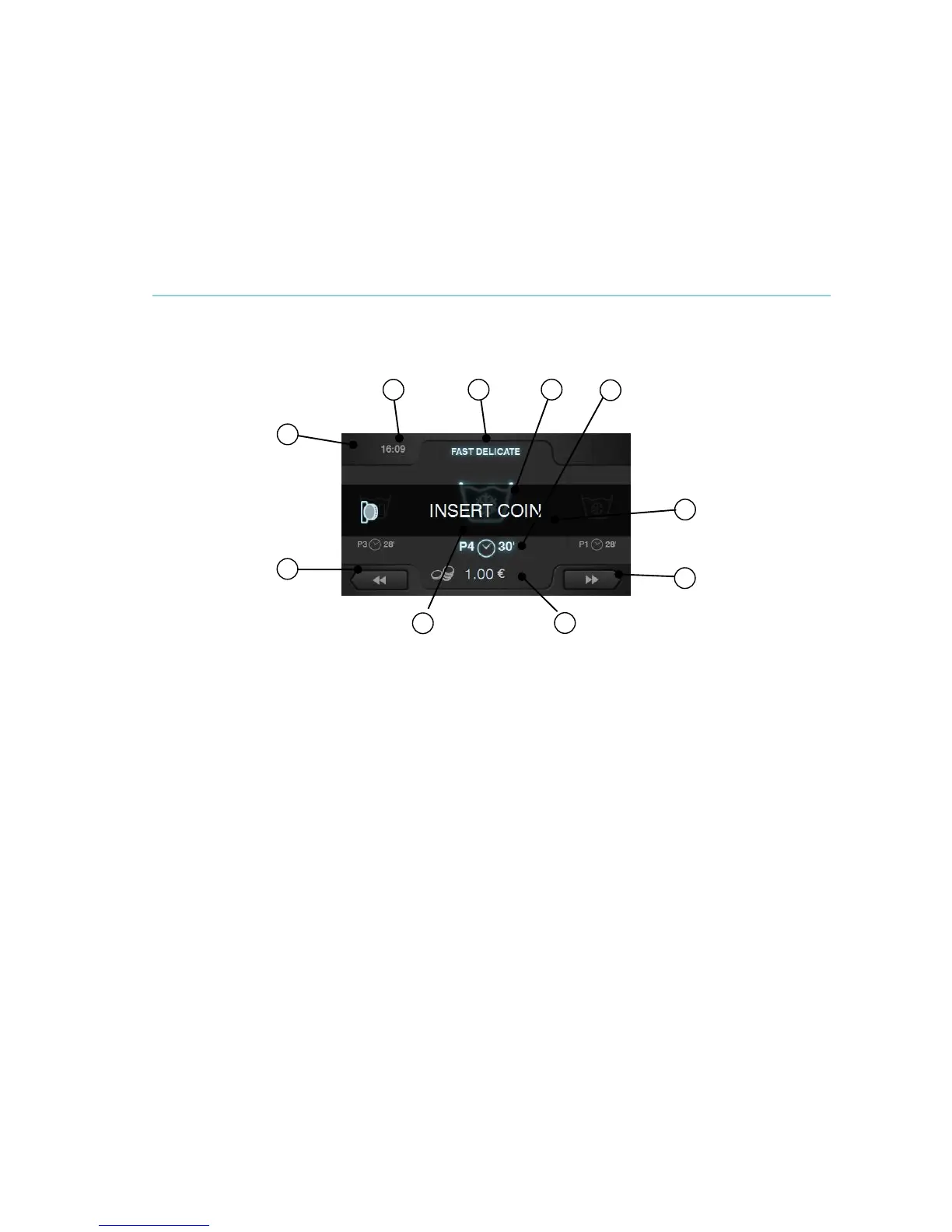
The self-service Main Screen allows management of the payment in order to run the selected
programme.
Some of the options may be omitted from the HUD menu.
1. Machine identifier: Label identifying the machine with the number selected by the user.
2. Time: Time and minutes in the selected format.
3. Programme name: Name configured for the selected programme.
4. Programme temperature: Programme temperature. The maximum temperature is taken
from among the different cycles of the programme.
5. Programme number and length: Position of the programme in the list (My
programmes).
Estimated length, in minutes, for the selected programme.
To calculate the length of a programme, the average is taken of the last three run times
for the programme in question.
6. Increase/decrease programme number: These buttons permit user to scroll up or down
the list of selected programmes.
If the programme number is increased while the machine is in the last programme, this
programme is maintained. Similarly, if it is decreased while the machine is in the first
programme, this programme is maintained.
As well as using the buttons, the programme can be increased/decreased by pressing
directly on the programme information (just above the button).
7. Price: If the COIN option is selected in self-service mode, the price of the selected
programme is displayed with the corresponding symbol (See currency table).
If the option CP or CR is selected, the text “INSERT COIN” or “INSERT PAYMENT” is
displayed.
8. Start/Amount remaining: Button to start running selected programme, provided the
corresponding amount for the programme in question has been inserted in the machine.
If full payment for the programme has not been made, the START button is replaced by
the amount remaining for the programme (COIN mode).
If the amount defined has not been reached and the machine is in CP or CR mode, the
respective icon is displayed alone.



 To Next Page