MEASURING BODY TEMPERATURE
To measure body temperature using your Digital Infrared
Thermometer, follow these steps:
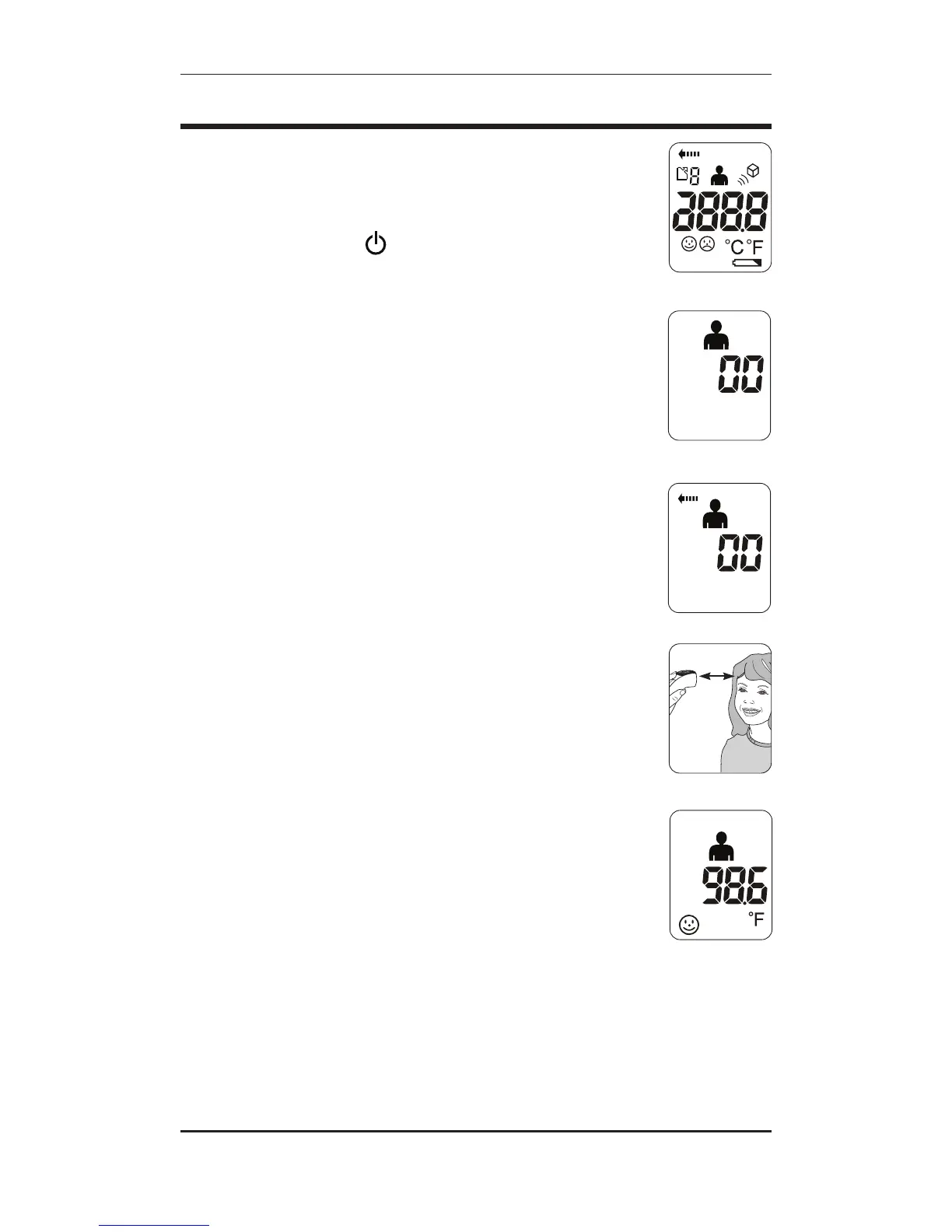
1. Press the Power button to turn the thermometer on. The unit
will run a self-test and all symbols on the display will
momentarily appear, Fig. 1.
2. Ensure that the thermometer is in Person mode; the Person
symbol will be on the display, Fig 2. To alternate between modes
press and release the Person/Object Mode button until you see
the desired measurement symbol on the display.
3. Press and hold the MEASURE button. The Person symbol,
Scan in Progress symbol and “00” should be displayed, Fig. 3.
4. While holding the MEASURE button, aim the infrared lens at
the patient’s forehead, holding the thermometer approximately
1.5” – 2.5” away, Fig. 4.
5. Release the MEASURE button, DO NOT MOVE THE
THERMOMETER; THE MEASUREMENT IS NOT YET COMPLETE.
6. The thermometer will beep again, and the temperature reading
will be displayed, Fig. 5. If the temperature measurement is
below 100.4° F, a happy face will be appear next to the
reading. If the reading is 100.4° F or above, a sad face will be
displayed.
7. After about one minute after use, the thermometer will
automatically beep and shut off.
Fig. 1
Fig. 2
Fig. 3
Fig. 4
Fig. 5
8 • ENGLISH


 To Next Page