12 USER´S MANUAL PUBLICATION DATE 05/05 507 329
4.6. ADD DETERGENTS
R For washing machines with top soap dispenser.
) Fill the soap dispenser on the top of the washer extractor depending of the chosen program.
Dispenser A : Prewash (add the detergent at the beginning of the wash cycle)
Dispenser B : Wash (add powder detergent or bleach detergent at the beginning of the
cycle, you may add liquid detergent or liquid bleach during the wash cycle. If added at the
start of the cycle, it will run in the washer prematurely)
Dispenser C : Final Rinse (Add fabric softener at the beginning of the cycle or before the
final rinse)
R For washing machines with front or side soap dispenser.
) Fill the soap dispenser at the front or side of the washer extractor depending of the chosen program.
Dispenser A : 1 st Wash
Dispenser B : 2 nd Wash
Dispenser D : Last Rinse
Add the detergents before the start of the wash cycle. You can always interrupt the program by opening the
Soap Dispenser Door to add once more detergent at the same dispenser.
R For washing machines connected to liquid soap supply system.
Check if the liquid soap supply system is in operation and if there is sufficient quantity of liquid soap.
R Standard wash programs versus custom made wash programs.
This explanation is only valid for standard wash programs. For custom made programs, it is possible that
other dispensers have been selected. (See „Programming manual“).
R Remark
: It is advisable to use only detergents with „reduced foaming“ which can easily be found in retail
shops. The dosage of soap to use is generally mentioned on the packing. An overdose of detergent can
lead to poor wash results and „suds“ overflow which can damage the machine.
Take care that the lid of the soap dispenser is closed when the machine starts.
4.7. START THE WASHER
4.7.1.CARD PROGRAMMER
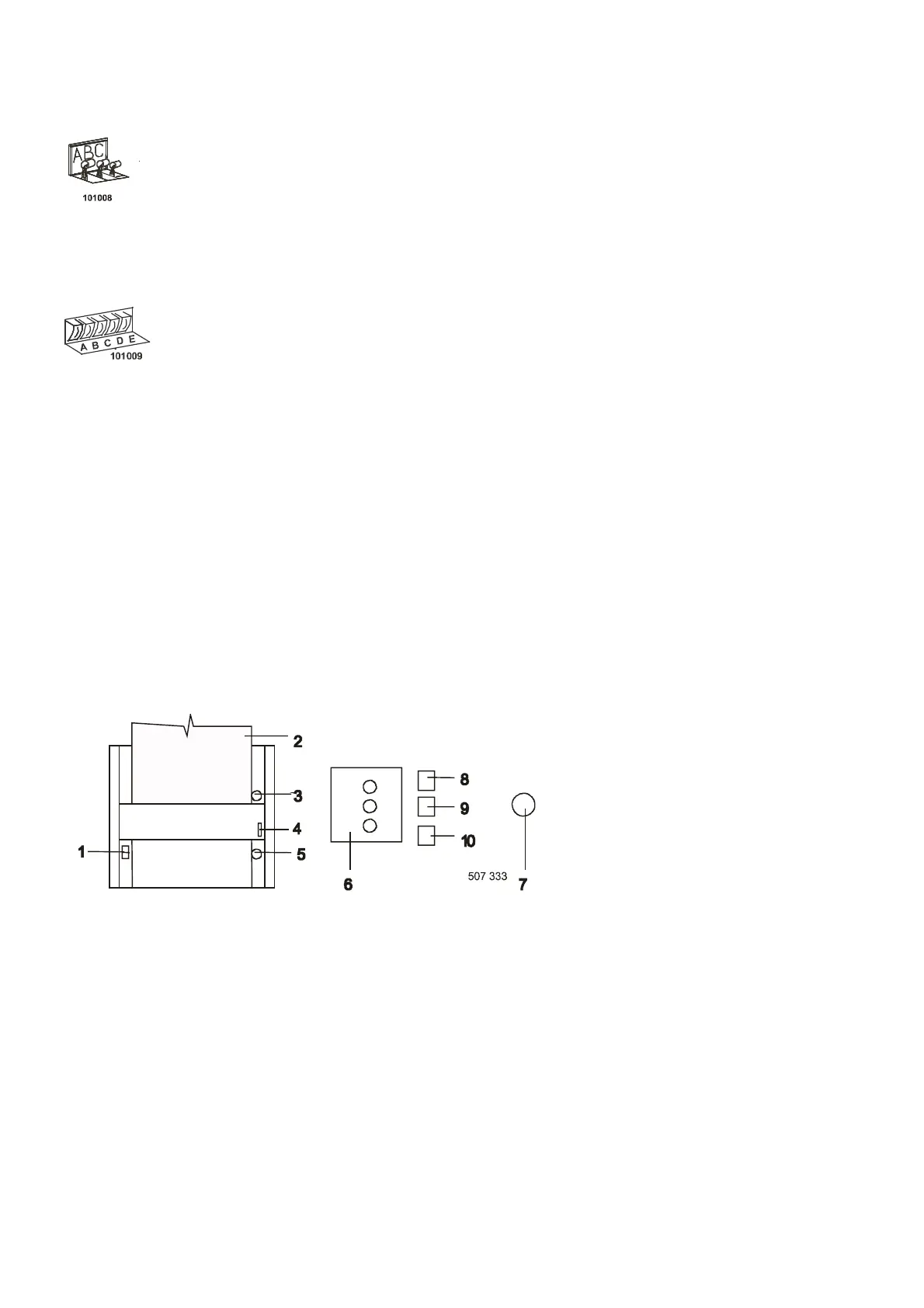
Check if the temperature setting on
the thermostat (6) corresponds to
the selected card.
Set the change-over switch (1) to the
„0“ position. Insert the (2) program
card into the programmer, so that
the thick blue line is not visible.
Fig. 4.7.1. Card programmer
Turn the change-over switch (1) to the „1“ position and press the green button (3) to start the washing programme.
– The light (9) is on if the programmer is in operation, and it is off during the water filling and heating function.
– The light (8) is on when the machine is under current, i.e. the machine main switch and the room electrical
switchboard are on.
– The light (10) is on when the machine heating is switched on.
INTERRUPTION:
– If you want to interrupt the programme, move the change-over switch (1) to „0“ position. To skip or repeat a
programme part, move the change-over switch to the „0“ position by turning the hand wheel (4), move the
card forward or back and return the switch (1) back to the „1“ position.
STOPPAGE:
– During operation you can stop the machine by pressing the red button (5). If you want to start the machine
again, press the green button (3).
– The EMERGENCY STOP button (7) can be used ONLY in case of an emergency situation (a risk of injuries
or machine damage).


 To Next Page