507 329 PUBLICATION DATE 05/05 USER´S MANUAL 13
– When the EMERGENCY STOP button (7) is pressed, all the machines functions are switched off. No light
will be on, the door remains locked and it is not possible to open it.
– To continue in operation, turn the EMERGENCY STOP button (7) located on the right side of the panel in
clockwise direction and pull it out. Then press the START button (3).
4.7.2. FULL CONTROL MICROPROCESSOR
FULL CONTROL MICROPROCESSOR MCB FC
SELECT PROCESS X X
After selecting the wished wash program number, by pressing the START button, the wash cycle will be
started. If there is no washing program available for the selected program number, INVALID will be displayed.
Once the program has been started, the name of the selected wash program will be displayed for a few seconds.
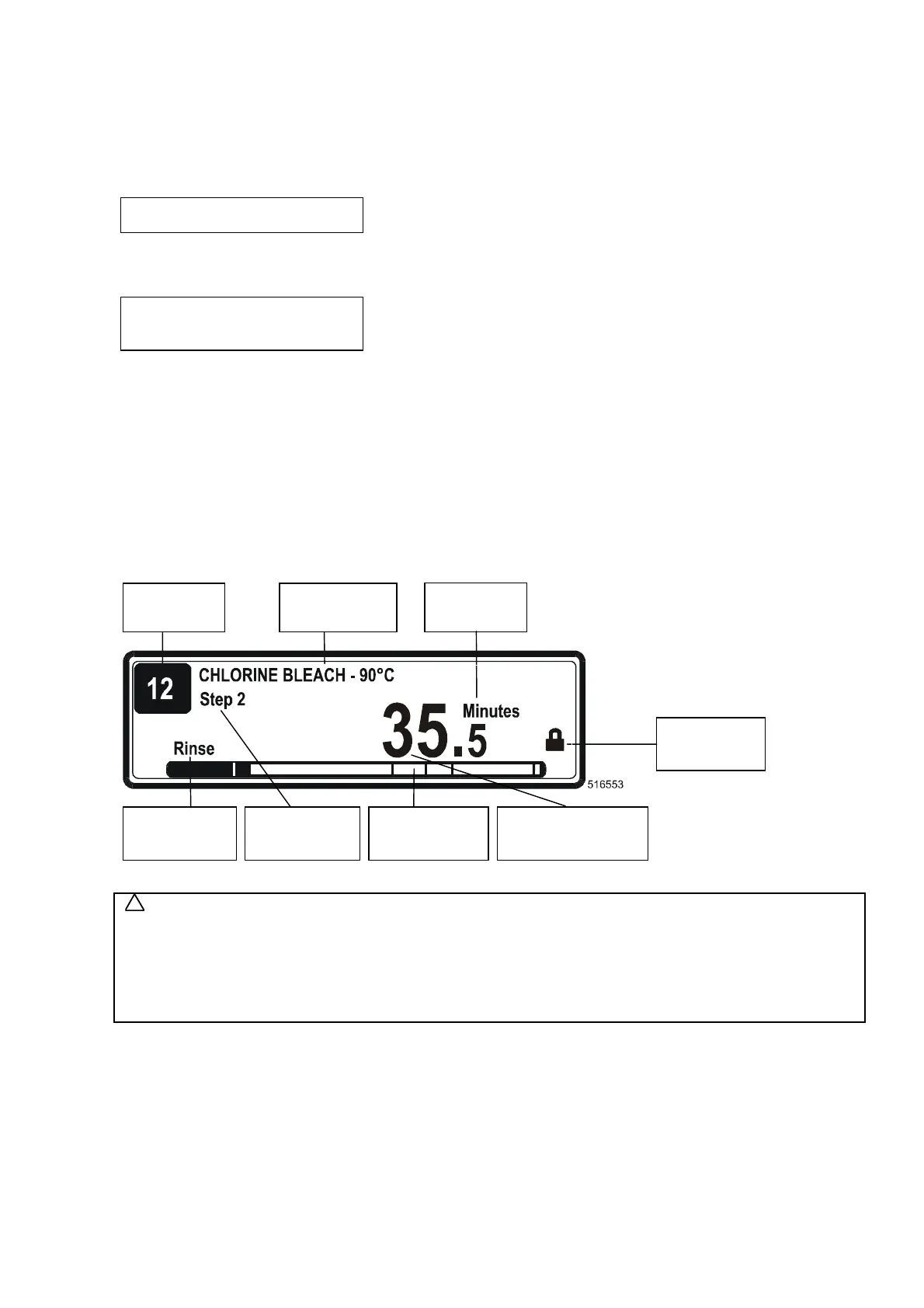
PrXX StYY ZZ.Z Min
Sequence
XX : The program number
YY : The program step number
ZZ.Z : The remaining program time in 1/10 of Minutes or 1/10 of Hours.
Sequence : The executed Sequence.
: A row of bars shows the remaining sequence time
Attention !!!
The program can only be started when the key switch is in Run Mode.
FULL CONTROL MICROPROCESSOR MCG FC
After selecting the desired wash program number, by pressing the START button the wash cycle will be started.
If there is no washing program available for the selected program number, INVALID will be displayed.
WARNING!
IF NOT READY/DOOR (VALID ONLY FOR „D“, „E“ MACHINES) IS DISPLAYED, IT IS NOT POSSIBLE TO
START WASHING CYCLE. CHECK WHETHER:
– THE MACHINE IS IN BASIC POSITION
– THE DRUM DOOR IS CLOSED
– THE PRESSURE OF COMPRESSED AIR SUPPLY IS IN PRESCRIBED RANGE.
CHECK ON THE MACHINE PRESSURE METER
4.8. END OF WASH CYCLE
4.8.1. CARD PROGRAMMER
The end of washing cycle will be reported by a sound signal. The light (fig. 4.7.1. pos.9) will switch off
(programmer operation), and the green key of the door releasing will turn on. After setting the change-over
switch (fig. 4.7.1. pos.1) to the „0“ position, you can remove the programme card.
!
Program
Number
Wash Cycle
Name
Wash/Spin
Sequence
Remaining Time
Wash Cycle
Units
Door State
Wash Cycle
Step
Progression
Bar


 To Next Page