15
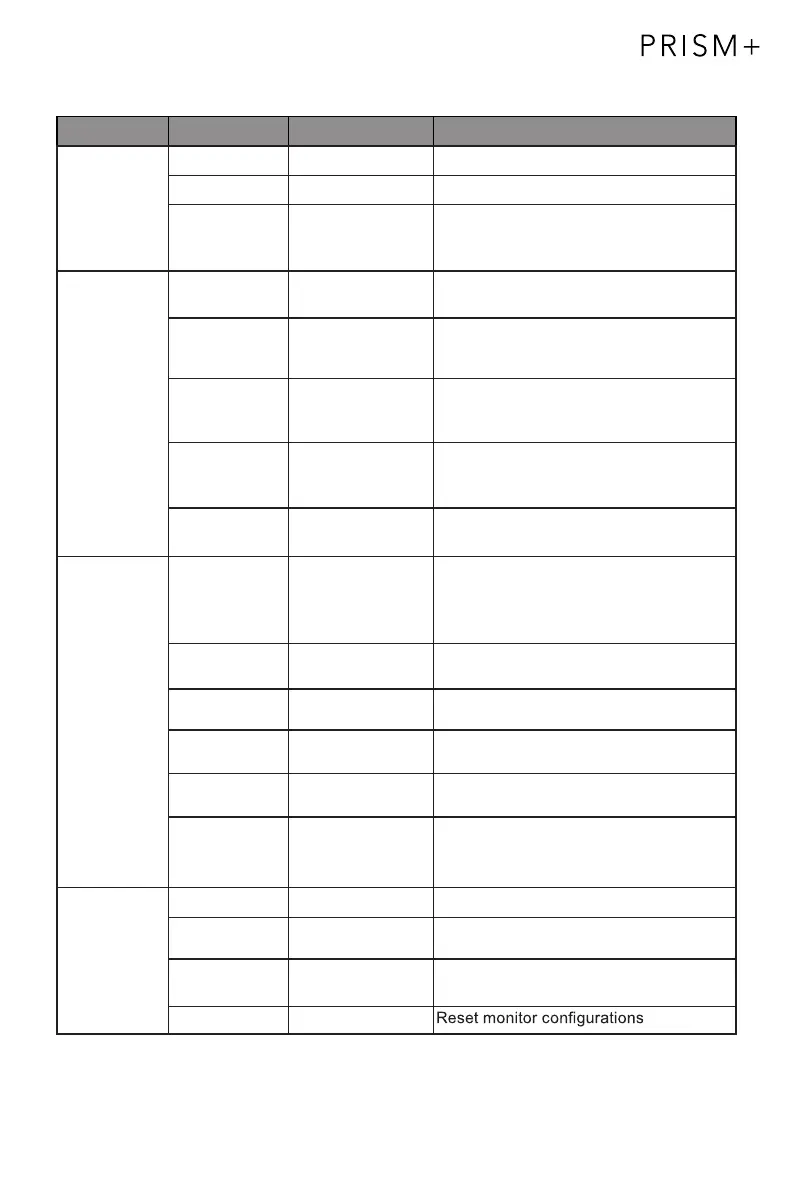
Main Menu Sub-Menu Options Description
Multi-Window Multi-Window Off, PIP Mode,
PBP 2Win
Select PIP/PBP modes according to the
number of input signals etc.
Sub Win2 Input DP, HDMI1(2.0),
HDMI2(1.4),
HDMI3(1.4)
Select according to input signal for PIP/
PBP mode
PIP Size Small, Medium,
Large
Adjust the PIP/PBP display window size
PIP Position Top Right, Top
Left, Bottom Right,
Bottom Left
Adjust the PIP/PBP window position
Swap NONE Swap the two channel signal source of
only the PIP/PBP 2 screens function
OSD Language
English, 简体中文,
한국어,Русский,
Español,
日本語,
Français
Set OSD language
OSD
H-Position
0-100 Adjust the OSD’s horizontal position
OSD V-Position 0-100 Adjust the OSD’s vertical position
OSD
Transparency
0-100 Set the OSD’s overall transparency
O
OSD Rotation
SD Time Out 5
Normal, 90, 180,
270
When the user flips the display, this
function can also flip the OSD to achieve
the best display angle
-100 Set how long the OSD remains open
after non-use
Other DP Version DP 1.1; DP 1.2;
FreeSync
(Adaptive Sync)
On, Off Turn the FreeSync function on/off
HDR On, Off; Auto
Detect
Turn the HDR mode on/off
Reset None
Audio Mute On, Off Turn mute mode on/off
Volume 0-100 Adjust audio volume
Audio Source DP, HDMI 1(2.0),
HDMI 2(1.4),
HDMI 3(1.4)
Select audio signal input via HDMI or DP


 To Next Page