7
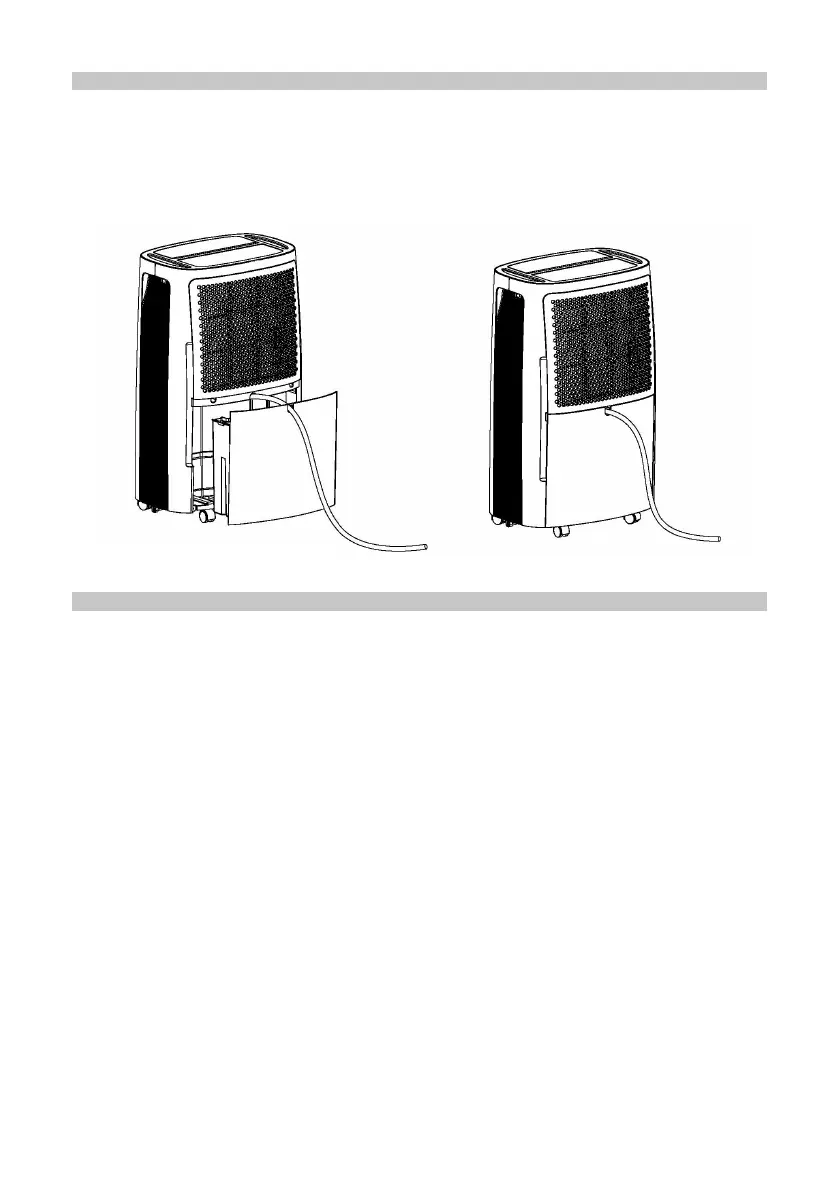
CONTINUOUS WATER DRAINAGE
• The dehumidier features a continuous drainage port. Using a plastic pipe (with an
inner diameter of 10mm) inserted into the drain hole (on intermediate plate), and
arrange the drain pipe through the cut out in the water tank front panel.
• The water in the drainage tank can be continuously drained from the continuous
port on the unit into a suitable drain.
MAINTENANCE
Important: In order to avoid an electric shock, power-off the dehumidier and
disconnect the mains plug before performing any maintenance or repair activities.
Cleaning
• Unplug from the mains supply before cleaning.
• Do not splash water into the dehumidier.
• Clean the outside of the dehumidier with a damp, not wet, cloth and dry
thoroughly before using.
• Do not use any chemicals, abrasives or solvents, which may damage the surface
of the dehumidier.
Filters
Clean the lters every two weeks. If the lters become blocked by dust, the efciency
of the dehumidier will be reduced.
• Remove the air lters on the front of the unit.
• Run a vacuum cleaner lightly over the surface of the lters to remove dust.
• If the lters are exceptionally dirty wash them in warm water and a mild detergent
and allow to dry thoroughly before retting.
Note: Do not operate the air dehumidier without the lters.


 To Next Page