GP-4402WW/GP-4502WW Hardware Manual
51
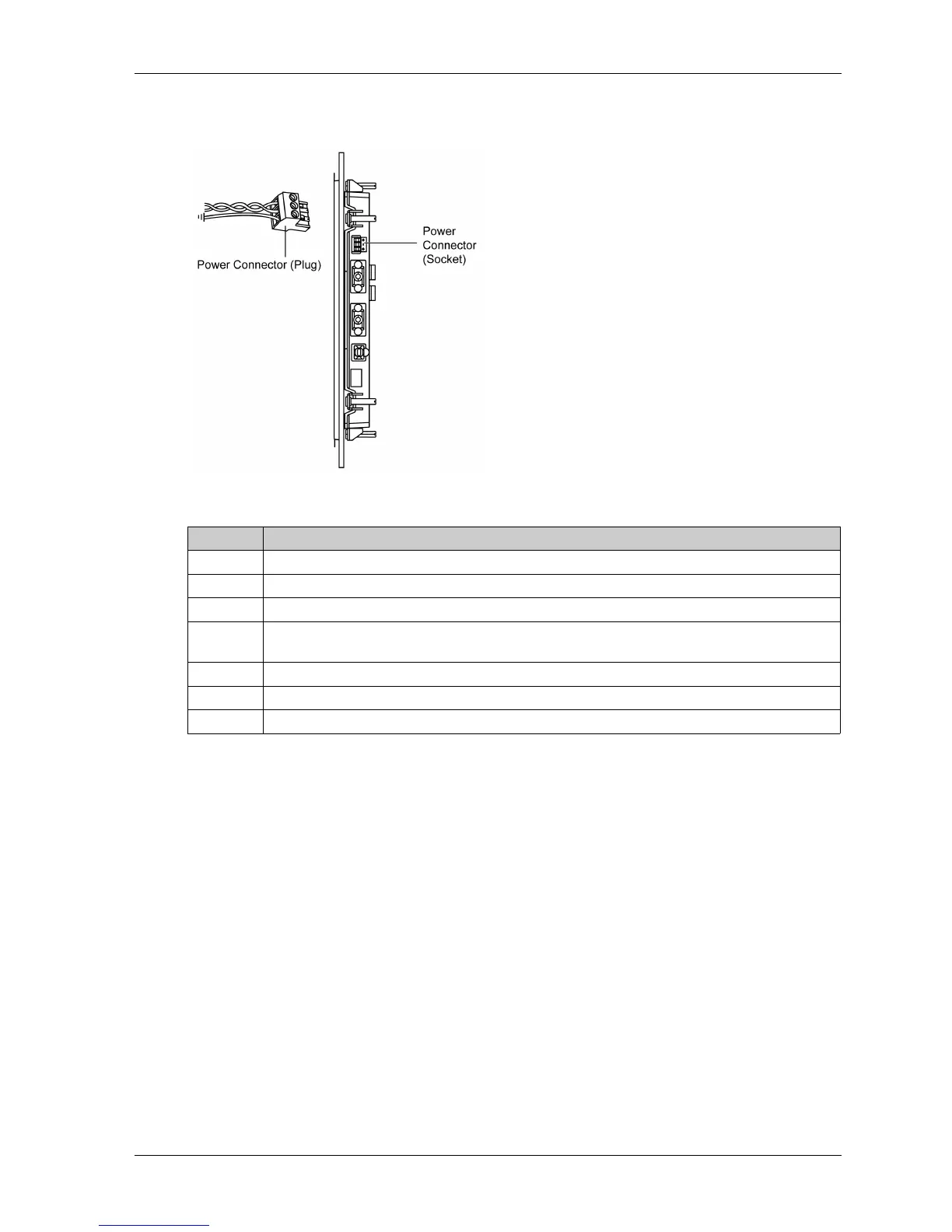
How to Connect the Power Cord
This figure shows a connection of the power cord:
This table explains how to connect the power plug:
NOTE:
Do not solder the wire directly to the power receptacle pin.
The power supply cord should meet the specification mentioned above. Be sure to twist the
power cords together, up to the power plug, for EMC cancellation.
Step Action
1 Remove the power cord from the power supply.
2 Remove the power plug from the panel.
3 Remove 7 mm (0.28 in) of the vinyl cover off the ends of the power cord wires.
4 If using stranded wire, twist the ends. Tinning the ends with solder reduces risk of fraying and
ensures good electrical transfer.
5 Connect the wires to the power plug by using a flat-bladed screwdriver (size 0.6 X 3.5).
6 Tighten the mounting screws using the defined torque: 0.5...0.6 N·m (5...7 lb-in).
7 Replace the power plug with the power connector.



 To Next Page