Need help?
Do you have a question about the Pro-Logix Solar PL3740 and is the answer not in the manual?
Key safety guidelines for safe operation of the battery charger.
Reminder to retain the manual for continued safe use of the charger.
Dangers of moving engine parts and precautions to avoid injury.
Precautions against burns from hot engine components.
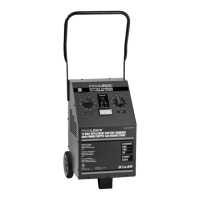
Overview of the battery charger's features and capabilities.
Explanation of the battery charging process and current flow.
Details on the stable power mode operation for vehicle systems.
Measures to prevent sparks and ignition of battery gases.
Step-by-step guide to assembling the charger's handle.
Guidelines for positioning the battery charger safely.
Information on power source requirements for the charger.
Recommendations for selecting and using extension cords.
Steps for preparing batteries before charging.
Description of the main power switch for the unit.
How to select the operational mode of the charger.
Explanation of selecting charge parameters or voltage targets.
Operation of the buttons to start and discontinue functions.
Information provided by the voltmeter display.
Meaning of the status and fault indicator LEDs.
Guidelines for selecting the appropriate charging rate.
How to select battery type for optimal charging.
Process for charging deeply discharged batteries.
Procedure for connecting the charger to vehicle-installed batteries.
Procedure for connecting the charger to batteries outside a vehicle.
Steps for initiating and performing the charging function.
Procedure for operating the charger in Stable Power Mode.
How to use the charger for engine starting assistance.
Guidelines for cleaning and maintaining the charger.
Instructions for moving and storing the unit.
 General
| Automatic Operation | Yes |
|---|---|
| Reverse Polarity Protection | Yes |
| Overcharge Protection | Yes |
| Input Voltage | 120V AC |
| Output Voltage | 12V |
| Battery Type | Lead-Acid, AGM, Gel |
| Charging Stages | 3-Stage |
| Protection Features | Overcharge, Reverse Polarity, Short Circuit |

 To Next Page