移除
REMOVE
打開
OPEN
When
the
robot
finishes
a
program, users
could
press
the
central
button
to
replay.
To code a new program, users could do either the options of below.
當機器人完成動作後,玩家可以按中間鍵令機器人重複執行前次動作
經由以下兩種方式可執行新的編程指令
重置 Reset
重複執行 Replay
31
1 2
3
步驟
STEP
4
再按一次中央鍵,機器人開始執行指令動作
Press the central button again to execute.
出發 Go
中央鍵
Central Button
重複執行 Replay
中央鍵
Central Button
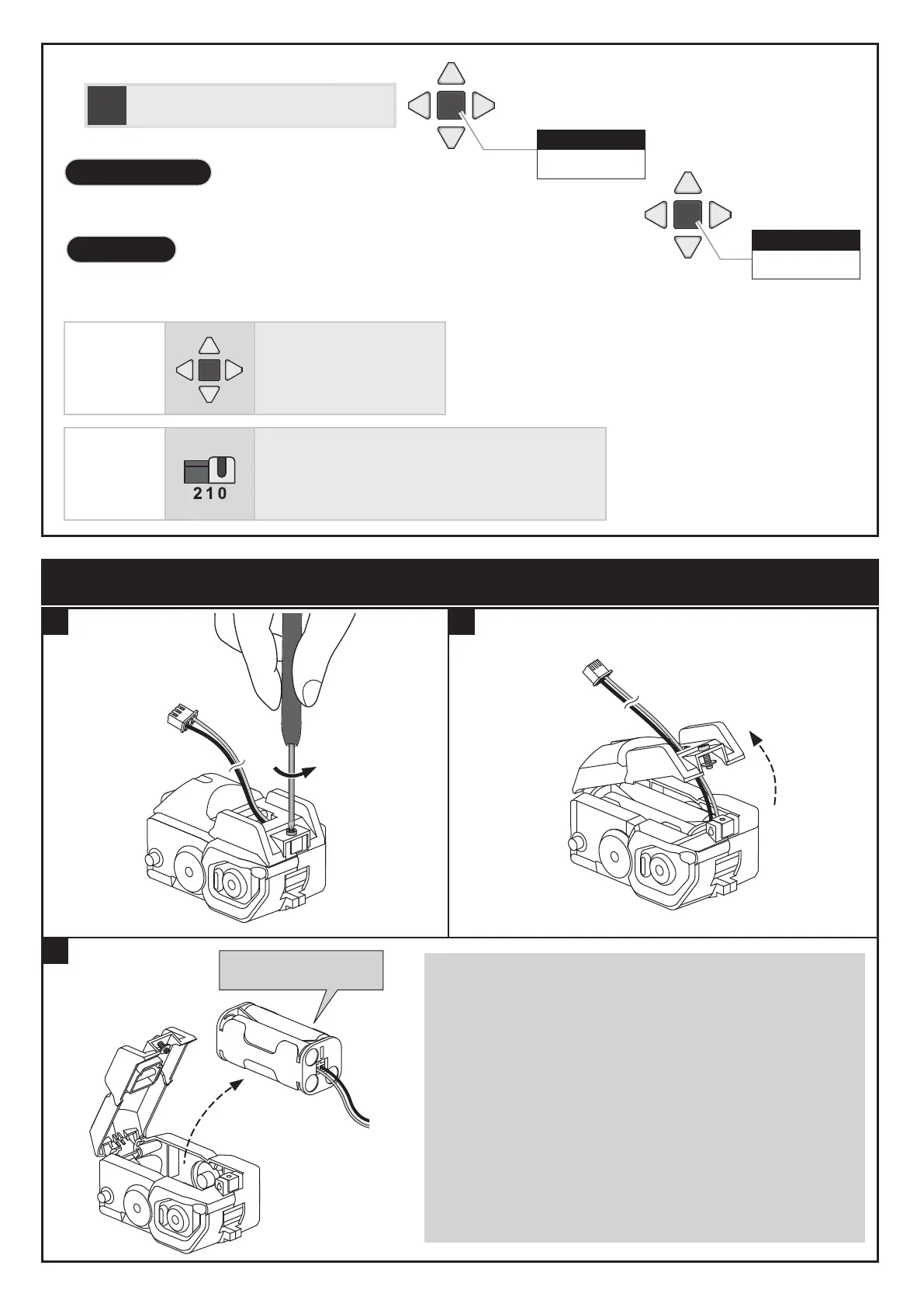
更換電池方式 How to Replace the Batteries
方 式 01
Option 01
Long-press the central
button for 1 seconds.
長按中央鍵1秒鐘
方 式 02
Option 02
Switch
to
Mode
0, and
then
switch
to
another
mode (1
or
2) to
code.
先切換到模式0 ,再切換到模式1 或 2
鹼性電池( AAA ) x 4
Battery( AAA) x 4
Installation, removal and replacement of batteries should be carried out
by adults or under adults supervision.
Avoid short circuiting the contacts in the battery compartment or the
battery terminals.
Do not mix used batteries and new batteries or batteries of different types.
Do not mix alkaline, standard (carbon-zinc), or rechargeable
(nickel-cadmium) batteries.
Batteries are to be inserted with the correct polarity.
Do not attempt to recharge non-rechargeable batteries.
Remove exhausted batteries from the product to avoid leakage.
˙電池移除或更換應由成人或在成人監督下進行。
˙請避免電池或電池連接器端子短路。
˙請勿混用新舊電池及不同廠牌、種類的電池,以免造成危險或電器損耗。
˙請勿混合鹼性、碳鋅電池或充電電池使用。
˙電池放入前請先確認正確正負極性方向。
˙請勿試圖對非充電電池進行充電。
˙充電前請將充電電池自玩具中取出。


 To Next Page