8
Note:
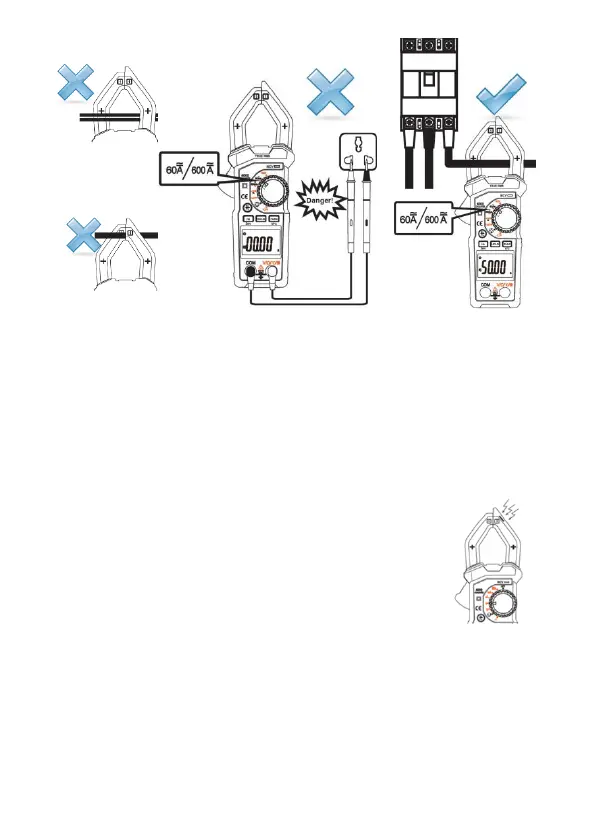
Clamp two lines of the measured circuit or more at the same time will not obtain
correct measurement results.
To obtain accurate readings, try to enable the measured cable in the middle position
of the current clamp.
If you haven't measured yet, there is a display number at the DCA position on the
LCD screen; press “Hz/Zero” key to clear.
If you measure the AC current from the VFC (Variable-frequency converter) power,
press “FUNC /VFC” key for about 2 seconds to turn on the VFC current
measurement.
4.6 Non-contact Voltage Detection (NCV)
1) Turn the transfer switch to the NCV position,
2) Put the clamp NCV sensor square close to the measured
cable, the meter could detect if the measured cable is >90V
AC voltage or not. When the meter detects AC voltage, the
meter buzzer alarms and the NCV LED flashes.
Note:
Even there is no alarm indication, the voltage might still exist. Do not judge if there
exist voltage or not in the cable relying on non-contact voltage detector. The detection
operation might be affected by various factors, such as the socket design, different
insulation thickness types, so on.
In NCV detection mode, the meter will not measure the voltage, resistance and
current at the same time.


 To Next Page