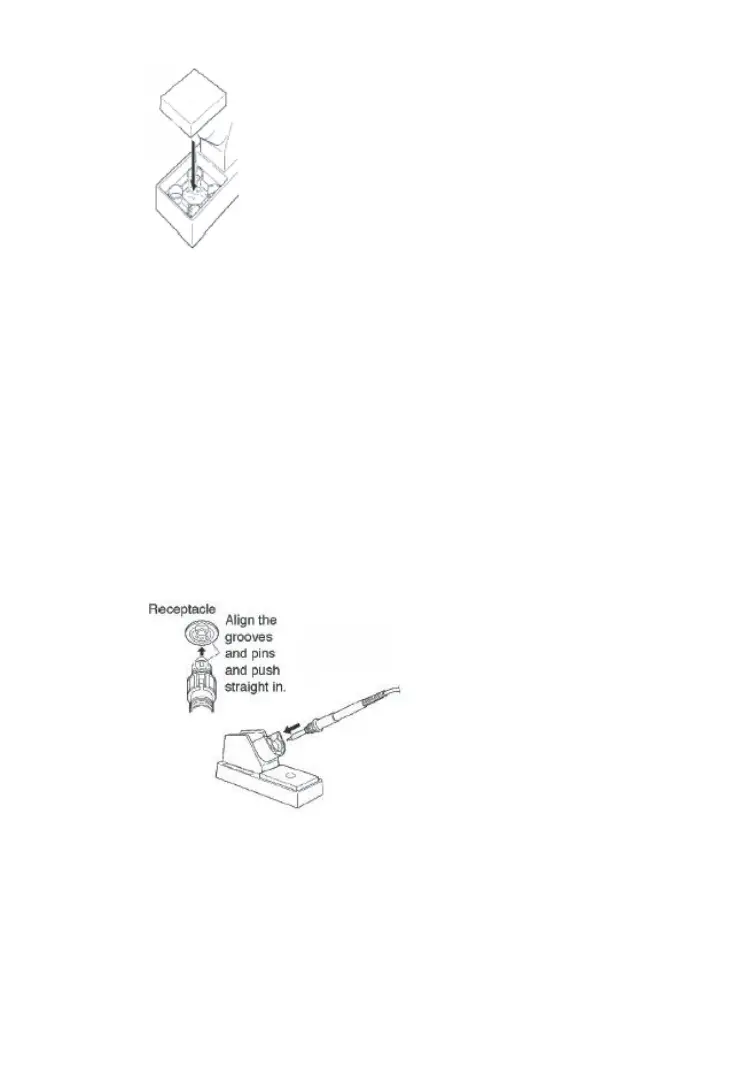
Fig. 8
***ATTENTION***
Sponge will swell when wet. Dampen the sponge with water and
squeeze dry before using. The tips may be damaged when used
with dry sponge.
2. Insert soldering iron into the stand. (Fig. 9)
3. Take out the protection tube on the top of soldering iron.
4. Connect soldering iron cable to the 5 hole socket on control station. (Fig.
9)
***ATTENTION***
Switch off the power before inserting or pulling out the plug
5. Insert power plug into power socket then turn on power switch.
6. Adjust temperature with regulation temperature knob.
***ATTENTION***
High temperature shortens tip life and may cause thermal shock to
components. Always use the lowest possible temperature when
soldering. It will also provide better protection for some components


 To Next Page