EasyManua.ls Logo

Pro XK3190-A9+ - User Manual

Pro XK3190-A9+
30 pages
Print Icon
To Next Page IconTo Next Page
Loading...
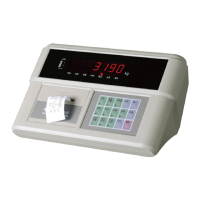
XK3190-A9+
Weighing Indicator
USER’ S MANUAL
Question and Answer IconNeed help?

Do you have a question about the Pro XK3190-A9+ and is the answer not in the manual?

Summary

Technical Parameters

Installation and Connectivity

Indicator Front and Back Views

Diagrams showing the front and back views of the indicator.

Load Cell Connection

Instructions for connecting the load cell to the indicator.

Printer Connection

Instructions for connecting a printer to the indicator.

Scoreboard Connection

Instructions for connecting a scoreboard to the indicator.

Serial Communication and Setup

Instructions for serial communication interface setup and parameter configuration.

Operating Procedures

Starting Up and Auto-Zero

Procedure for starting the indicator with auto-zero function.

Manual Zero Adjustment

How to perform manual zero adjustment.

Tare Functions

Explanation and usage of tare functions.

Date and Time Settings

Procedure for setting and operating date and time.

Battery Usage and Charging

Information on battery usage and charging.

Inner Code Display

How to display and interpret inner codes.

Data Saving and Storage

Methods for saving weighing data records.

Printing Operations

Instructions for setting up and performing printing operations.

Report Printing

Procedures for printing various reports.

Data Record Deletion

Methods for deleting data records.

Memorized TARE Weight Input

Steps to input and memorize TARE weights.

Power Saving Function

Explanation of the power saving function.

Software Version Check

How to check the indicator's software version.

Maintenance and Safety Cautions

General Maintenance and Safety Cautions

Guidelines for maintaining the indicator and general safety precautions.

Status and Error Indications

Normal Status Indications

Indications for normal operating status.

Error Code Information

Codes and explanations for error messages.

Wrong Connection Indications

Information indicating incorrect connections.

Component Error Troubleshooting

Troubleshooting common component errors.

Appendices

Summary

Technical Parameters

Installation and Connectivity

Indicator Front and Back Views

Diagrams showing the front and back views of the indicator.

Load Cell Connection

Instructions for connecting the load cell to the indicator.

Printer Connection

Instructions for connecting a printer to the indicator.

Scoreboard Connection

Instructions for connecting a scoreboard to the indicator.

Serial Communication and Setup

Instructions for serial communication interface setup and parameter configuration.

Operating Procedures

Starting Up and Auto-Zero

Procedure for starting the indicator with auto-zero function.

Manual Zero Adjustment

How to perform manual zero adjustment.

Tare Functions

Explanation and usage of tare functions.

Date and Time Settings

Procedure for setting and operating date and time.

Battery Usage and Charging

Information on battery usage and charging.

Inner Code Display

How to display and interpret inner codes.

Data Saving and Storage

Methods for saving weighing data records.

Printing Operations

Instructions for setting up and performing printing operations.

Report Printing

Procedures for printing various reports.

Data Record Deletion

Methods for deleting data records.

Memorized TARE Weight Input

Steps to input and memorize TARE weights.

Power Saving Function

Explanation of the power saving function.

Software Version Check

How to check the indicator's software version.

Maintenance and Safety Cautions

General Maintenance and Safety Cautions

Guidelines for maintaining the indicator and general safety precautions.

Status and Error Indications

Normal Status Indications

Indications for normal operating status.

Error Code Information

Codes and explanations for error messages.

Wrong Connection Indications

Information indicating incorrect connections.

Component Error Troubleshooting

Troubleshooting common component errors.

Appendices

Pro XK3190-A9+ Specifications

General IconGeneral
ModelPro XK3190-A9+
CategoryMeasuring Instruments
TypeWeighing Indicator
Accuracy ClassIII
Operating Temperature-10°C to 40°C
Humidity≤85% RH
Communication InterfaceRS232
Power SupplyAC 110V/220V or DC
Load Cell ExcitationDC 5V
Load Cell Connection4-wire