The Protekt™ Aire 2000 is a medical device designed for the prevention and treatment of pressure ulcers, suitable for use in hospitals, homecare, or other healthcare environments. It consists of a control unit and an air cell overlay system.
Function Description:
The Protekt™ Aire 2000 system provides low air loss, alternation, and static pressure redistribution therapy. The control unit inflates the air cell overlay, which is placed over an existing mattress. The system offers both alternating pressure mode and static mode. In alternating pressure mode, the air cells alternate in 10-minute cycles, providing dynamic pressure relief. In static mode, the overlay provides a firm surface, which can facilitate patient transfer or repositioning and help prevent bottoming out when a patient is in a sitting position.
Important Technical Specifications:
Control Unit (Item #: 80021):
- Power Supply: 120V/60Hz
- Air Output: 8 liters/min
- Pressure Range: 30-60 mmHg
- Cycle Time: 10 minutes (for alternating pressure mode)
- Size: 11" x 5.9" x 3.5"
- Weight: 1.4kg (3lbs)
- Input Rating: 120VAC, 60Hz, 1A
- Fuse Rating: 250V, 1A
- Power Supply Cord: Non-detachable, 18AWG/2C, Rated 300V, 105°C
Overlay (Item #: 80022):
- Size: 80"L x 36"W x 5"H
- Top Cover Material: Nylon/PU
- Air Cells Material: Nylon/PVC
- Bottom Cover Material: Nylon/PVC
- Number of Air Cells: 20
- CPR Valve: Yes
Environmental Requirements:
- Operation Temperature: 50°F~95°F (10°C~35°C)
- Storage and Transport Temperature: 5°F~122°F (-15°C~50°C)
- Operation Humidity: 20%~80% non-condensing
Usage Features:
Control Unit Features:
- Power Switch (1): Turns the control unit ON/OFF.
- Pressure-adjust Knob (2): Allows adjustment of pressure based on the patient's weight.
- Normal Pressure Indicator (3): A green indicator that illuminates when the pressure has reached the preset or user-defined level.
- Low Pressure Indicator (4): An orange indicator that warns when the pressure is below a preset or user-defined level.
- Static/Alternating Control (5): A button to switch between static mode (ON) and alternating pressure mode (OFF).
Installation Instructions:
- Place the overlay flat on the mattress with the inflation tube towards the foot end.
- Secure the overlay in place.
- A thin cotton sheet may be placed over the overlay top cover.
- Hang the control unit at the foot end of the bed using its hooks, ensuring it is secured.
- Connect the inflation tubes from the overlay to the control unit's inflating nozzles, ensuring they are properly attached and not kinked or tucked.
- Plug the power cord into a properly grounded electrical outlet with compatible voltage.
- Turn on the power switch on the control unit.
Operating Instructions:
- Turn on the control unit power; the power switch indicator will illuminate.
- The Low Pressure indicator (orange) will come on during inflation.
- Press the Static button for quicker inflation if desired.
- Once the pressure reaches the preset level (approximately 30 minutes), the Normal Pressure indicator (green) will turn on, and the Low Pressure indicator will turn off.
- Patients can lie directly on the overlay or with a loosely tucked sheet for comfort.
- Set the pressure-adjust knob according to the patient's weight.
- Use the Static button to switch between Alternating mode and Static mode. Static mode starts within approximately 6 minutes, while alternating pressure mode cycles every 10 minutes.
Safety Precautions:
- Always unplug the product immediately after use and before cleaning.
- Do not use while bathing or near water.
- Never leave the product unattended when plugged in.
- Close supervision is necessary when used by or near children or invalids.
- Use only for its intended purpose as described in the manual.
- Do not operate if the cord or plug is damaged, or if the unit has been dropped or damaged.
- Keep the cord away from heated surfaces.
- Ensure air openings are not blocked by lint, hair, or soft surfaces.
- Do not insert objects into openings or hoses.
- Do not use outdoors or where aerosol products are being used.
- Connect to a properly grounded outlet only.
- The control unit should only be used with the provided air overlay.
- Avoid exposing the product to lint, dust, sunlight, heat, and moisture.
- Keep the product away from pets and children.
Maintenance Features:
Cleaning Guidelines:
- Use a neutral detergent to clean the surface of the control unit and overlay. Disinfectant products may be used according to the manufacturer's protocol, but do not use phenolics.
- Do not immerse the control unit in water or heat/steam in an autoclave.
- Ensure the overlay and cover are fully air-dried after cleaning and before use.
- Air Filter Cotton Cleaning (every ~3 months):
- Remove the air filter cover and air filter cotton.
- Wash the air filter cotton with clean water; soak if dirt is present.
- Dry the air filter cotton completely before reinserting it into the air filter cover.
General Maintenance:
- Verify the control unit is in good condition by checking if indicators illuminate when powered on.
- The power supply cord can be replaced by qualified service personnel.
- For safety reasons, only qualified service personnel should open the equipment.
- The manufacturer provides circuit diagrams, component lists, descriptions, and calibration instructions to assist service personnel with repairs.
- Lay operators or responsible organizations should contact the manufacturer or representative for assistance with setup, use, maintenance, and reporting unexpected operations or events.
Troubleshooting:
- No air output (Power indicator ON):
- Failure Cause: Inflation tube not connected to control unit, or silicone tubes inside control unit disconnected.
- Fault Handling: Connect the air tube, or contact service personnel.
- No air output (Power indicator OFF):
- Failure Cause: No power.
- Fault Handling: Turn on the power switch.
- Incomplete inflation / Overlay too soft:
- Failure Cause: Small hole at the air cell, end of overlay life, or air knob at "MIN" location.
- Fault Handling: Replace the air cell or whole overlay, or turn the air tube to the right for maximum pressure.
Warranty:
The Protekt™ Aire 2000 is warranted to be free of defects in materials and workmanship for 18 months from the date of purchase for the original consumer purchaser. The warranty does not cover device failure due to owner misuse, negligence, normal wear and tear, or non-durable components like rubber accessories, casters, and grips.

 Need help?
 General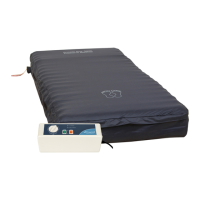

 To Next Page