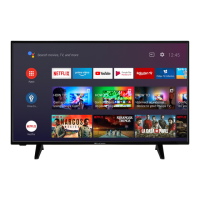
This document describes the ProCaster 43A900H, a colour television with remote control, featuring an Android™ operating system and Google Cast functionality.
Function Description
The ProCaster 43A900H is a Smart TV designed for household and general use, but also suitable for public places. It offers a fully integrated digital terrestrial/cable/satellite TV (DVB-T-T2/C) tuner, allowing users to watch broadcast channels. The Android™ operating system provides access to a wide range of applications, including streaming services like Netflix and YouTube, as well as Google Play Movies & TV and Google Play Music. The TV supports Ultra HD (4K) resolution (3840x2160), delivering four times the pixel count of Full HD TVs, both horizontally and vertically. It also features High Dynamic Range (HDR) and Hybrid Log-Gamma (HLG) for enhanced luminosity, colour, and detail, as well as Dolby Vision™ for a dramatic visual experience with astonishing brightness and exceptional contrast.
Connectivity options include multiple HDMI inputs (supporting HDMI 2.1a), USB inputs for multimedia playback and recording, and an Ethernet (LAN) port for internet connectivity. Wireless connectivity is provided via built-in 802.11 a/b/g/n/ac WLAN support. The TV also incorporates HbbTV (Hybrid Broadcast Broadband TV) for seamlessly combining broadcast and broadband services, offering catch-up TV, video-on-demand, electronic programme guides, and interactive advertising.
Important Technical Specifications
- Display: 43-inch (108 cm) visible screen size, with a resolution of 3840x2160 pixels.
- Energy Efficiency Class: A+
- On Mode Average Power Consumption: 54.0 Watt
- Annual Energy Consumption: 78 kWh/annum
- Standby Power Consumption: 0.50 Watt
- Networked Standby Power Consumption: < 2 Watt
- Operating Voltage: 220-240V AC, 50 Hz
- Audio Output Power (WRMS.): 2 x 10 (10% THD)
- Receiving Channels: VHF (BAND I/III) - UHF (BAND U) - HYPERBAND
- Digital Reception: Fully integrated digital terrestrial-cable TV (DVB-T2-C) (DVB-T2 compliant)
- RF Aerial Input: 75 Ohm (unbalanced)
- Wireless LAN Transmitter:
- Frequency Ranges: 2400 - 2483.5 MHz (CH1-CH13) with Max Output Power < 100 mW
- 5150 - 5250 MHz (CH36 - CH48) with Max Output Power < 200 mW
- 5250 - 5350 MHz (CH52 - CH64) with Max Output Power < 200 mW
- 5470 - 5725 MHz (CH100 - CH140) with Max Output Power < 200 mW
- Supported USB File Formats:
- Video Codecs: MPEG 1/2, MPEG4, Sorenson H.263, H.263, H.264, HEVC/H.265, MVC, AVS, AVS+, WMV3, VC1, Motion JPEG, VP8, VP9, RV30/RV40. Resolutions up to 4096x2176@60fps, bit rates up to 135Mbps.
- Audio Codecs: MPEG1/2 Layer1/2/3, AC3, EAC3, AAC-LC, HEAAC, WMA, WMA 10 Pro M0/M1/M2, VORBIS, DTS, LPCM, IMA-ADPCM, MS-ADPCM, G711 A/mu-law, LBR (cook), FLAC, DTS LBR, DTS XLL, DRA. Sample rates up to 96KHz, channels up to 7.1, bit rates up to 1.5Mbps (LPCM) or < 1533Kbps (DRA).
- Picture Formats: JPEG (up to 15360x8640), PNG (up to 9600x6400), BMP (up to 9600x6400), MPO (up to 15360x8640), GIF (up to 6400x4800).
- Subtitle Formats: Internal (DVD Subtitle, DVB Subtitle, UTF-8 Plain Text, ASS, SSA, VobSub, DVD Subtitle, XSUB, XSUB+) and External (.srt, .ssa/.ass, .smi, .sub, .txt).
- Supported DVI Resolutions: 640x480, 800x600, 1024x768, 1280x768, 1280x960, 1360x768, 1366x768, 1280x1024, 1400x1050, 1600x900.
Usage Features
- Initial Setup Wizard: Guides users through the initial configuration, including language selection, network connection (wired or wireless), Google account sign-in, terms of service, location settings, Android improvement data sharing, country selection, password (PIN) definition, and TV mode selection (Home or Store).
- Remote Control: A comprehensive remote with numeric buttons, language selection, volume control, microphone for voice search, Home button, Guide button for EPG, OK button for selections, Back/Return button, Netflix and YouTube quick launch buttons, Menu button for Live TV settings, coloured buttons for on-screen functions, Rewind/Stop/Record/Pause/Play/Fast Forward buttons for media control, Text button for teletext, Source button for input selection, Info button for content information, Programme +/- for channel changing, Mute, and Subtitles.
- TV Control Button: A physical control button on the TV allows for basic functions like Quick Standby-On.
- Channel Management: Users can scan for analogue and digital channels, update scans, perform analog manual scans, and single RF scans. Features like LCN (Logical Channel Number), Channel Scan Type, Channel Store Type, Favorite Network Select, Channel Skip, Channel Sort, Channel Move, and Channel Edit are available.
- Parental Controls: Allows blocking of channels and programmes based on age ratings, setting PINs, and restricting access to input sources.
- Picture Settings: Offers various picture modes (User, Standard, Vivid, Sport, Movie, Game), Dolby Vision modes (Bright, Dark), and adjustable settings for brightness, contrast, colour, HUE, sharpness, gamma, and colour temperature. Advanced video settings include DNR, MPEG NR, Adaptive Luma Control, Local Contrast Control, and DI Film Mode.
- Sound Settings: Provides sound styles (User, Standard, Vivid, Sports, Movie, Music, News), balance adjustment, Sound Surround, Equalizer Detail, Digital Output options (Auto, Bypass, PCM, Dolby Digital Plus, Dolby Digital), SPDIF Delay, Auto Volume Control, and Downmix Mode (Stereo, Surround). Dolby Audio Processing is available for enhanced sound quality.
- Timer Functions: Includes Sleep Timer, Picture Off, Switch Off Timer, and No Signal Auto Power Off. Power On Time Type and Auto Power On Time can be configured for scheduled TV power-on.
- USB Recording: Allows instant recording of programmes and timeshift recording to a connected USB disk. Recorded programmes can be watched directly on the TV. USB hard disk drives are recommended for HD recordings.
- Multimedia Player (MMP): Accessible from the Home Screen, it allows browsing and playing/displaying media content (videos, music, photos, text documents) from connected USB devices or media servers. Supports Normal Parser and Recursive Parser viewing styles.
- DMR (Digital Media Renderer): Enables casting media files from mobile devices to the TV, provided both devices are on the same network.
- Google Cast: Built-in technology for wirelessly mirroring mobile device screens or casting content from Cast-enabled apps like YouTube, Dailymotion, and Netflix.
- HDMI CEC (Consumer Electronic Control): Allows operating connected HDMI CEC-supported devices with the TV remote control. The TV also supports ARC (Audio Return Channel) for audio links to external sound systems via HDMI2.
- HbbTV System: Provides access to HbbTV applications, which combine broadcast and broadband services. Users can interact with these applications using the remote control.
- Accessibility Features: Includes settings for Visually Impaired (audio commentary, speaker/headphone routing, volume, pan and fade, fader control), AC4 Dialogue Enhancement, Captions, Text to speech, and High Contrast Text.
Maintenance Features
- Software Update: The TV can automatically find and update its firmware via broadcast signals or the internet. Users can manually check for updates through the Settings menu.
- Troubleshooting & Tips: The manual provides guidance for common issues such as the TV not switching on, remote control unresponsiveness, no channels, no picture/distorted picture, no sound/poor sound, and inaccessible input sources.
- Disk Format: The ability to format connected USB storage devices, which can resolve operation errors but will erase all data.
- Disposal Information: Provides guidelines for the proper disposal of the electrical and electronic equipment and batteries, in accordance with national legislation and EU directives, to conserve natural resources and prevent environmental and health hazards. It advises contacting local authorities or retailers for collection and recycling information.

 Need help?









 To Next Page
 General