13
DA-2800 Operating Instructions V0.4
2. Setup and settings
2.1 Introduction
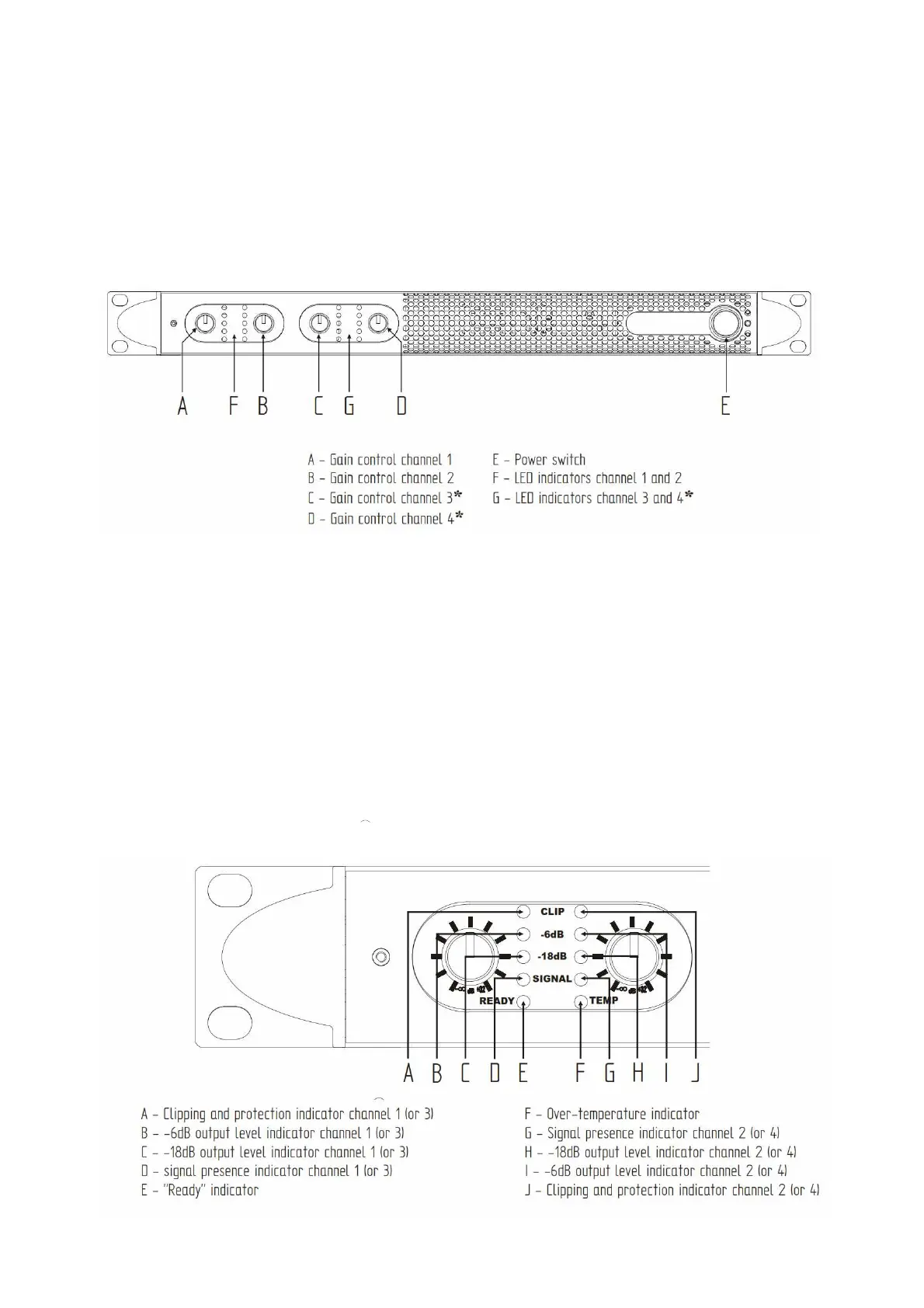
The figure below shows the front panel of the DA-2800. The front panel controls and indicators give
the user functional control and detailed operational information regarding the status of the amplifier.
The gain controls operate on a logarithmic scale from -8 to +32dB.
2.2 LED indicators
The figure below shows the front panel of the DA-2800 (two channels only).
- The CLIP LED illuminates when the output stage of the corresponding channel has reached
maximum output and is clipping.
-
The SIGNAL LED indicates that there is a signal present at the input stage of the corresponding
channel.
-
The -18dB and -6dB LEDs indicate output levels relative to maximum output.
-
The READY LED illuminates when the amplifier is ready to use and its operational status is
nominal.
-
The TEMP LED indicates that the output power for the corresponding channel is being limited
because of overheating
. See the next section for more information.



 To Next Page