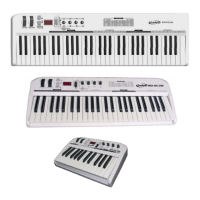
All notes off
9 Press EDIT button to enter keyboard multi-function mode, and then press ALL NOTE
OFF to transmit all notes off message (Controller #123), in case of abnormal
constant sound from system or external sound module.
All sound off (61 C / 49 C only)
9 Press EDIT button to enter keyboard multi-function mode, and then press ALL
SOUND OFF to transmit all sound off MIDI message (Controller #120), in case of
abnormal constant sound from system or external sound module.
Reset all controllers
9 Press EDIT button to enter keyboard multi-function mode, and then press RESET ALL
CONTROLLER to transmit all reset all controllers message (Controller #121).
GM / GS / XG On (25 C only)
9 Press EDIT button to enter keyboard multi-function mode, and then press
GM/GS/XG ON to transmit GM initialization message (F0 7E 7F 09 01 F7), GS
initialization message (F0 41 10 42 12 40 00 7F 00 41 F7), and XG initialization
message (F0 43 10 4C 00 00 7E 00 F7).
GM On (61 C / 49 C only)
9 Press EDIT button to enter keyboard multi-function mode, and then press GM ON to
transmit GM initialization message (F0 7E 7F 09 01 F7).
GM2 On (61 C / 49 C only)
9 Press EDIT button to enter keyboard multi-function mode, and then press GM2 ON
to transmit GM2 initialization message (F0 7E 7F 09 03 F7).
GS On (61 C / 49 C only)
9 Press EDIT button to enter keyboard multi-function mode, and then press GS ON to
transmit GS initialization message (F0 41 10 42 12 40 00 7F 00 41 F7).
XG On (61 C / 49 C only)
9 Press EDIT button to enter keyboard multi-function mode, and then press XG ON to
transmit XG initialization message (F0 43 10 4C 00 00 7E 00 F7).



 To Next Page