OPERATING THE STEPPER CONSOLE
The stepperconsole is designed to give you instant _:eedbackas you exercise on the stepper. Pleaseread theseinstruc-
tions carefully before operating the console. Note: Removethe clear plastic kom the front of the conso]e.
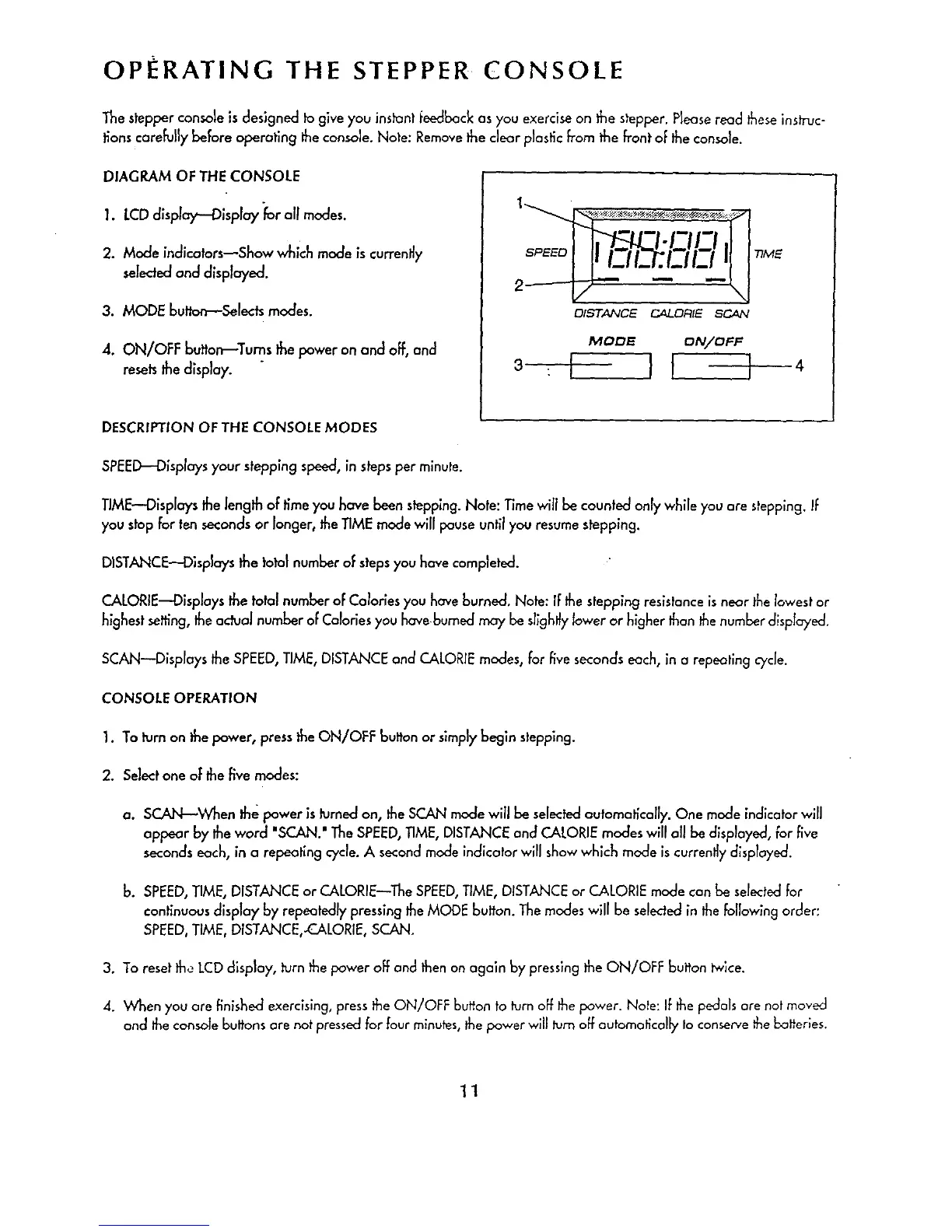
DIAGRAM OF THE CONSOLE
1. LCDdisplay -Display for all modes.
2. Mode indicators--Show which mode _scurrently
seleded and d_spbyed.
3. MODE button--Selects modes.
4. ON/OFF butto_Turns thepower on and off, and
resetsthe display.
7;ME
D/STANCE C4LORIE SCAN
MODE ON/OFF
3 -I I[ ]
4
DESCRIPTION OF THE CONSOLE MODES
SPEED_DispIays your steppingspeed, in stepsper minute.
TIME"Displays the length of time you have been stepping. Note: Time will be counted only while you are stepping.If
you stopfor ten seconds or longer, the TIME mode will pauseuntil you resume stepping.
DISTANCE--Displays the total number of steps you have completed.
CALORIE'_Displays the total number of Calories you have burned, Note: If the stepping resistance isnear the lowest or
highest setting, the adual number of Calories you have burned may be sllghl_ylower or higher than thenumber displayed,
SCAN--Displays the SPEED,TIME, DISTANCE and CALORIEmodes, for five secondseach, in a repeating cycle.
CONSOLE OPERATION
1. To turn on the power, pressthe ON/OFF button or simplybegin stepping.
2. Select one of the _ve modes:
a. SCAN--When the power is ksrned on, the SCAN mode will be selected outomatlcolly. One mode indicator will
appear by the word 'SCAN." The SPEED,TIME, DISTANCE and CALORIE modes will all be displayed, for five
secondseach, in a repeoting cycle. A secondmede indicator will showwhich mode is currently displayed.
b. SPEED,TIME, DISTANCE or CALORIE--The SPEED,TIME, DISTANCE or CALORIE mode con be selectedfor
continuous display by repeatedly pressing the MODE bu_'on. The modes will be selectedin the following order:
SPEED,TIME, DISTANCE,-CALORIE, SCAN.
3. To reset the LCD d_sploy, turn the power off and then on ogaln by presslng the ON/OFF button tw$ce.
4. When you ore finished exercising,press the ON/OFF button to turn off the power. Note: If the pedalsore not moved
and theconsole buttons are not pressed for fourminutes, thepower will turn off automat;tally Io conserve the batteries.
11



 To Next Page