18
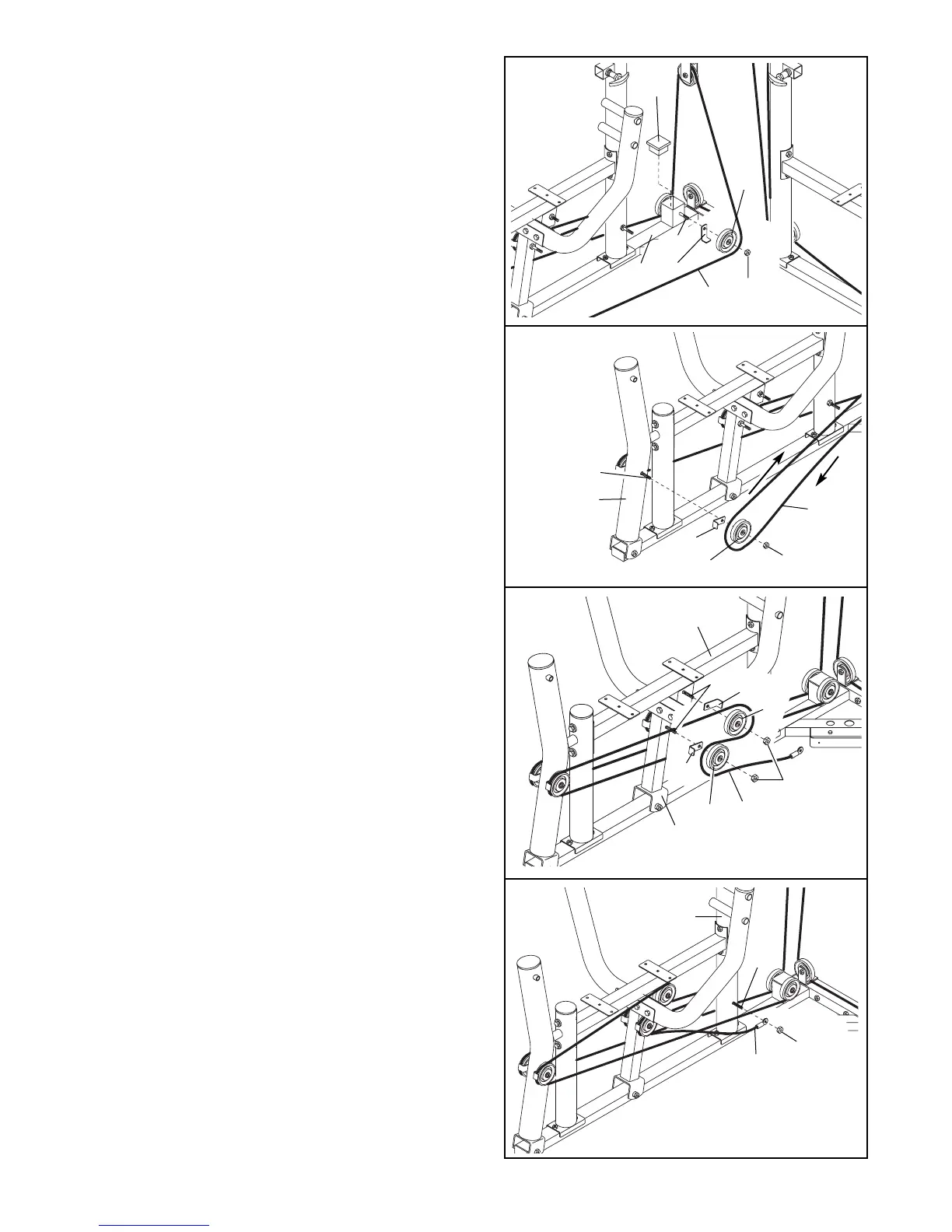
46. Remove the 3/8” Nylon Locknut (50) from the indi-
cated 3/8” x 5 1/2” Bolt (55).
Wrap the Leg Press Cable (75) around a 3 1/2”
Pulley (24). Secure the Pulley and a Cable Trap
(25) to the 3/8” x 5 1/2” Bolt (55) on the indicated
side of the Press Base (6) with the 3/8” Nylon
Locknut (50). Be sure the Cable Trap is oriented
to hold the Cable in place.
Press a 2 1/2” Square Inner Cap (76) into the Press
Base (6).
48. Remove the indicated 3/8” Nylon Locknuts (50).
Wrap the Leg Press Cable (75) around a 3 1/2”
Pulley (24). Attach the Pulley and a Cable Trap (25)
to the 3/8” x 4 3/4” Bolt (60), on the indicated side
of the Press Seat Frame (7), with the first 3/8”
Nylon Locknut (50).
Wrap the Leg Press Cable (75) around a 3 1/2”
Pulley (24). Attach the Pulley and a Cable Trap (25)
to the 3/8” x 4 3/4” Bolt (60), on the indicated side of
the Press Frame (8), with a 3/8” Nylon Locknut (50).
Be sure the Cable Traps (25) are oriented to
hold the Cable (75) in place.
47. Remove the 3/8” Nylon Locknut (50) from the indi-
cated 3/8” x 6” Bolt (59).
Wrap the Leg Press Cable (75) around a 3 1/2”
Pulley (24) in the direction shown. Secure the
Pulley and a Cable Trap (25) to the 3/8” x 6” Bolt
(59) on the indicated side of the Press Leg Lever
(90) with the 3/8” Nylon Locknut (50). Be sure the
Cable Trap is oriented to hold the Cable in
place.
49. Remove the indicated 3/8” Nylon Locknut (50).
Attach the Leg Press Cable (75) to the 3/8” x 3 3/4”
Bolt (102) on the indicated side of the Press Upright
(2) with the 3/8” Nylon Locknut (50).
46
47
48
49
75
25
90
59
50
24
25
55
76
6
50
75
102
50
75
2
50
75
24
8
24
60
7
24
25
25



 To Next Page