EasyManua.ls Logo

progeo MOTOTRONIK - User Manual

progeo MOTOTRONIK
40 pages
Print Icon
To Next Page IconTo Next Page
Loading...
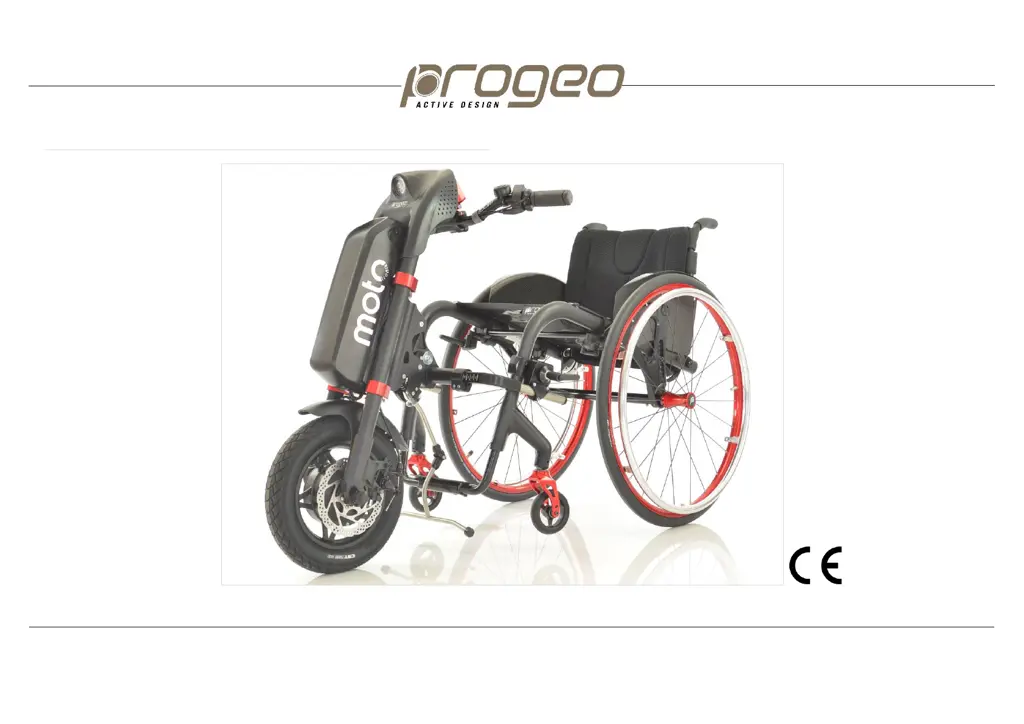
ELECTRONIC POWER ASSIST DEVICE FOR MANUAL WHEELCHAIRS
ENGLISH rev. 1 11/2021
User's manual
MOTOTRONIK

Other manuals for progeo MOTOTRONIK

Questions and Answers

Summary

INTRODUCTION

PRELIMINARY INFORMATION

SYMBOLS USED

PRODUCT LABEL

INTENDED USE AND ENVIRONMENT OF USE OF THE DEVICE

USER REQUIREMENTS

DEVICE LIFETIME

INSTALLATION OF THE DEVICE

SAFETY: WARNINGS AND PRECAUTIONS

DESCRIPTION OF PARTS

BATTERY AND BATTERY CHARGER

On;off switching and charge level of the battery

Details how to check battery charge level and switch the device on/off using the battery's indicator and switch.

BATTERY AND BATTERY CHARGER

Fitting and removing the battery

Step-by-step guide for securely attaching and detaching the battery unit from the motor unit.

BATTERY AND BATTERY CHARGER

Battery charger and charging

Instructions on connecting the battery charger and monitoring the charging process via LED indicators.

BATTERY AND BATTERY CHARGER

Warnings for the battery and battery charger

Essential safety precautions for using the battery and charger to prevent hazards.

COUPLING AND REMOVING THE DEVICE

COUPLING AND REMOVING THE DEVICE

Coupling the connection frame

Procedure for correctly connecting the connection frame to the wheelchair's frame.

COUPLING AND REMOVING THE DEVICE

Coupling the motor unit to the connection frame

Guide for securely attaching the motor unit to the connection frame assembly.

COUPLING AND REMOVING THE DEVICE

Removing the motor unit from the connection frame

Steps for safely detaching the motor unit from the connection frame.

COUPLING AND REMOVING THE DEVICE

Removing the connection frame

Instructions on how to detach the connection frame from the wheelchair.

Removing the motor unit coupled to the connection frame

Method to detach the motor unit and connection frame assembly as one unit.

COUPLING AND REMOVING THE DEVICE

Stand

Explains the proper mounting, locking, and dismounting of the device's integrated stand.

USER INTERFACE

Display

Describes the LCD display, its icons, and displayed parameters like speed and battery level.

USER INTERFACE

Control tools

Identifies and explains the function of all control buttons, switches, and levers on the handlebar.

USER INTERFACE

Switching on;off the display

Instructions for powering the device's display on and off, including auto-off features.

Speed selection

Details on how to adjust and select the device's different speed levels.

Forward;reverse gear

Explains how to engage and operate the forward and reverse driving modes.

USER INTERFACE

Accelerator

Describes the lever used to control acceleration and speed.

Mechanical disc brake

Operation of the mechanical disc brake and parking brake function.

USER INTERFACE

EBS (Electronic Brake System)

Explains the electronic braking system, energy recovery, and its activation.

Cruise Control

How to activate and use the Cruise Control for maintaining a constant speed.

USB port to charge your mobile phone

Instructions for using the integrated USB port to charge mobile devices.

SETTINGS

SETTINGS

Device parameters

Overview of adjustable device parameters including braking, acceleration, speed limits, and units.

TYRE PRESSURE

TRANSPORT IN THE CAR

CLEANING

ACCESSORIES

Full LED headlight

How to turn on/off and check the status of the optional full LED headlight.

Rear view mirror

Instructions for mounting and adjusting the position of the rear view mirror.

ACCESSORIES

Removable basket

Guide for mounting and removing the optional basket, including its maximum load.

ACCESSORIES

Removable ballasts

Instructions for attaching and detaching ballasts to increase traction, noting usage restrictions.

ACCESSORIES

Twist throttle

Description of the twist throttle as an alternative accelerator control.

Easy-release lever

Details the easy-release lever used for detaching the motor unit, especially for quadriplegics.

Handlebar stem extension

Information on the handlebar stem extension for adjusting handlebar height and reach.

Carrying bag

Details on the carrying bag for protecting the device during transport or storage.

MAINTENANCE

STORAGE

TROUBLESHOOTING GUIDE

TECHNICAL DATA

DISPOSAL;RECYCLING OF MATERIALS

WARRANTY

progeo MOTOTRONIK Specifications

General IconGeneral
Brandprogeo
ModelMOTOTRONIK
CategoryWheelchair
LanguageEnglish

Related product manuals