6. Setting the Code
Setting the Codes
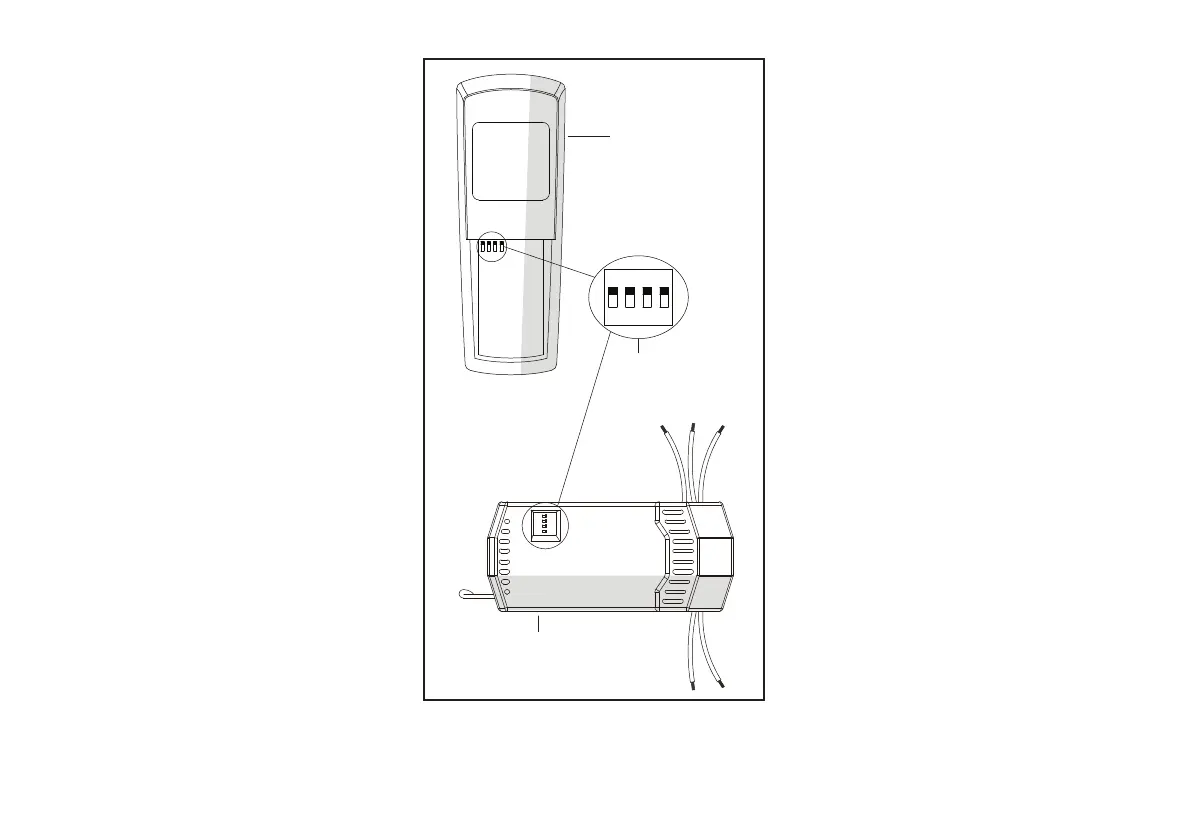
This unit has 16 different code combinations
to prevent possible interference from other
remote units such as garage door openers, car
alarms or security systems.
To set the codes, perform the following steps:
1. Setting the code on the transmitter:
a. Remove the battery cover from the
battery compartment on the back side of
the transmitter.
b. Slide code switches to your choice of up
or down position (factory setting is up).
c. Replace the battery cover on the battery
compartment of the transmitter.
2. Setting the code on the receiver:
a. Slide code switches to the same position
as set on your transmitter.
1 2 3 4
ON DIP
Transmitter
Receiver
Dip
Switches
Figure 10



 To Next Page