124
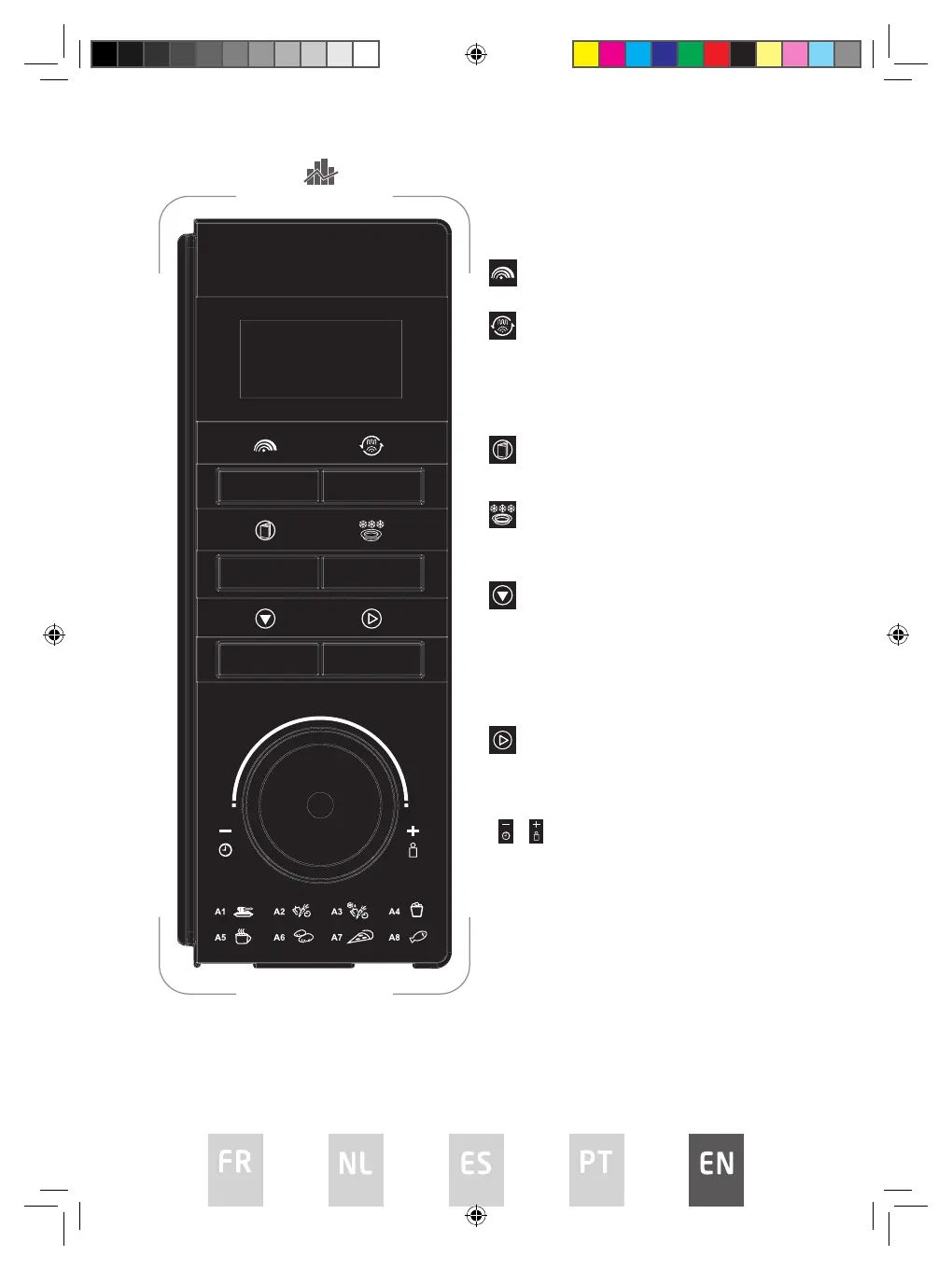
CONTROL PANEL
Display
Cooking time, power, indicators and present time
are displayed.
Microwave cooking
Press this button to set microwave power level.
Convection / Microwave + Convection
cooking / Grill / Microwave + Grill cooking
Press this button to set a convection or grill
cooking program or one of two microwave +
convection/grill cooking modes.
Auto cook menu button
Press this button to set the auto cook menu.
Defrost / Clock / Temp button
Press this button to defrost food by weight, set
the clock or temperature.
Pause/Cancel button
• Press this button to cancel setting or reset
the oven before setting a cooking program.
• Press once to temporarily stop cooking or
press twice to cancel cooking completely.
• This button is also used to activate/
deactivate child lock function.
Speed cooking/Start/Conrm button
• Press this button to start a cooking program
or set speed cooking program.
• Press this button to confirm the setting.
/ Time/Weight dial
Rotate this dial to select time, weight or number
of servings.
CB230
CB230 IB.indd 124CB230 IB.indd 124 26/7/2022 3:35 PM26/7/2022 3:35 PM


 To Next Page