84
INSTALLATION
Removing packing
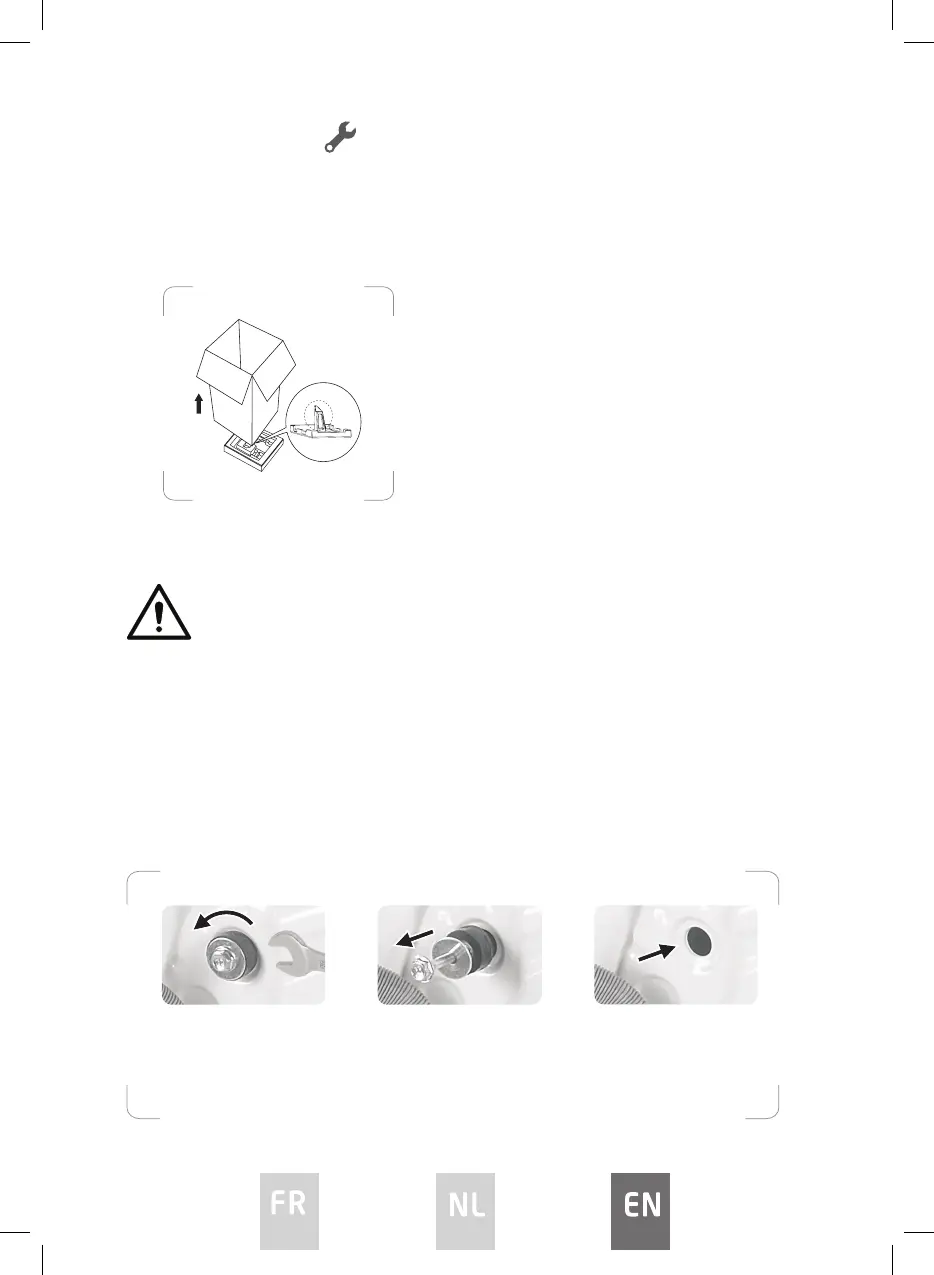
1. Remove the cardboard box and styrofoam packing.
2. Lift the washing machine and remove the base packing. This will require 2
or more people.
3. Remove the tape securing the power supply cord and drain hose.
4. Remove the inlet hose from the drum.
WARNING :
Packaging material (e.g. Films, Styrofoam) can be dangerous for children.
There is a risk of suocation ! Keep all packaging away from children.
Removing transit bolts
To prevent internal damage during transport, the 4 special bolts are locked.
Before operating the washing machine, remove the bolts along with the rubber
bungs.
If they are not removed, it may cause heavy vibration, noise and malfunction.
Make sure the small triangle foam (a)
is removed with the bottom packaging
together. If not, lay the unit down on the
side surface and remove it manually.
1. Unscrew the bolts with a
spanner.
2. Take out the bolts along
with the rubber bungs by
slightly twisting the bung.
Keep the transit bolts for
future use.
3. Close the holes with the
caps supplied.
FP580DWH 1.indd 84FP580DWH 1.indd 84 19/12/2023 3:56 PM19/12/2023 3:56 PM




 To Next Page