100
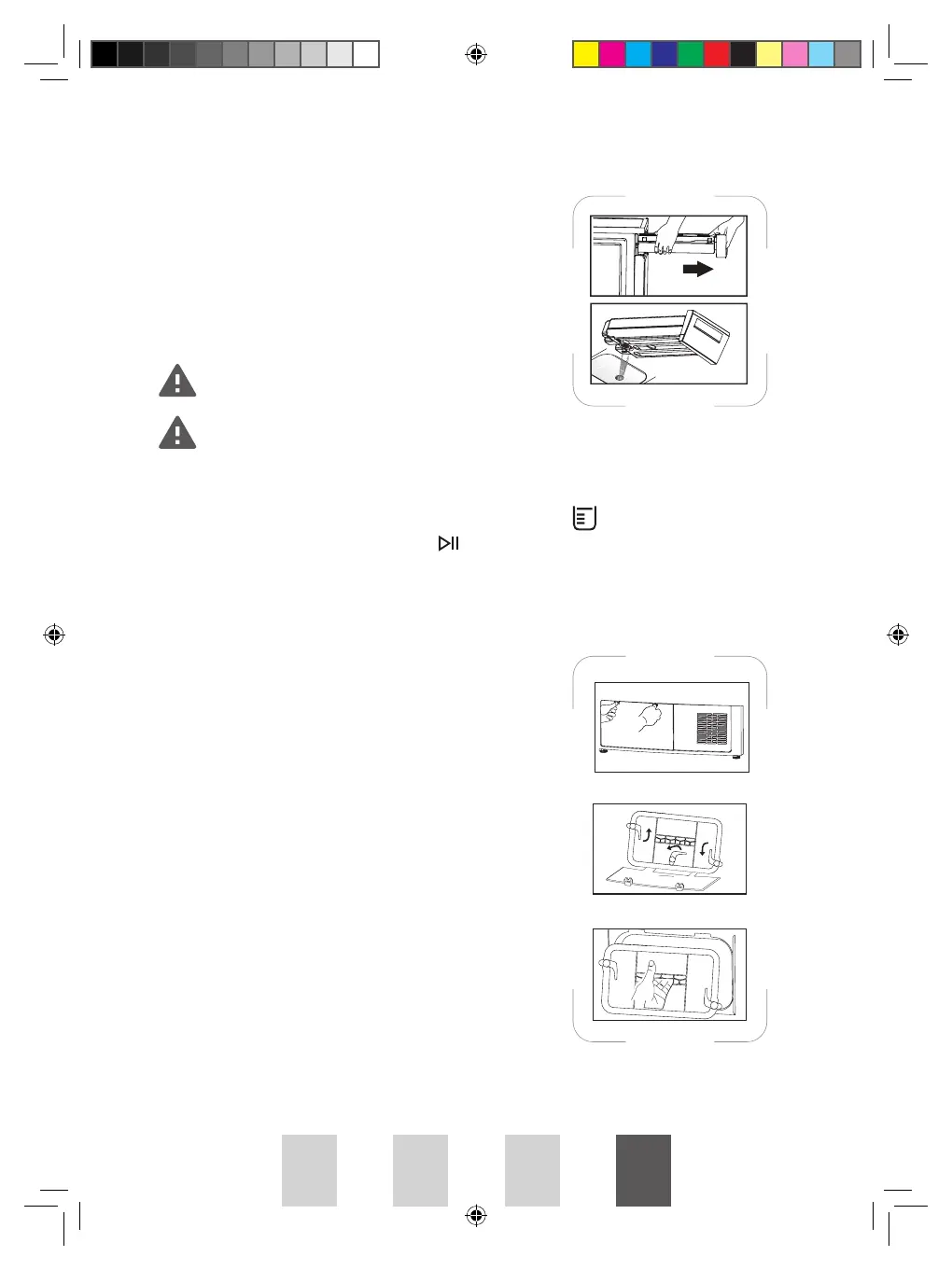
Draining the Water Tank
Drain the water tank after each drying process. To
drain the water tank:
1. Pull the water tank and remove it carefully.
2. Drain the water in the tank.
3. Place the water tank back into position.
Condensed water is not drinkable!
Never remove the water tank when the appliance is operating!
If you forget to drain the water tank, the appliance will stop during drying when
the water tank is full and the warning indicator light
will illuminate. In this
case, drain the water tank and press
to resume the drying cycle.
Cleaning the Filter Base
Clean the filter base after each drying process.
1. If a drying process has been carried out, open
the cover of the filter base and wait until it
cools down.
2. Unlock the 3 filter base locks. Pull out the filter
base.
3. Clean the filter base under running water. Dry
thoroughly.
PROHP82 IB JAN2024.indd 100PROHP82 IB JAN2024.indd 100 9/1/2024 2:52 PM9/1/2024 2:52 PM




 To Next Page