EasyManua.ls Logo

Prominence Home Enoki 51642 - User Manual

Prominence Home Enoki 51642
14 pages
Print Icon
To Next Page IconTo Next Page
Loading...
Question and Answer IconNeed help?

Do you have a question about the Prominence Home Enoki 51642 and is the answer not in the manual?

Summary

PACKAGE CONTENTS

Package Contents List

Lists all components included in the fan package.

Hardware Contents List

Lists all hardware components for fan installation.

Tools Required

Lists necessary tools not included with the fan.

DIMENSION REFERENCE

Fan Dimensions

Displays the physical dimensions of the ceiling fan.

MOUNTING OPTIONS

Downrod Mount

Details the downrod mounting option for ceilings 8 ft. or higher.

Angled Ceiling Mount

Explains angled ceiling mounting for vaulted or angled ceilings up to 10 degrees.

SAFETY INSTRUCTIONS

General Safety Precautions

Provides essential safety warnings and precautions for fan installation and use.

SAFETY WARNINGS

Specific Electrical and Installation Warnings

Details specific warnings on electrical shock, blade clearance, and dimmer switch usage.

ASSEMBLY INSTRUCTIONS

Electrical Power Shut Off and Mounting Bracket Installation

Covers turning off power and attaching the mounting bracket to the outlet box.

Downrod Preparation and Canopy Assembly

Details preparing the downrod and feeding components through it.

ASSEMBLY INSTRUCTIONS CONTINUED

Downrod Installation and Receiver Placement

Guides on securing the downrod and positioning the receiver in the mounting bracket.

Secondary Hanging System

Explains the requirement and installation of a secondary hanging system.

ASSEMBLY INSTRUCTIONS (WIRING)

Secondary Support Screw Installation

Details securing the braided cable using the secondary support screw.

Wire Connections

Provides instructions for connecting receiver and fan wires using wire connectors.

ASSEMBLY INSTRUCTIONS (FINAL STEPS)

Canopy and Canopy Cover Installation

Guides on attaching the canopy and canopy cover to the mounting bracket.

Blade Installation

Explains how to attach blades to the motor assembly using screws and washers.

Light Pan and Light Kit Attachment

Details the process of attaching the light pan and light kit to the fan.

ASSEMBLY INSTRUCTIONS (LIGHTING & REMOTE)

Light Kit and Glass Bowl Installation

Covers connecting the light kit and attaching the glass bowl.

Remote Control Battery Installation

Provides instructions for inserting batteries into the remote control.

ASSEMBLY AND OPERATION COMPLETION

Wall Bracket Installation

Details how to install the wall bracket for remote storage.

Power Restoration

Instructs on turning on the electrical power to complete installation.

Operating Instructions: Reverse Switch

Explains how to use the reverse switch for summer and winter airflow.

OPERATING INSTRUCTIONS (REMOTE)

Remote Control Button Functions

Details the functions of each button on the remote control.

Remote Synchronization (LEARN)

Explains how to sync the remote to the fan receiver.

WiFi App Control

Guides on controlling the fan via the Fansio app.

TROUBLESHOOTING

Fan Does Not Start Troubleshooting

Provides remedies for when the fan fails to start.

Fan Noise Troubleshooting

Offers solutions for common fan noise issues.

Fan Wobble Troubleshooting

Lists steps to correct excessive fan wobble.

Light Not Working Troubleshooting

Explains how to fix issues with the fan light.

Remote Control Not Working Troubleshooting

Provides steps to resolve remote control connectivity problems.

LIMITED LIFETIME WARRANTY

Warranty Service Contact

Provides contact information for obtaining warranty service.

Warranty Coverage Details

Outlines the terms and conditions of the fan's limited lifetime warranty.

Overview

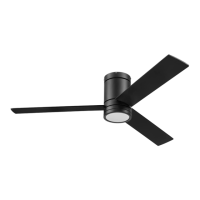
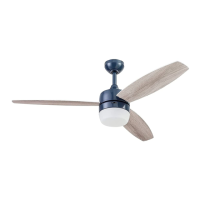
This document is an owner's manual for the Enoki 52" Smart Ceiling Fan, produced by Prominence Home. It covers models #51642 (Matte Black), #51643 (Pewter), #51644 (White), and #51645 (Blue).

Function Description:

The Enoki 52" Smart Ceiling Fan is designed to provide air circulation and illumination in residential settings. It features a smart control system, allowing operation via a remote control and a smartphone app (Fansio® app). The fan offers multiple speed settings, a light on/off/dimming function, a light delay feature for safe exit, a variable breeze mode simulating natural airflow, and a Home Shield mode for simulating occupancy. The fan also includes a reverse switch to change the direction of blade rotation, enabling both downward airflow for cooling in warmer weather and upward airflow for circulating warm air in cooler weather.

Important Technical Specifications:

  • Fan Size: 52 inches
  • Weight: Net Weight: 14.04 lb (6.37 kg)
  • Mounting Options: Downrod Mount (suitable for ceilings 8 ft. or higher) and Angled Ceiling Mount (up to 10 degrees, may require a longer downrod for proper blade clearance).
  • Electrical Requirements: Must be connected to an outlet box marked "acceptable for fan support." Installation must comply with national electrical code (ANSI/NFPA 70-1999) and local codes.
  • Remote Control: Operates on a 2.4 GHz frequency (not compatible with 5.0 GHz routers). Requires two CR2032 batteries.
  • Blade Clearance: Blades must be at least 7 feet (2.1 meters) from the floor and at least 18 inches (0.5 meters) from the tip of the blades to the wall.
  • Light: Supports dimmable bulbs (specific bulb type not mentioned, but dimming function is available).
  • Safety Certifications: ETL Listed (US), Intertek. Complies with Industry Canada license-exempt RSS standard(s) and FCC Rules Part 15.

Usage Features:

  • Remote Control Operation:
    • Fan Off: Turns the fan power off.
    • Light On/Off: Toggles the light. Press and hold to dim or brighten.
    • High Speed: Activates fan at high speed.
    • Light Delay: Keeps light on for 60 seconds for safe exit. Tap once to activate; fan light blinks once to confirm. Press any button to cancel.
    • Medium Speed: Activates fan at medium speed.
    • Variable Breeze: Simulates natural breeze. Press and hold to activate; press any fan speed button to cancel.
    • Low Speed: Activates fan at low speed.
    • Home Shield: Simulates occupancy by randomly turning the light on (5-20 minutes) while the fan remains off. Light remains off for 60 minutes between events. Press and hold to activate; light blinks twice to confirm. Press any button to cancel.
    • LED Indicator: Illuminates when any remote button is pressed.
    • LEARN Button: Used to sync the remote to the receiver.
  • Smart Control (WiFi): The fan can be controlled via the Fansio® app on a smartphone. Requires a 2.4 GHz WiFi network.
  • Reverse Switch: Located on the fan, it allows changing the blade direction.
    • Warmer Weather (Left): Downward airflow for a wind chill effect.
    • Cooler Weather (Right): Upward airflow to move stagnant, hot air off the ceiling.
    • Important: Fan must be stopped before moving the reverse switch. The switch must be fully left or right to operate correctly; middle position prevents operation.
  • Energy Efficiency: Using a ceiling fan can help optimize thermostat settings, potentially reducing energy consumption.

Maintenance Features:

  • Troubleshooting Guide: The manual includes a comprehensive troubleshooting section for common issues such as fan not starting, noise, wobbling, light not working, and remote control malfunction.
  • Remote Control Battery Replacement: Instructions for replacing the two CR2032 batteries in the remote control are provided.
  • Remote Control Re-syncing: Instructions are given for re-syncing the remote control to the fan receiver if communication issues arise. This involves cycling power to the fan and pressing specific buttons on the remote.
  • Blade Balancing Kit: A blade balancing kit (item #27 in hardware contents) is included to address fan wobbling.
  • Set Screw Checks: All set screws on the fan must be checked and retightened where necessary before installation.
  • Cleaning: Users are advised not to bend blade brackets when cleaning the fan.
  • Service Department: A dedicated service department is available for assistance with problems that cannot be remedied or difficulties during installation (1-877-459-3267, 8 a.m. - 5 p.m. Central, Monday-Friday).
  • Warranty: A Limited Lifetime Warranty is provided. The fan motor is warranted for life against defects in workmanship and material. All other ceiling fan parts (excluding the motor and parts made with glass) are warranted for one year from the purchase date. Purchasers are responsible for removal and reinstallation costs. The warranty is voided if the original purchaser ceases to own the fan or if service is performed by a non-licensed electrician. HKC's responsibility is limited to repair or replacement of defective parts or the product.

Prominence Home Enoki 51642 Specifications

General IconGeneral
BrandProminence Home
ModelEnoki 51642
CategoryFan
LanguageEnglish

Related product manuals