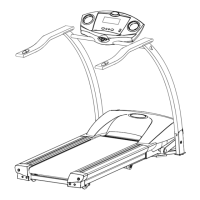
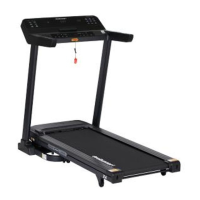
This document outlines the features, assembly, operation, and maintenance of the PRORUNNER ELITE TREADMILL QRS7-10 (SKU: JV03TNNABXXXXX).
Function Description
The PRORUNNER ELITE TREADMILL QRS7-10 is designed for home use, offering a comprehensive fitness experience. It features a console with various functions including USB and MP3 interfaces for media playback, quick incline and speed shortcuts, volume control, and dedicated buttons for incline/decline, home, start, stop, and return. The treadmill supports both manual operation and eight built-in program sports modes, divided into two categories: time countdown, distance countdown, and calorie countdown, as well as body sculpting, fat burning, mountain running, road running, and heart rate control speed running. Additionally, it includes six speed matching movement modes: full marathon, half marathon, 3km, 5km, 10km, and 15km. A unique "Real Life Movement" feature allows users to experience virtual runs through canyon, grassland, and seaside scenes. The treadmill also incorporates a user center for personal information and sports data management, including historical records and ranking when connected to a network.
Beyond its primary function as a treadmill, the device offers additional features such as a massage machine and sit-up bracket, enhancing its versatility as a multi-functional fitness equipment.
Important Technical Specifications
- User Weight Limit: 150kg (HC product)
- Power Source: 220V-240VAC
- Running Belt Lateral Movement: Maximum 12mm
- Speed Range: 1.0-18.8km/h (adjustment range 0.1km/time)
- Incline Range: 0-15% (adjustment range one segment/time)
- Heart Rate Monitoring: Systems may be inaccurate; over-exercising can be dangerous.
- Maximum Speed Adjustment (Heart Rate Control): 3.0 (metric) / 2.0 (imperial) - maximum speed, default 10.0 (metric) / 6.0 (inch).
Usage Features
Assembly: The treadmill requires careful assembly by adults or professionals. Key steps include assembling the electronic meter by securing the column to the base with M8x20 and M8x65 screws and M8 flat washers, and then fixing the electronic meter to the column. The left and right side covers are fixed to the base using 4.216 screws. For multi-function models, the massage machine bracket is attached to the left and right columns using M820 screws and M8 flat washers, and the supine support is secured with M8*30 screws and an M8 flat washer. The massage head is fixed to the supine support with a hexagonal screw, flat washer, and spring pad. The dumbbell and twister are placed in their designated slots, and the security lock is placed on the electronic meter dot.
Operation:
- Power On: Insert the power plug, turn on the power switch (red light), and wait for the "BI" sound and screen display.
- Safety Lock: Place the safety lock in the panel's yellow position and clip it to clothing. Removing it will immediately stop the motor.
- Quick Start: Press the "Start" button to begin running at the lowest speed and slope. Speed and slope can be adjusted using the incline and speed buttons.
- Gesture Operation: The touchscreen supports single-finger press and hold to slide left/right for module switching, slide up/down for list scrolling, and single-click for icon selection.
- Program Movement: Eight built-in sports modes (time, distance, calorie countdown, body sculpting, fat burning, mountain running, road running, heart rate control) and six speed matching modes (marathon, half marathon, 3km, 5km, 10km, 15km) are available. Users can adjust targets and monitor progress through ring and column charts.
- Real Life Movement: Offers virtual running scenes (Canyon, Grassland, Seaside) to enhance engagement. Motion parameters are displayed at the bottom of the screen and can be hidden/shown.
- User Center: Allows users to manage personal information (avatar, nickname, gender, height) and track sports data (calories, time, steps, mileage). Registration is recommended via mobile.
- Media Playback: USB and MP3 interfaces allow for playing audio and video files. Local media can be stored and managed. Users are advised to use fast-rhythm music and avoid watching videos while running to prevent distraction.
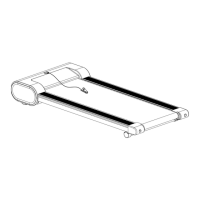
- Folding: For storage, turn off the power, unplug the cord, and lift the running platform until it locks with the gas spring casing. To unfold, lightly press the gas spring casing with your foot to slowly lower the platform.
Precautions:
- Do not download unauthorized apps or use third-party apps without caution.
- Clean the device periodically.
- Ensure the safety lock is always used during exercise.
- Monitor heart rate and avoid over-exercising.
- Warm-up and cool-down are crucial for safe exercise.
- Exercise 30-60 minutes after meals.
- Stand in the middle of the running belt during use.
- Do not exercise vigorously under fasting conditions.
- Exercise duration should not exceed 60 minutes for ordinary users.
Maintenance Features
Cleaning:
- Frequency: Clean frequently to ensure service life.
- Safety: Always cut off power and unplug the power line before cleaning.
- After Use: Wipe sweat stains and debris with a clean, damp towel.
- Note: Avoid corrosive materials, liquids, and direct sunlight on electronic components.
- Weekly: Clean the ground around the treadmill and remove dirt from shoes.
- Storage: Store in a clean, dry environment with power off and unplugged.
Refueling Oil Process:
- Automatic Refueling: For models with this feature, fold the frame to a 45° angle and drip lubricating oil into the automatic fueling pipe. The treadmill will automatically refuel every 50KM. Monitor the oil bottle and replace oil if insufficient.
- Manual Refueling: Open the fuel filler on the side of the treadmill, pour silicone oil, and then run the treadmill for a period.
- Important: The running belt must be stopped and at rest during refueling. Proper maintenance is crucial for the treadmill's longevity.
Running Belt Adjustment:
- Tightening: Insert a 6mm inner hexagonal wrench into the adjusting screw on the left side of the running belt. Rotate clockwise 1/4 turn to tighten. Repeat on the right side, ensuring equal rotation. Continue until the belt does not slip. Avoid over-tightening to prevent damage.
- Centering: If the running belt deviates (due to uneven foot pressure), it should return to the center when no one is on it. If not, run the machine at 6KM/H. For left deviation, turn the left screw clockwise 1/4 turn. For right deviation, turn the right screw clockwise 1/4 turn. Repeat until centered.
- Post-Adjustment Check: After centering, adjust speed to 1KM/H and observe for deviation or slipping. Repeat steps if necessary.
- Warning: Do not over-tighten rollers, as this can cause permanent bearing damage. The left and right elastic attachments are located behind the walking machine.
System Settings:
- Brightness Adjustment: Adjust screen brightness.
- Wi-Fi Management: Connect to Wi-Fi.
- Factory Mode: Access advanced settings.
- Clean Cache: Clear application cache to improve performance.
- Machine Management: Displays accumulated mileage and distance to next maintenance.
- Language & Date/Time: Adjust system language and time settings.
Error Reporting Interface: The treadmill provides error messages and solutions for various abnormalities, including communication failure, stall protection, no speed signal, ascension learning failure, over current protection, motor open circuit, storage error, inversion error, instantaneous over current, and external voltage over voltage. Solutions typically involve checking connections, replacing wires, controllers, motors, or lightening the load.

 Need help?

 To Next Page
 General