Preparation for using your new TV
Audio : D, DI
1 Checking Items before Connecting
Ptease check the list below before connecting the product to other devices
< Check items before connecting. >
Check the instruction manual when connecting external devices External products sometimes have different
buttons and locations
1 Do not connect the power unless every connection is well connected. The product may be damaged if
turned
on while still in the process of being connected.
2 Connect the left (white) and right (red) cables correctly to the sound cable.
3 Check the terminals to connect the product to on the rear panel
2: Connecting an Antenna
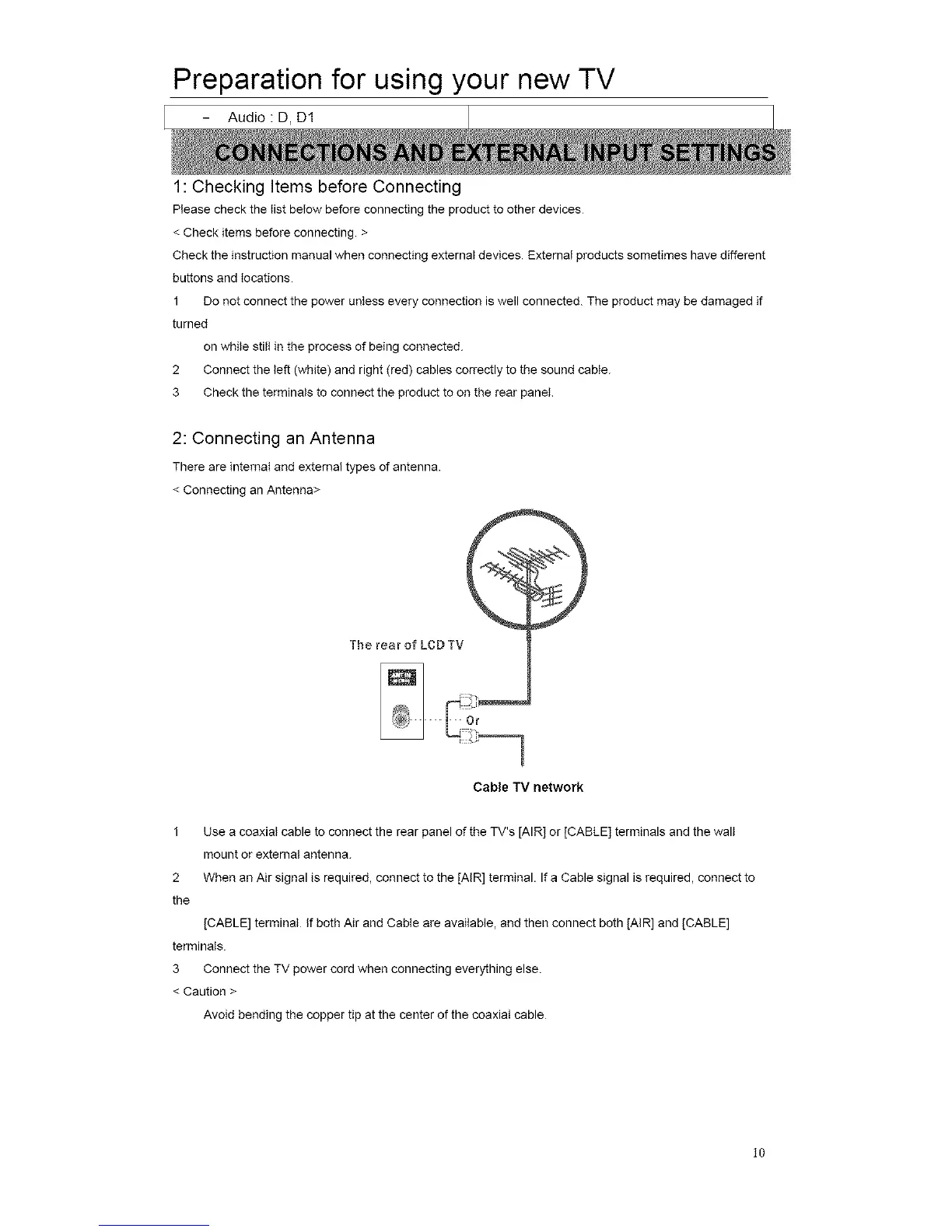
There are internal and external types of antenna.
< Connecting an Antenna>
Cable TV network
1
2
the
Use a coaxial cable to connect the rear panel of the TV's [AIR] or [CABLE] terminals and the wall
mount or extemat antenna.
When an Air signal is required, connect to the [AIR] terminal. If a Cable signal is required, connect to
[CABLE] terminal If both Air and Cable are available, and then connect both lAIR] and [CABLE]
terminals
3 Connect the TV power cord when connecting everything else.
< Caution >
Avoid bending the copper tip at the center of the coaxial cable
l0














 To Next Page