5
Télécommande
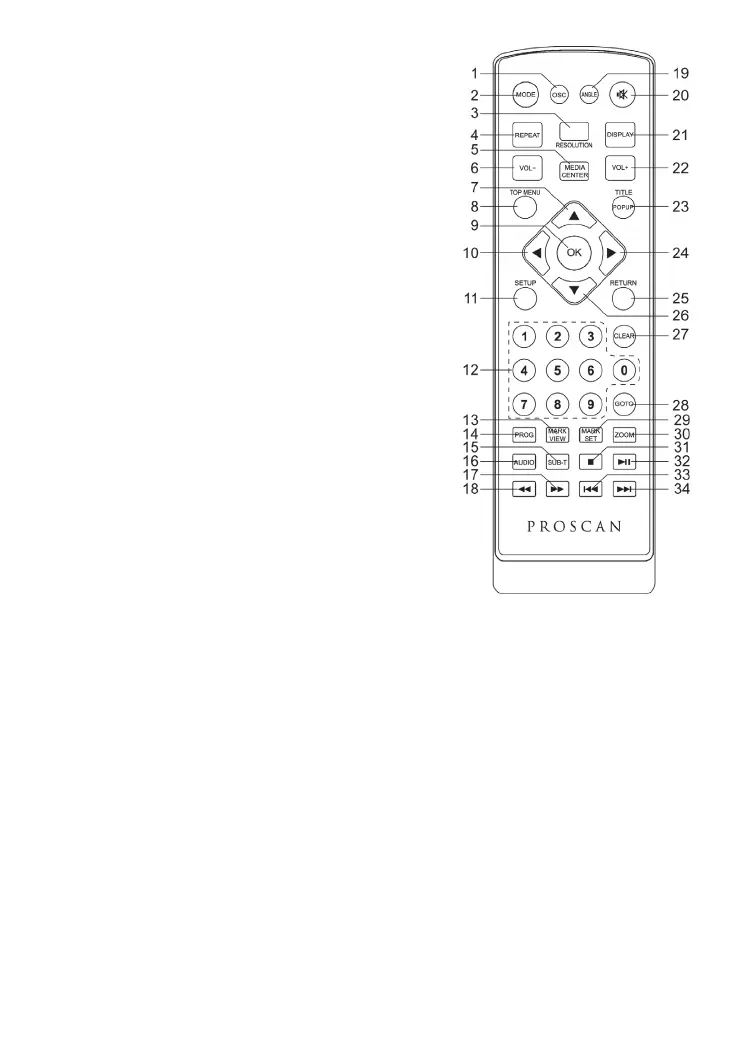
(1) OSC: Accédez au menu de contrôle de l'écran.
(2) MODE: Basculement entre DVD et AV IN
(3) RESOLUTION: Activer/ désactiver la résolution
(4) REPEAT: Différents types de rondelle Repeat sont
différents
DVD: RepeatCH>RepeatTT>RepeatAll>Repeat Off.
CD/VCD: Repeat track>Repeat all> Repeat Off.
Playlist: Repeat file>Repeat playlist>Repeat Off.
(5) MEDIA CENTER: Ouvrir le centre de fermeture
Media Center
(6) VOL-: Volume réduit
(7) UP: Navigates through the Menus.
(8) TOP MENU: To open the Top menu of BD/DVD
video disc.
(9) OK: Confirms an entry or selection.
(10) LEFT: Navigates through the Menus.
(11) SETUP: Accès au menu Paramètres
(12) NUMBERS: For direct channel access.
(13) MARK VIEW: View bookmarks of the currently
playing disc
(14) PROG: Edit the program and play.
(15) SUBTITLE: Langues de sous-titrage
(16) AUDIO: Choix d'une langue audio
(17) FAST FORWARD: Allez-y.
(18) FAST REVERSE: Retrouvez-vous..
(19) ANGLE: Playback a scene recorded with multiple
angles. (The angle function will not work on DVD video discs that does not contains
recorded with multiple angles.)
(20) MUTE: Mise en sourdine
(21) DISPLAY Affiche les informations sur la rondelle courante
(22) VOL+: Volume accru
(23) TITLE: To open the Title menu of a disc.
POPUP: Shows and hides popup menu.
(24) RIGHT: Navigates through the Menus.
(25) RETURN: Return to a previous display menu.
(26) DOWN: Navigates through the Menus.
(27) CLEAR: To clear an entry.
(28) GOTO: Jump to a user specified time during playback.
(29) MARK SET: Set bookmarks of the currently playing disc.
(30) ZOOM: To zoom it or zoom out.
(31) STOP: Stop play.
(32) PLAY/PAUSE: Start (resume) / pause play.
(33) PREV: Skip to the previous title, chapter or track.
(34) NEXT: Skip to the next title, chapter or track.


 To Next Page