OSD Menu
18
Description
5. Setup menu
OSD Menu
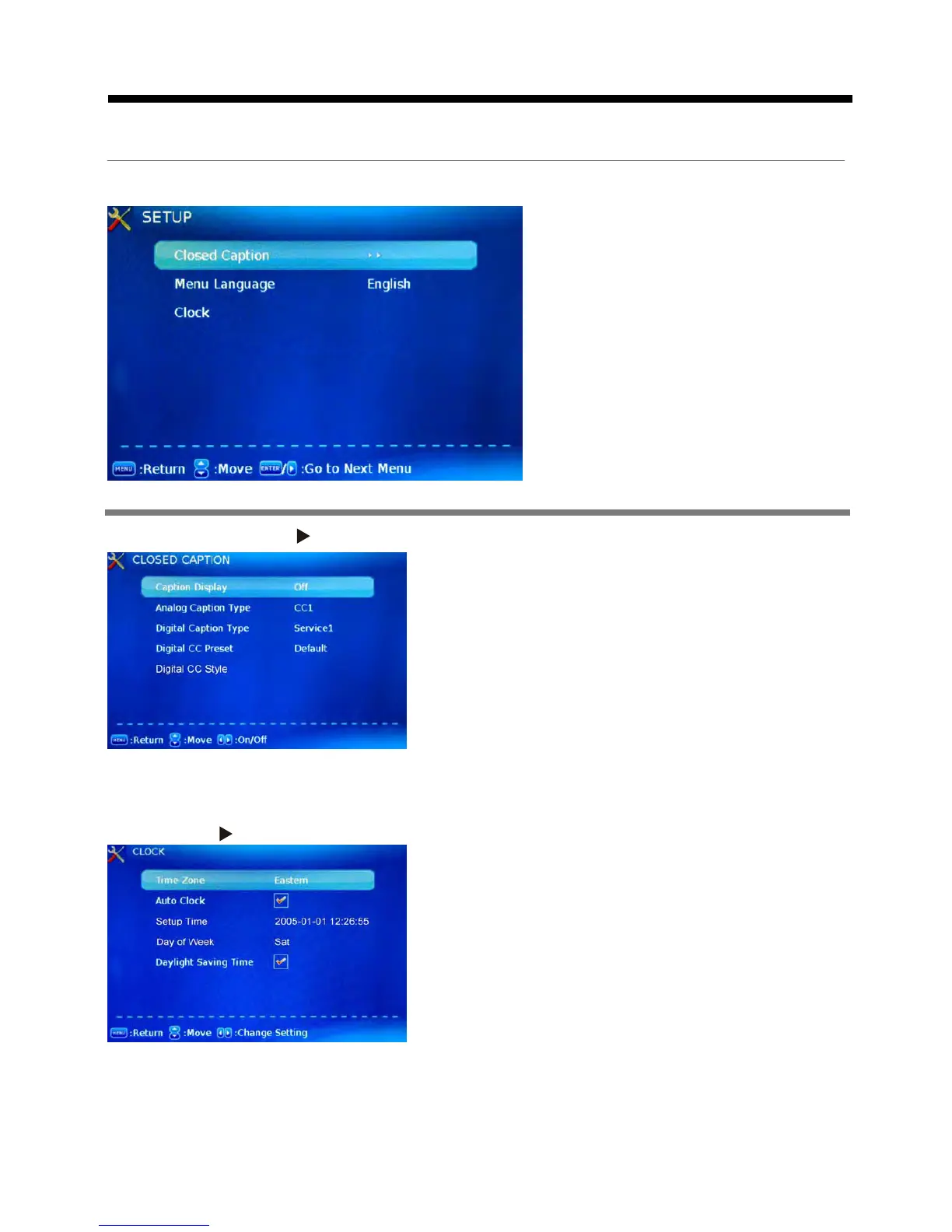
Closed Caption: Press button to enter the Closed Caption (CC)menu.
Caption Display: Activate or deactivate the Caption
Analog Caption Type: Allow you to select the basic
selection among: CC1, CC2, CC3, CC4, CC5, CC6,
Digital Caption Type: Allow you to select the advanced
selection among: Service1, Service2, Service3 Service4,
Digital CC Preset: Select the Digital CC Preset between Default and Custom.
Digital CC Style: Setting the Digital CC Style.
Menu Language: Select OSD menu language.
Clock: Press button to enter the Clock menu.
CC7 and CC8.
Service 5 and Service 6.
Time zone: Select the time zone for the TV.
Auto Clock: Activate or deactivate the Auto Clock
Setup Time: Set Auto Clock to Off, then you can set the time manually .
Note: In the case of loss of power, the clock setting will be lost.
Day of Week: Display the day of week.
Daylight Saving Time: Activate or deactivate the Daylight Saving Time function for the TV.
function.
If set it to ON , the TV will sync the local clock according
to the DTV broadcasting time automatically. Otherwise
you can set the time manually.
displaying.















 To Next Page